Introduction
There are few things more frustrating than being locked out of your own garage because a remote stopped working or you lost the original clicker. If you are searching for how to program a Genie Blue Max garage door opener, you likely have an older but reliable unit that needs a quick synchronization reset rather than a full replacement. This guide is designed to walk you through the exact process with empathy and precision, ensuring you get back inside safely without calling an expensive technician. We understand that dealing with legacy technology can be confusing, so we have broken down every step into clear, actionable instructions tailored specifically for the Blue Max series.
Understanding Your Genie Blue Max System
Before grabbing a ladder, it is vital to understand that the Genie Blue Max (often associated with the PMX500IC/B or similar 12-dip-switch models) operates differently than modern “Intellicode” openers. Unlike newer rolling-code systems, many Blue Max units rely on physical DIP switches or a specific “Learn Code” button combination unique to this transitional era of Genie manufacturing.
According to technical documentation archived by Wikipedia, early radio-controlled garage systems utilized fixed binary codes set by toggle switches, which later evolved into the encrypted signals used today. Identifying whether your specific Blue Max model uses the older 12-switch method or the newer Learn Button method is the first critical step in successful programming. Misidentifying this can lead to hours of futile button pressing.
Identifying Your Receiver Type
- DIP Switch Model: Look inside the motor head or remote battery compartment for two rows of tiny sliding switches (usually 9 or 12).
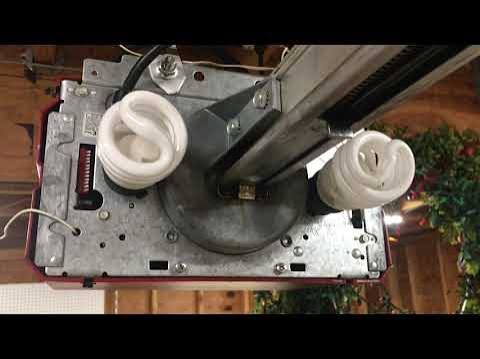
- Learn Code Model: Look for a square button labeled “Learn Code” near the antenna wire, often accompanied by an LED indicator light.
Safety First: Pre-Programming Checklist
Safety must always precede convenience when working with automated machinery. Before attempting to program your device, ensure the following:
- Clear the Area: Remove all vehicles, pets, and children from the door’s path.
- Test Manual Operation: Disengage the emergency release cord and lift the door manually. It should move smoothly with minimal effort. If it is heavy or sticks, do not program the opener; call a professional for spring or track repair first.
- Check Batteries: 80% of “programming failures” are actually dead batteries. Install fresh alkaline batteries in both the remote and keypad before starting.
- Power Cycle: Unplug the opener for 30 seconds and plug it back in to clear any temporary logic errors in the receiver board.
Step-by-Step: Programming the Remote Control
This section covers the most common intent: syncing a handheld transmitter. Please identify your system type below and follow the corresponding numbered list precisely.
Method A: For Learn Code Blue Max Units
Most Blue Max units produced after 1995 utilize this method. The timing here is crucial; rushing will cause the receiver to time out.
- Locate the “Learn Code” button on the motor head. It is typically black with a red LED next to it.
- Press and release the Learn Code button once. Do not hold it. The red LED will begin blinking at a rate of twice per second.
- Within 30 seconds, press the button on your remote control that you wish to program. Hold it firmly.
- Watch the LED. It will either turn solid or stop blinking, indicating the code has been received.
- Release the remote button.
- Press the same remote button again to confirm. The LED should go out completely.
- Test the remote immediately. If the door cycles, you have successfully learned how to program a Genie Blue Max garage door opener remote.
Method B: For DIP Switch Blue Max Units
If your unit lacks a Learn button, you must match the hardware configuration manually.
- Open the battery compartment of your new remote.
- Slide each of the 9 or 12 switches to match the exact pattern found inside your existing remote or on the receiver unit mounted to the ceiling.
- Use a small flathead screwdriver or pen tip for precision. Even one mismatched switch will prevent operation.
- Close the remote and test. No button pressing sequence is required beyond matching the physical switches.
Expert Tip: If you are replacing a lost remote for a DIP switch unit and cannot find the original pattern, you can create a new random pattern. However, you must also change the switches on the ceiling receiver to match the new remote. Never leave switches in a straight line or alternating pattern, as these are susceptible to interference.
Programming the Wireless Keypad (GK-R or Similar)
Many homeowners want keyless entry. Programming a keypad for the Blue Max follows a similar logic but requires a PIN setup phase.
| Feature | Remote Programming | Keypad Programming |
|---|---|---|
| Trigger | Single button press | PIN + Send button |
| Confirmation | LED blink/solid | LED flash sequence |
| Security | Fixed/Rolling code | User-defined 3-4 digit PIN |
| Time Limit | 30 seconds | 30 seconds between steps |
| Reset Need | Only if changing batteries | Required if forgetting PIN |
Keypad Sync Steps
- Press and release the Learn Code button on the motor head (LED blinks).
- Go to the keypad outside. Enter your desired 3 or 4-digit PIN.
- Press and hold the “Send” (or arrow) button until the opener lights flash or the motor runs.
- Release the button. The keypad is now linked to that specific PIN.
- To add additional users, repeat the Learn Code process on the motor head, then enter a different PIN on the keypad during the learning window.
Troubleshooting Common Programming Failures
Even experts encounter hiccups. If your Genie Blue Max refuses to accept the new code, consult this diagnostic checklist before assuming hardware failure.
- LED Never Blinks: The Learn button may be stuck, or the logic board fuse has blown. Check the 3-amp fuse located on the back panel of the motor unit.
- LED Blinks But Door Doesn’t Move: The code was accepted, but the travel limits are misadjusted. Locate the “Up Limit” and “Down Limit” dials on the side of the opener and adjust them incrementally.
- Remote Works Intermittently: This is classic RF interference. LED bulbs in the garage are notorious for blocking Genie frequencies. Swap to incandescent bulbs temporarily to test. Also, verify the antenna wire is hanging vertically and not coiled.
- Keypad Flashes Red Repeatedly: You have entered the wrong PIN too many times, triggering a lockout. Wait 5 minutes before retrying, or perform a factory reset on the keypad by removing the battery for 60 seconds.
- Range Issues: If the remote only works within 5 feet, the receiver sensitivity has degraded. Consider installing a universal receiver conversion kit designed for legacy Genie models.
Frequently Asked Questions (FAQ)
1. Can I use a modern Intellicode remote with my older Genie Blue Max?
Generally, no. The Blue Max series predates the current Intellicode encryption standard. You must use a compatible legacy remote or install a universal receiver upgrade kit that bridges the frequency gap. Always check the packaging for “Blue Max Compatible” labeling.
2. How do I erase all remotes from my Genie Blue Max memory?
For Learn Code models, press and hold the Learn Code button for approximately 10 seconds until the red LED turns off completely. This wipes all stored transmitters and keypads. For DIP switch models, simply changing the switch pattern on the receiver effectively “erases” all previously matched remotes instantly.
3. Why does my programmed remote work for a week and then stop?
This usually indicates a failing capacitor on the logic board or severe RF interference. First, replace the remote battery. If the issue persists, inspect the garage for new electronic devices (WiFi extenders, baby monitors) that may share the 315MHz or 390MHz frequency band.
4. Is there a master code for Genie Blue Max keypads?
No. There is no universal master override code for security reasons. If you have forgotten your PIN and cannot access the Learn button inside the garage, you will need to gain entry through another door or window to reset the system from the motor head.
5. How often should I reprogram my garage door opener?
You only need to reprogram when adding new devices, replacing batteries (in rare cases where memory is volatile), or if you suspect unauthorized access. As a security best practice, consider clearing and reprogramming all devices annually if you live in a high-traffic rental property or have recently moved in.
6. What tools do I need for this process?
Typically, none. A stepladder to reach the motor head and a small flathead screwdriver for DIP switches are usually sufficient. Having a helper to watch the LED while you operate the remote can significantly speed up the process.
Conclusion
Mastering how to program a Genie Blue Max garage door opener restores both convenience and security to your home without the cost of a full system replacement. By correctly identifying your receiver type, following precise timing protocols, and observing safety precautions, you can solve this problem in under 15 minutes. Remember, patience with older technology yields better results than force; if the LED doesn’t respond, pause and restart the sequence rather than mashing buttons.
We hope this guide has empowered you to take control of your home maintenance. If you found this tutorial helpful, please share it on social media or send it to a neighbor who might be struggling with their own garage door woes. Your share could save someone else a costly service call and a headache-free evening! Stay safe and keep those doors opening smoothly.
Leave a Reply