Introduction
Losing or breaking your handheld garage door opener can be incredibly frustrating, especially when you are locked out or rushing to leave for work. If you are searching for how to program LiftMaster garage door to car without remote, you are likely looking for a seamless way to regain access using your vehicle’s built-in system. The good news is that most modern vehicles equipped with HomeLink or Car2U systems can be programmed directly to your LiftMaster opener without needing the original handheld transmitter, provided you have physical access to the motor unit.
This guide will walk you through the exact process safely and efficiently. We understand that garage door mechanics can feel intimidating, but by following these steps, you can restore your convenience and secure your home without calling a technician. Let’s get your car synced up so you never have to worry about a missing remote again.
Understanding HomeLink and LiftMaster Compatibility
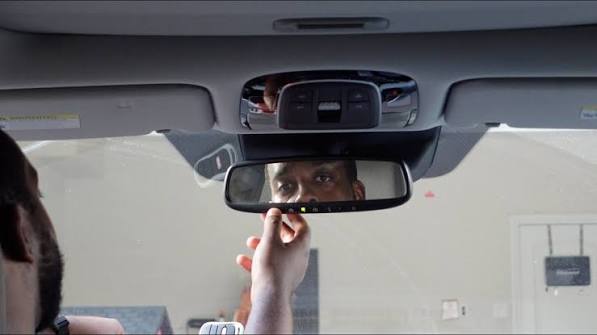
Before diving into the buttons, it is crucial to understand why this works without a remote. Your car’s visor contains a universal transceiver (usually HomeLink) that mimics the radio frequency signal of a garage door opener.
According to industry data from the Consumer Technology Association, over 85% of new vehicles sold in the US come equipped with integrated garage door control systems. However, compatibility varies based on the age of your LiftMaster unit.
Quick Compatibility Check
| LiftMaster Feature | Manufacturing Era | Programming Method Required |
|---|---|---|
| Purple/Orange Learn Button | 2006–Present | Standard HomeLink Sync |
| Yellow Learn Button | 2011–Present | Security+ 2.0 Protocol |
| Red/Red-Orange Learn Button | 1997–2005 | Rolling Code Reset |
| Green Learn Button | Pre-1997 | Fixed Code (DIP Switch) |
| No Learn Button / DIP Switches | Pre-1993 | Manual Frequency Matching |
Note: Always verify your specific model number on the back of the motor housing before proceeding.
Safety First: Critical Precautions Before Programming
Garage doors are heavy mechanical devices under high tension. When learning how to program LiftMaster garage door to car without remote, safety must be your priority.
- Clear the Area: Ensure no people, pets, or objects are in the path of the door during testing.
- Disconnect Power if Needed: If you need to remove the cover of the motor unit, unplug it first to prevent electrical shock.
- Check Sensor Alignment: Verify that the photo-eye sensors near the floor are clean and aligned. A malfunctioning sensor can cause the door to reverse unexpectedly during programming tests.
- Use a Stable Ladder: Never stand on chairs or unstable surfaces to reach the learn button. Use a properly rated step ladder.
Expert Tip: According to the International Door Association, approximately 20,000 injuries occur annually related to garage doors. Taking 30 seconds to inspect your hardware before programming can prevent accidents.
Step-by-Step: How to Program LiftMaster Garage Door to Car Without Remote
This method utilizes the “Learn” button on the motor head to bypass the need for a handheld remote. This is the most reliable approach for post-1996 LiftMaster openers.
Step 1: Locate the Learn Button on the Motor Unit
Grab your ladder and locate the antenna wire hanging from the back or side of the LiftMaster motor. Near this antenna, you will find a colored square or circular button. The color indicates the security protocol (see table above). You may need to remove the light lens cover to access it on some newer models.
Step 2: Clear Previous Car Memory (Recommended)
To avoid signal conflicts, reset your car’s HomeLink buttons first. Press and hold the two outer HomeLink buttons in your vehicle simultaneously for 10–20 seconds until the indicator light flashes rapidly. Release immediately once flashing begins. This ensures a clean slate for the new LiftMaster signal.
Step 3: Activate the Motor’s Learning Mode
Press and release the Learn button on the LiftMaster motor unit. The LED indicator next to the button will illuminate steadily or begin blinking, depending on your model. You now have exactly 30 seconds to complete the next step before the motor exits learning mode. Move quickly but calmly.
Step 4: Transmit Signal from Vehicle to Motor
Return to your car. Hold the desired HomeLink button 1–3 inches away from the visor (or aim toward the motor if hardwired). Press and hold the button firmly. Watch the HomeLink indicator light:
- Slow Flash: Still transmitting/searching.
- Rapid Flash/Solid Light: Successfully paired.
Release the button once the light changes state. This typically takes 5–15 seconds.
Step 5: Test and Verify Operation
Press the newly programmed HomeLink button once. The garage door should activate. Test it from various distances (driveway, street) to ensure consistent range. If the door reverses immediately after closing, check your force settings and sensor alignment—this is unrelated to programming but critical for operation.
Troubleshooting Common Programming Failures
Even professionals encounter hiccups. Here are solutions to the most frequent issues when figuring out how to program LiftMaster garage door to car without remote:
- Light Flashes But Door Doesn’t Move: The frequencies matched, but the rolling code didn’t sync. Repeat Steps 3 and 4, ensuring you hold the car button until the rapid flash appears, not just the initial slow flash.
- Learn Button Light Goes Out Too Fast: You missed the 30-second window. Simply press the Learn button again and retry Step 4 immediately.
- Car Button Works Intermittently: Weak car battery or interference from LED bulbs. Replace your vehicle’s key fob battery (some systems draw power from it) and ensure your garage uses RF-friendly LED bulbs.
- Older LiftMaster with DIP Switches: If your unit has tiny sliding switches instead of a Learn button, you must manually match each switch position in your car’s transmitter compartment to the motor unit. This requires opening the HomeLink module—consult your vehicle manual specifically for “fixed code” programming.
Frequently Asked Questions (FAQ)
Can I program my car to a LiftMaster without ANY remote or keypad?
Yes, as long as you have physical access to the motor unit and its Learn button. The motor itself acts as the pairing source, eliminating the need for an external transmitter. However, pre-1993 models without a Learn button may require purchasing a compatible remote to bridge the frequency gap.
Why does my HomeLink work sometimes but not others?
Intermittent operation usually stems from three causes: weak vehicle battery, radio frequency interference from nearby electronics, or degraded capacitors in older LiftMaster units. Start by replacing your car battery and testing at different times of day to rule out environmental interference.
Do I need to reprogram my car after changing the LiftMaster battery?
No. Changing the backup battery in your LiftMaster opener does not erase stored codes. Reprogramming is only necessary if you perform a factory reset on the motor, replace the logic board, or change the entire opener unit.
Is it safe to program multiple cars to the same LiftMaster?
Absolutely. Most LiftMaster openers support 15–30 unique remotes/HomeLink vehicles. Each car receives a distinct rolling code, maintaining security. Just ensure you don’t exceed your model’s memory limit, which can cause older entries to be overwritten.
What if my car doesn’t have HomeLink?
Vehicles without integrated systems can use aftermarket solutions like the Chamberlain Clicker or universal visor clips that plug into your cigarette lighter/USB port. These function identically to built-in systems and pair using the same Learn button method described above.
How often should I reprogram for security?
Security experts recommend clearing and reprogramming all devices annually or whenever you move into a new home. This removes access from previous owners’ lost remotes and ensures your rolling code encryption remains current against potential replay attacks.
Conclusion
Mastering how to program LiftMaster garage door to car without remote empowers you to maintain seamless home access regardless of lost or broken transmitters. By leveraging your vehicle’s built-in HomeLink system and the motor’s Learn button, you eliminate dependency on external devices while enhancing daily convenience. Remember to prioritize safety, verify compatibility, and troubleshoot methodically if issues arise.
Your garage door is your home’s largest moving appliance—treating its programming with care reflects responsible homeownership. If this guide helped you regain access, please share it on social media to assist fellow homeowners facing the same challenge. Tag us with your success story; we love seeing our community solve problems independently! Stay safe, stay synced, and enjoy the peace of mind that comes with reliable automation.
Leave a Reply