Introduction
There are few things more frustrating than pressing your garage door remote and watching absolutely nothing happen. Whether you have just moved into a new home, replaced a lost remote, or reset your system after a power outage, understanding how to program a garage door opener to a Genie unit is an essential homeowner skill. This guide will walk you through the process with empathy and precision, ensuring you get back to secure, convenient access without needing to call an expensive technician.
Programming your Genie opener doesn’t require advanced engineering knowledge; it simply requires patience and the right steps. Below, we break down the exact methods for various Genie models, safety precautions, and expert tips to ensure your system works flawlessly for years to come.
Understanding Your Genie Opener Technology
Before diving into buttons and LEDs, it is vital to understand what makes Genie openers unique. Unlike older fixed-code systems, most modern Genie openers utilize Intellicode® rolling code technology. This security feature changes the access code every time the remote is used, preventing thieves from “grabbing” your signal and opening your garage later.
According to industry standards referenced in Wikipedia’s overview of garage door openers, rolling code technology became the mandatory safety standard in North America in 1993. If your Genie unit was manufactured after this date, you are working with a rolling code system. Knowing this distinction matters because the programming sequence for Intellicode units differs significantly from legacy dip-switch models.
Intellicode vs. Legacy Systems: Quick Comparison
| Feature | Intellicode (Modern) | Legacy (Pre-1993) |
|---|---|---|
| Security | Rolling code (billions of combos) | Fixed code (limited combos) |
| Programming Method | Learn button + Remote press | Dip switch matching |
| LED Indicator | Blue or Red LED on motor head | No LED indicator |
| Compatibility | Universal remotes (newer) | Specific vintage remotes |
| Reset Process | Hold learn button 10 sec | Change physical switches |
Note: Always check the model number on your motor head before purchasing replacement remotes to ensure compatibility.
Safety First: Pre-Programming Checklist
Before you climb a ladder or press any buttons, please observe these critical safety measures. Garage doors are heavy mechanical devices, and improper handling can lead to injury or property damage.
- Clear the Area: Ensure no people, pets, or objects are in the path of the door.
- Check Sensor Alignment: Verify that the Safe-T-Beam sensors at the bottom of the door tracks are clean, aligned, and unobstructed. The red LED should be solid, not blinking.
- Disconnect Power (If Wiring): Only disconnect power if you are installing hardwired accessories like a wall console. For remote programming, keep the unit plugged in.
- Use a Stable Ladder: Never stand on chairs or unstable surfaces to reach the motor head. Use a fiberglass ladder to avoid electrical conductivity risks.
- Read the Manual: Locate your specific model’s manual. While this guide covers general Genie protocols, manufacturer specifications always take precedence.
How To Program A Garage Door Opener To A Genie Remote
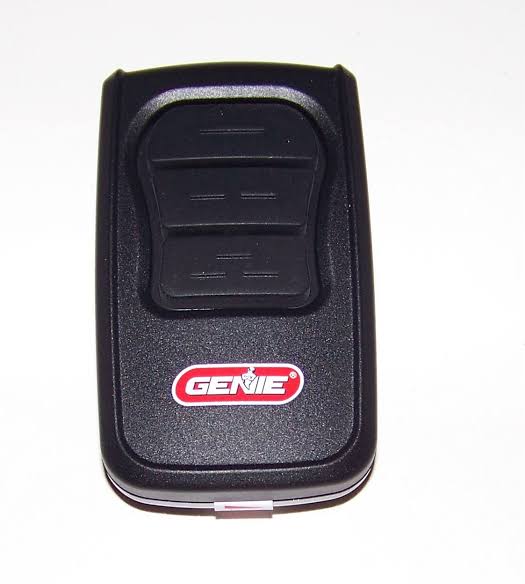
This is the most common task homeowners face. The following steps apply to most Genie Intellicode remotes (including G3T-R, G1T-BX, and GSTB-R models).
Step-by-Step Remote Programming
- Locate the Learn Button: Find the square “Learn” button on the motor head. It is typically located under the light lens cover or near the antenna wire. On newer ChainMax and SilentMax models, it may be behind a small access panel.
- Activate Learn Mode: Press and release the Learn button. You will see a blue LED illuminate (or red on older Intellicode units). You now have approximately 30 seconds to complete the next step before the system times out.
- Press the Remote Button: Within the 30-second window, press and hold the button on your remote that you wish to program. Hold it until the motor head LED blinks or turns off.
- Confirm the Code: Release the remote button. Press the same remote button again to test. The door should activate.
- Test Safety Reversal: Place a 2×4 board flat on the floor under the center of the door. Close the door. Upon contact, the door must automatically reverse. If it does not reverse immediately, stop using the opener and adjust the force settings per the manual.
Programming Multiple Remotes
You can typically store up to 7 different transmitters in a Genie Intellicode memory bank. Simply repeat the four steps above for each additional remote. There is no need to reprogram existing remotes when adding new ones unless you perform a full system reset.
Programming a Genie Wireless Keypad
Many users prefer keyless entry for guests or when they forget their remote. Programming a keypad follows a similar logic but includes a PIN setup phase.
- Open the Battery Cover: Slide down the battery compartment cover on the keypad.
- Enter Learn Mode on Motor: Press the Learn button on the overhead motor head until the LED lights up.
- Initiate Keypad Pairing: Within 30 seconds, go to the keypad and press the “Program” button (sometimes labeled as arrows up/down simultaneously). The keypad backlight should flash.
- Set Your PIN: Enter your desired 3–6 digit PIN, then press the “Send” or “Program” button.
- Finalize: Press the Send button again. The motor head LED should blink to confirm acceptance. Test by entering your PIN and pressing Send.
Expert Tip: Avoid using obvious PINs like 1234 or your house number. Choose a random combination that is easy for you to remember but difficult for others to guess.
Troubleshooting Common Programming Failures
Even with perfect instructions, things sometimes go wrong. Here are data-backed solutions to the most frequent issues.
Remote Won’t Program After Multiple Attempts
- Battery Issue: Even new batteries can be defective. Replace with fresh alkaline batteries (avoid lithium in some older Genie remotes as voltage spikes can confuse the receiver).
- Memory Full: If you’ve exceeded the 7-transmitter limit, the oldest codes may be pushed out. Perform a factory reset by holding the Learn button for 10+ seconds until the LED goes out, then reprogram all active remotes.
- Interference: LED bulbs in the opener light fixture can emit radio frequency interference. Temporarily unscrew the bulb and try programming again. If successful, replace with Genie-approved LED bulbs.
Door Opens But Doesn’t Close
This is almost always a Safe-T-Beam sensor issue, not a programming failure. Check for spider webs, dirt, or misalignment. The sending sensor shows amber; the receiving sensor shows red. Both must be solid. Sunlight hitting the receiving sensor directly can also cause temporary failure—shade the sensor and retry.
Remote Works Intermittently
Range issues often stem from antenna positioning. Ensure the antenna wire hangs vertically and isn’t coiled or touching metal. In rare cases, nearby ham radios or military installations can cause RF noise. Installing a Genie universal receiver extension kit can resolve persistent range problems.
FAQ: Your Top Questions Answered
Q1: Can I program a non-Genie remote to my Genie opener?
Yes, but only if the remote is explicitly labeled “compatible with Genie Intellicode.” Universal remotes from brands like Chamberlain or LiftMaster often include Genie frequencies, but you must verify compatibility on the packaging. Generic “universal” remotes without Intellicode support will not work with post-1995 Genie units.
Q2: How do I know if my Genie opener uses Intellicode or dip switches?
Look at the back or side of your existing remote. If you see tiny sliding switches inside the battery compartment, it’s a legacy dip-switch system. If there are no switches and the remote has a single large button or multiple buttons with no visible internals, it’s likely Intellicode. You can also check the motor head label for “Intellicode” branding or a manufacture date after 1995.
Q3: Will programming a new remote erase my old ones?
No. Adding a new remote simply appends its code to the memory bank. Old remotes remain functional unless you perform a full system reset (holding Learn for 10+ seconds). Only reset if you’ve lost a remote and want to prevent unauthorized access.
Q4: Why does my Genie opener light flash when I press the remote?
Flashing lights usually indicate a diagnostic code. Three flashes followed by a pause often means lock mode is engaged. Check your wall console for a “Lock” button and disable it. Continuous flashing may indicate sensor obstruction or travel limit errors. Consult your model-specific manual for flash code meanings.
Q5: How often should I reprogram my garage door opener?
You should never need to reprogram unless you experience functionality loss. However, security experts recommend changing your keypad PIN annually and performing a system reset if you lose a remote or move out of a rental property. Regular maintenance (lubrication, balance testing) matters far more than reprogramming for long-term reliability.
Q6: Can smart home integration affect programming?
Integrating with Aladdin Connect or other Wi-Fi modules does not interfere with traditional remote programming. Smart modules operate on a separate communication channel. However, ensure your Wi-Fi signal reaches the garage, as weak connectivity can cause app-based control failures that users mistakenly attribute to remote programming issues.
Conclusion
Mastering how to program a garage door opener to a Genie system empowers you to maintain home security and convenience independently. By understanding Intellicode technology, following precise safety protocols, and methodically executing the programming steps, you eliminate guesswork and costly service calls. Remember that proper sensor alignment and quality batteries solve 80% of perceived programming failures.
Your garage door is the largest moving object in your home—treat it with respect, and it will serve you reliably for decades. If this guide helped you regain seamless access, please share it on social media to help fellow homeowners avoid the same frustration. Tag us or leave a comment below with your Genie model and any unique challenges you overcame; your experience could save someone else hours of troubleshooting!
Stay safe, stay secure, and enjoy the peace of mind that comes with a perfectly programmed garage door.
Leave a Reply