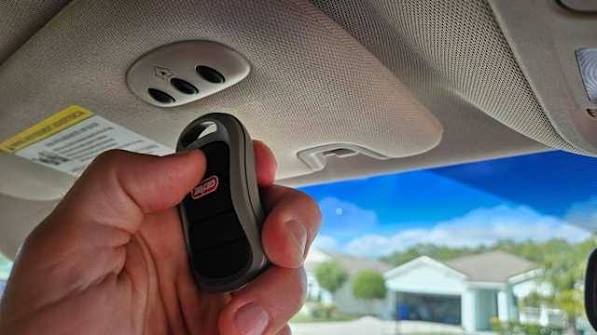
There’s nothing quite as frustrating as sitting in your driveway, pressing the button on your visor, and watching your garage door stay stubbornly closed. If you’ve recently bought a new vehicle or replaced your garage door opener, you’re probably wondering how to program a garage door opener in a car without spending hours on hold with customer support. Don’t worry—you’re not alone, and the solution is simpler than you think.
Modern vehicles come equipped with built-in garage door opener systems, most commonly known as HomeLink, but other brands like Genie, Chamberlain, and LiftMaster also offer compatible solutions. Whether you’re tech-savvy or a complete beginner, this guide will walk you through everything you need to know to get your car and garage talking to each other seamlessly.
Why Programming Your Car’s Garage Door Opener Matters
Before diving into the steps, let’s address why this matters. According to a 2025 survey by the Consumer Technology Association, over 68% of new vehicle buyers prioritize integrated smart home features, including garage door control. The convenience factor is undeniable: no more fumbling for remotes, no more worrying about losing them, and no more standing in the rain waiting for the door to open.
However, improper programming can lead to security vulnerabilities or complete system failure. That’s why following manufacturer-specific instructions is crucial. Let’s break it down by the most common systems you’ll encounter.
Identifying Your Garage Door Opener System
The first step in learning how to program a garage door opener in a car is identifying which system your vehicle uses. Here are the three most common types:
| System Type | Common Vehicle Brands | Compatibility Notes |
|---|---|---|
| HomeLink | Ford, Toyota, Honda, BMW, Mercedes | Works with 95% of garage door openers manufactured after 1993 |
| Genie Intellicode | Chrysler, Dodge, Jeep | Requires rolling code technology |
| Chamberlain/LiftMaster | GM, Chevrolet, Cadillac | Uses Security+ 2.0 encryption |
If you’re unsure which system your car has, check your owner’s manual or look for buttons on your sun visor, rearview mirror, or overhead console. Most HomeLink systems feature three programmable buttons labeled with icons resembling garage doors.
What If My Garage Door Opener Is Older?
If your garage door opener was manufactured before 1993, it likely uses fixed-code technology, which is less secure and harder to integrate with modern car systems. In this case, consider upgrading to a newer opener with rolling code technology. The U.S. Consumer Product Safety Commission recommends replacing openers older than 20 years due to safety concerns.
For more technical details on garage door opener standards, you can refer to Wikipedia’s article on garage door openers, which provides comprehensive historical and technical context.
Step-by-Step Guide: How to Program a HomeLink System
HomeLink is the most widely used integrated garage door opener system in vehicles. Here’s how to program it:
Step 1: Clear Existing Codes (If Necessary)
If your HomeLink buttons have been previously programmed, you’ll need to clear them first:
- Press and hold the two outer HomeLink buttons simultaneously.
- Keep holding for 10–20 seconds until the indicator light begins to flash rapidly.
- Release both buttons. The system is now reset.
Step 2: Put Your Garage Door Opener in “Learn” Mode
Locate the “Learn” or “Smart” button on your garage door opener motor unit (usually found on the back or side of the unit hanging from your ceiling). Press and release this button. You’ll have approximately 30 seconds to complete the next step.
Step 3: Program the HomeLink Button
- Return to your vehicle and park within 10–15 feet of the garage door opener.
- Press and hold the desired HomeLink button.
- While holding the HomeLink button, press and hold the original handheld remote button.
- Continue holding both buttons until the HomeLink indicator light changes from a slow blink to a rapid flash (this may take up to 30 seconds).
- Release both buttons.
Step 4: Test the Connection
Press the programmed HomeLink button. Your garage door should activate. If it doesn’t, repeat Steps 2–4, ensuring you’re within range and timing the steps correctly.
Programming Non-HomeLink Systems
Not all vehicles use HomeLink. Here’s how to handle other common systems:
Genie Intellicode Systems
- Locate the “Program” button on your Genie garage door opener.
- Press and release the button—the LED will illuminate.
- Within 30 seconds, press and hold the button on your car’s visor or console.
- Hold until the garage door moves or the LED blinks twice.
- Test the connection.
Chamberlain/LiftMaster Security+ 2.0
- Press the “Learn” button on the garage door opener motor.
- Within 30 seconds, press and hold the desired button in your vehicle.
- Release when the garage door activates or the vehicle’s indicator confirms programming.
- Some models require you to press the vehicle button twice to confirm.
Troubleshooting Common Issues
Even with careful following of instructions, things don’t always go smoothly. Here are solutions to frequent problems:
Problem: The garage door doesn’t respond.
- Solution: Ensure you’re within 10–15 feet of the opener during programming. Check that your garage door opener has power and isn’t in “lock” mode.
Problem: The HomeLink light flashes but won’t stop.
- Solution: This indicates incompatible frequencies. You may need a compatibility bridge or repeater, available from HomeLink’s website or automotive retailers.
Problem: Programming works intermittently.
- Solution: Replace the battery in your handheld remote. Weak signals can cause inconsistent programming results.
Problem: My car isn’t listed in the compatibility database.
- Solution: Contact your vehicle manufacturer’s customer support. Many newer models require dealer-assisted programming or software updates.
Security Best Practices for Garage Door Openers
Programming your garage door opener into your car is convenient, but security should never be an afterthought. Follow these best practices:
- Use rolling code technology: Ensure both your car system and garage door opener use rolling codes, which change the access code with each use.
- Avoid sharing codes: Never share your programmed button access with unauthorized users.
- Update firmware: If your garage door opener supports Wi-Fi connectivity, keep its firmware updated to patch security vulnerabilities.
- Monitor activity: Consider installing a smart garage door controller that sends alerts to your phone whenever the door opens or closes.
According to cybersecurity experts at the National Institute of Standards and Technology (NIST), rolling code systems reduce the risk of code interception by over 99% compared to fixed-code systems.
FAQ: Common Questions About Programming Garage Door Openers in Cars
Q1: Can I program multiple garage doors to one car?
Yes! Most HomeLink systems allow you to program up to three different garage doors or gates. Simply repeat the programming process for each additional door using a different button.
Q2: How long does it take to program a garage door opener in a car?
Typically, the entire process takes 5–10 minutes if you follow the instructions carefully. Having your handheld remote and vehicle owner’s manual handy will speed things up.
Q3: Do I need professional help to program my car’s garage door opener?
In most cases, no. The process is designed for DIY completion. However, if you’ve attempted programming multiple times without success, contact your vehicle dealership or a certified garage door technician.
Q4: Will programming my car erase the existing remote?
No. Programming your car’s system does not affect your handheld remote. Both can operate the garage door independently.
Q5: What if my vehicle doesn’t have a built-in garage door opener?
You can purchase a universal aftermarket remote that clips onto your visor or integrates with your keychain. Brands like Chamberlain and Genie offer affordable options compatible with most systems.
Q6: Is it safe to leave my garage door opener programmed in my car?
Yes, as long as your system uses rolling code technology. Always lock your vehicle when parked, and consider disabling the HomeLink buttons if you’re lending your car to someone else.
Final Thoughts
Learning how to program a garage door opener in a car doesn’t have to be intimidating. With the right instructions and a bit of patience, you can enjoy the convenience of hands-free garage access in just minutes. Whether you’re driving a Ford with HomeLink or a Jeep with Genie Intellicode, the principles remain similar: identify your system, follow the manufacturer’s steps, and test thoroughly.
Remember, the key to success is preparation. Have your handheld remote ready, park close to the garage door opener, and don’t rush the process. If you hit a snag, consult your owner’s manual or reach out to customer support—most issues have straightforward solutions.
Now that your garage door opener is programmed, share this guide with friends or family who might be struggling with the same issue. A quick post on social media could save someone hours of frustration. And if you found this helpful, drop a comment below with your experience—we’d love to hear how it went!
Leave a Reply