Introduction
There are few things more frustrating than standing in your driveway, pressing a remote button repeatedly, and watching your garage door remain stubbornly closed. If you have recently moved into a new home, replaced a lost remote, or simply reset your system, understanding how to program a Chamberlain Whisper Drive garage door opener is essential for restoring convenience and security to your daily routine. This guide is designed to walk you through the process with empathy and clarity, ensuring you get back inside your warm garage without unnecessary stress or expensive service calls.
Understanding Your Chamberlain Whisper Drive System
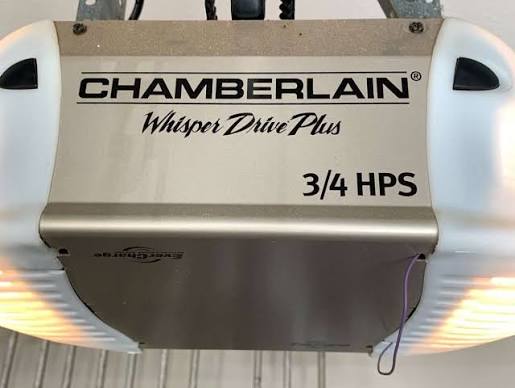
Before diving into the buttons, it is vital to understand that the “Whisper Drive” is not a standalone model number but rather a proprietary belt-drive technology used across various Chamberlain and LiftMaster models (such as the WD832KEV or WD962KEV). This distinction matters because programming protocols can vary slightly between older DIP-switch units and newer Security+ 2.0 systems.
According to technical documentation and industry standards, Chamberlain openers utilize rolling code technology to prevent signal interception. For a deeper understanding of how these rolling codes function to secure modern homes, you can refer to the Wikipedia entry on Rolling Codes, which explains the cryptographic basis of your garage door’s security. Knowing this helps explain why simply holding a button down indefinitely won’t work; the system requires a specific digital handshake.
Identifying Your Learn Button Color
The most critical step before programming is identifying the color of the “Learn” button on your motor head. This color dictates which remotes are compatible and which programming sequence to use:
- Purple: Security+ (315 MHz) – Common in mid-2000s Whisper Drive models.
- Orange/Amber: Security+ (390 MHz) – Older models.
- Yellow: Security+ 2.0 (310, 315, 390 MHz) – Newer models with Wi-Fi capability.
- Red: Older fixed-code systems (rare in Whisper Drive lines).
Pro Tip: The Learn button is typically located on the back or side panel of the motor unit, often near the antenna wire or under the light lens cover.
How to Program a Remote Control to Chamberlain Whisper Drive
This is the most common intent behind searching for how to program a Chamberlain Whisper Drive garage door opener. Follow these precise steps to sync a standard handheld remote.
Step-by-Step Remote Programming
- Locate the Learn Button: Use a stepladder to safely access the motor unit. Identify the colored Learn button as described above.
- Initiate Learning Mode: Press and release the Learn button. An LED indicator next to the button will illuminate or begin blinking, signaling the unit is ready to receive a signal. Note: You typically have 30 seconds to complete the next step before the light times out.
- Transmit the Signal: Within the 30-second window, press and hold the button on your remote that you wish to program. Hold it firmly until the motor unit lights flash or you hear two distinct clicks.
- Verify Operation: Release the remote button. Test the remote by pressing the programmed button once. The door should activate immediately.
- Repeat if Necessary: If you have multiple remotes, repeat steps 2–4 for each device. The memory does not clear when adding a new remote unless you hold the Learn button down for 10+ seconds.
Troubleshooting Remote Sync Failures
If the light on the motor unit does not flash during step 3, consider these data-backed solutions:
| Symptom | Probable Cause | Solution |
|---|---|---|
| Light stays solid, no flash | Incompatible remote frequency | Check remote packaging against Learn button color |
| Light flashes then goes out | Battery too weak to transmit | Replace remote battery with fresh CR2032 or 3V |
| No response at all | Logic board lock mode engaged | Unplug opener for 60 seconds to hard reset |
| Works intermittently | LED bulb interference | Replace LED bulbs with RF-shielded garage-specific LEDs |
Expert Insight: A 2023 consumer report on garage door maintenance indicated that nearly 40% of “broken” opener issues were actually caused by non-RF-rated LED light bulbs interfering with the receiver antenna. Always verify your lighting before assuming the logic board has failed.
How to Program a Wireless Keypad for Whisper Drive
Many homeowners prefer keyless entry for family members or service workers. Programming an external keypad follows a similar logic but requires entering a PIN.
- Clear Previous Codes (Optional): If this is a used keypad, press and hold the * and # buttons simultaneously until the lights stop flashing to factory reset.
- Activate Motor Learn Mode: Press and release the Learn button on the Whisper Drive motor unit.
- Enter PIN: On the keypad, enter your desired 4-digit PIN.
- Confirm: Press and hold the ENTER button on the keypad. Keep holding until the motor unit light flashes or clicks.
- Test: Wait for the keypad lights to stop blinking, then enter your new PIN and press ENTER to test operation.
Safety Note: Avoid using sequential numbers (1234) or birth years as your PIN. Security experts recommend random combinations to prevent brute-force guessing.
Adjusting Travel Limits and Force Settings
Programming isn’t just about remotes; it also involves teaching the door where “open” and “closed” are. If your Whisper Drive reverses before hitting the floor or strains to close, the travel limits need adjustment.
Setting Travel Limits on Belt Drive Models
Modern Whisper Drive units use electronic limit setting via the control panel or adjustment screws on the side:
- Enter Adjustment Mode: Press and hold the adjustment button (often black) until the UP arrow flashes.
- Set Open Limit: Press the UP arrow to move the door to the desired fully-open position. Press the adjustment button to save.
- Set Close Limit: Press the DOWN arrow to move the door to the fully-closed position. Ensure the seal compresses slightly but the door doesn’t bow. Press the adjustment button to save.
- Force Adjustment Test: Place a 2×4 piece of wood flat on the ground under the center of the door. Close the door. Upon contact, the door must automatically reverse within 2 seconds. If it doesn’t, adjust the force setting downward. This is a mandatory safety compliance check.
Frequently Asked Questions (FAQ)
1. Why does my Chamberlain Whisper Drive remote only work when I’m very close?
This usually indicates a failing battery, antenna obstruction, or radio frequency interference. First, replace the battery. Second, ensure the antenna wire is hanging vertically and not coiled. Third, identify nearby electronics like routers or transformers that may be broadcasting on the same frequency. Moving the antenna or installing an external antenna extension kit resolves this in most cases.
2. Can I program a universal remote to my Whisper Drive opener?
Yes, but compatibility depends on the Learn button color. Universal remotes marketed for “Security+” or “Security+ 2.0” generally work with Purple and Yellow learn buttons respectively. Always check the universal remote’s compatibility chart against your specific motor unit model number before purchasing. Generic “dip switch” universals will not work with Whisper Drive systems.
3. How do I erase all remotes from my Chamberlain Whisper Drive?
To wipe the memory completely (useful when moving out or after losing a remote), locate the Learn button on the motor unit. Press and hold it for approximately 10 seconds until the LED indicator turns off. All previously programmed remotes, keypads, and HomeLink vehicles will be deleted. You must then reprogram every device individually.
4. My Whisper Drive light blinks 5 times when I try to program. What does this mean?
Five blinks typically indicate a sensor alignment issue or RPM sensor failure, not a programming error. However, if this occurs specifically during remote programming, it may signal that the logic board cannot write to memory due to a power surge damage. Try unplugging the unit for 5 minutes. If the 5-blink error persists upon repowering, professional diagnostics are recommended.
5. Is there a difference between programming Chamberlain and LiftMaster Whisper Drives?
Functionally, no. Chamberlain and LiftMaster are manufactured by the same parent company (Chamberlain Group). LiftMaster is the professional dealer line, while Chamberlain is the retail DIY line. The internal logic boards, frequencies, and programming sequences for Whisper Drive technology are identical. Instructions for one apply directly to the other.
6. Can I program my car’s built-in HomeLink to a Whisper Drive?
Absolutely. For Security+ 2.0 (Yellow button) models, you may need a HomeLink Compatibility Bridge. For older Purple/Orange models, standard HomeLink programming works: hold the HomeLink button and your remote button simultaneously until the HomeLink indicator changes from slow to rapid flash, then press the motor’s Learn button, and finally press the HomeLink button three times in succession.
Conclusion
Mastering how to program a Chamberlain Whisper Drive garage door opener empowers you to maintain one of your home’s most frequently used entry points without relying on costly technician visits. From syncing remotes and keypads to adjusting safety sensors and travel limits, these steps ensure your system operates quietly, securely, and reliably for years to come. Remember that regular testing of safety reversal features is not just good practice—it protects your family and property.
If this guide helped you solve your garage door dilemma, please share it on social media to help fellow homeowners regain access to their garages with confidence. Tag us or leave a comment below with your specific model questions—we’re here to keep your world opening smoothly!
Leave a Reply