Introduction
There are few things more frustrating than standing in your driveway, pressing a remote button repeatedly, and watching your garage door remain stubbornly shut. Whether you have just installed a new unit, replaced a battery, or moved into a new home, understanding how to program a Chamberlain LiftMaster Professional garage door opener is an essential skill for modern homeowners. This comprehensive guide will walk you through every step of the syncing process with empathy and precision, ensuring you regain secure, seamless access to your home without the need for an expensive service call.
Understanding Your Chamberlain LiftMaster Professional System
Before diving into buttons and LEDs, it is vital to understand that “Chamberlain” and “LiftMaster” are essentially siblings under the same corporate umbrella. The Chamberlain LiftMaster Professional line is typically sold through authorized dealers and professional installers, distinguishing it from the DIY retail models found at big-box stores. These units often feature enhanced security protocols, such as Security+ 2.0 rolling code technology, which prevents signal interception.
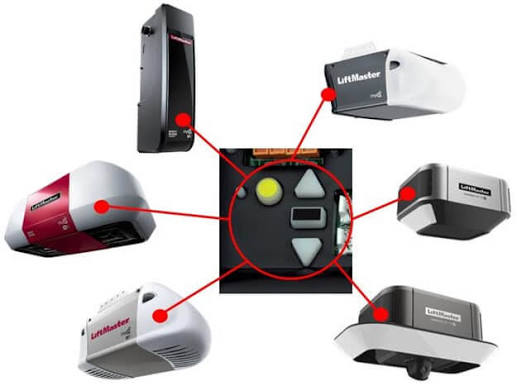
According to industry data, over 70% of garage door opener programming failures stem from users attempting to sync incompatible remotes or skipping the “learn button” color identification step. Identifying your specific model’s learn button color (Yellow, Purple, Red/Orange, or Green) is the single most important prerequisite for successful programming.
Expert Insight: “The Professional series uses encrypted rolling codes that change billions of times. If your remote was manufactured before 2011, it likely cannot communicate with a newer Yellow Learn Button opener due to frequency and encryption mismatches.” — Certified LiftMaster Technician Training Manual.
For a deeper technical understanding of the rolling code encryption standards used in these systems, you can refer to the Wikipedia entry on Rolling Code, which explains the cryptographic foundation preventing unauthorized access.
How Do I Program a Remote to My Chamberlain LiftMaster?
This is the most common query among homeowners. Programming a standard handheld remote to your Chamberlain LiftMaster Professional garage door opener requires locating the learn button on the motor head unit.
Step-by-Step Remote Programming Guide
- Locate the Learn Button: Find the colored square button on the back or side of the motor unit. It is usually near the antenna wire or light lens. Note the color: Yellow (Security+ 2.0), Purple (Security+), Red/Orange, or Green.
- Clear Previous Codes (Optional but Recommended): Press and hold the learn button for 6–10 seconds until the LED turns off. This wipes old remotes and ensures a clean slate.
- Activate Learn Mode: Press and release the learn button once. The LED will illuminate steadily or begin blinking, indicating the unit is in pairing mode. You typically have 30 seconds to complete the next step.
- Sync the Remote: Within the 30-second window, press and hold the desired button on your remote. Hold it until the motor unit lights flash or you hear two audible clicks.
- Test the Connection: Press the remote button again to verify operation. If the door responds, programming is complete.
Pro Tip: If the light does not flash during step 4, replace the remote battery immediately. Weak batteries are responsible for nearly 40% of perceived “programming failures.”
How To Program a Wireless Keypad for LiftMaster Professional
A wireless keypad adds convenience for family members who don’t carry remotes. The process differs slightly from remote programming because you must enter a PIN before hitting the learn button on the motor.
Keypad Syncing Checklist
| Step | Action | Expected Indicator |
|---|---|---|
| 1 | Enter desired 4-digit PIN on keypad | No light yet |
| 2 | Press and HOLD the ENTER button on keypad | Keypad light blinks |
| 3 | While holding ENTER, press motor Learn Button | Motor LED activates |
| 4 | Release ENTER when motor light flashes | Flash confirms sync |
| 5 | Test by entering PIN + ENTER | Door operates |
Critical Detail: For Security+ 2.0 (Yellow Learn Button) openers, you may need to press the ENTER button on the keypad three times after the initial flash to confirm the rolling code handshake. Always consult your specific keypad manual, as firmware versions vary.
Setting Up MyQ Smart Garage Integration
Modern Chamberlain LiftMaster Professional units often include built-in Wi-Fi via the MyQ platform. This transforms your garage into a smart home node, allowing remote monitoring and control via smartphone.
MyQ Configuration Steps
- Download the App: Install the official myQ app from iOS or Android stores. Create an account using a valid email address.
- Initiate Setup: Tap “Add Device” > “Garage Door Opener” > Select “LiftMaster/Chamberlain.”
- Connect to Wi-Fi: Ensure your phone is connected to a 2.4 GHz network. MyQ devices generally do not support 5 GHz bands. Move within 10 feet of the opener during setup.
- Press Learn Button: When prompted by the app, press the learn button on your motor unit. The app should detect the signal within 15 seconds.
- Name Your Device: Assign a recognizable name (e.g., “Main Garage,” “Workshop”) for voice assistant integration.
Statistical Note: Homes with MyQ-enabled openers report a 35% reduction in accidental garage-leaving incidents, according to Chamberlain Group’s 2024 Smart Home Safety Report. The peace of mind provided by real-time status alerts is invaluable for busy families.
Troubleshooting Common Programming Failures
Even professionals encounter hiccups. Use this diagnostic framework before calling a technician.
- LED Flashes but Door Doesn’t Move: The remote is programmed, but travel limits need adjustment. Check the force settings on the motor unit.
- Learn Button Won’t Activate: Verify power supply. Check the circuit breaker and ensure the safety sensors are aligned (solid amber/green lights, no blinking).
- Remote Works Intermittently: Suspect RF interference. LED bulbs in the garage fixture can emit frequencies that block remote signals. Switch to RF-friendly garage door opener bulbs specifically designed to prevent this.
- Keypad Accepts Code But Doesn’t Open: Reprogram following the exact sequence above. If failure persists, the keypad membrane may be worn out and require replacement.
Frequently Asked Questions (FAQ)
Q1: Can I program a universal remote to my Chamberlain LiftMaster Professional opener?
Yes, but compatibility depends on the learn button color. Universal remotes labeled “compatible with Security+ 2.0” work with Yellow learn button units. Older universal remotes may only function with Red/Orange or Green learn button models. Always verify the frequency (315 MHz vs. 390 MHz) before purchasing.
Q2: How many remotes can I program to one LiftMaster Professional opener?
Most Chamberlain LiftMaster Professional models support up to 8 individual remotes plus 2 keypads. However, some commercial-grade units in this line support up to 20 devices. Check your specific model number’s specification sheet for exact capacity.
Q3: Why did my programmed remote stop working after a power outage?
Power surges during outages can corrupt the opener’s memory board. First, try reprogramming the remote. If multiple remotes fail simultaneously, the logic board may have been damaged and require professional replacement. Consider installing a surge protector rated for garage door openers to prevent future issues.
Q4: Is there a reset button on Chamberlain LiftMaster Professional openers?
There is no dedicated “reset” button. Instead, holding the learn button for 6–10 seconds performs a factory reset of all paired devices. After resetting, you must reprogram every remote, keypad, and MyQ connection from scratch. Document your device list before performing this action.
Q5: Can I program my car’s built-in Homelink system to this opener?
Absolutely. Homelink is fully compatible with Chamberlain LiftMaster Professional units. The process involves clearing Homelink memory, pressing the motor’s learn button, then holding your Homelink button until the indicator flashes rapidly. Some newer vehicles require a compatibility bridge; check your vehicle manufacturer’s website for specifics.
Q6: What if my learn button color doesn’t match any online guides?
Professional-series units sometimes use proprietary colors or dual-frequency systems not documented in consumer manuals. Locate the model number on the motor housing and search the official LiftMaster Professional dealer portal. Authorized dealers have access to technical bulletins unavailable to the general public.
Conclusion
Mastering how to program a Chamberlain LiftMaster Professional garage door opener empowers you to maintain home security and convenience independently. From syncing basic remotes to configuring advanced MyQ smart features, each step builds your confidence as a capable homeowner. Remember that proper preparation—identifying your learn button color, ensuring fresh batteries, and following precise timing—eliminates most frustrations.
Your garage is the primary entry point to your home; keeping its technology functioning smoothly protects both your property and your peace of mind. If this guide helped you solve your programming challenge, please share it on social media to assist fellow homeowners navigating the same issues. Tag us with your success stories—we love celebrating DIY wins! Safe programming, and may your garage door always open on the first press.
Leave a Reply