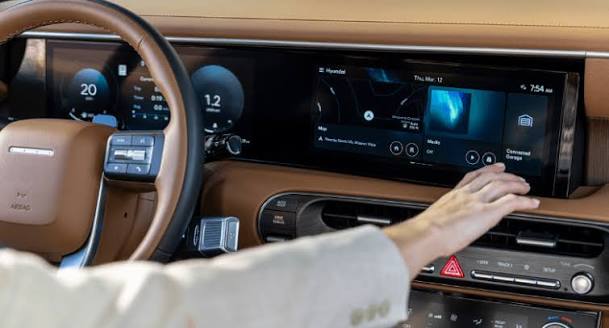
Introduction
There is nothing quite as frustrating as pulling into your driveway after a long day, only to realize you cannot get your new vehicle’s built-in system to sync with your home. If you are struggling to figure out how to program 2025 Hyundai Santa Fe garage door opener functions, please know that you are not alone; this is one of the most common questions new owners ask during their first month of ownership. The good news is that the 2025 Santa Fe utilizes the latest HomeLink® technology, which makes the pairing process significantly faster and more reliable than older models once you understand the specific sequence. This comprehensive guide will walk you through every step with empathy and precision, ensuring you can open your garage seamlessly from your driver’s seat without needing a separate plastic remote cluttering your visor.
Understanding HomeLink Technology in the 2025 Santa Fe
Before diving into the buttons, it is vital to understand what you are actually programming. The 2025 Hyundai Santa Fe does not use a proprietary Hyundai signal; instead, it uses an integrated universal transceiver system known as HomeLink. According to Wikipedia, HomeLink is a wireless radio frequency transceiver that allows users to activate RF devices such as garage doors, gates, and lighting systems directly from a vehicle’s overhead console or rearview mirror.
For the 2025 model year, Hyundai has updated the interface to be more intuitive, but the underlying frequency protocols remain compatible with major US manufacturers like LiftMaster, Chamberlain, Genie, and Craftsman. Understanding this distinction helps prevent confusion: you are teaching your car to mimic your existing handheld remote, not installing new hardware in your garage.
Compatibility Check: Rolling Code vs. Fixed Code
Most modern garage door openers (manufactured after 1996) utilize “Rolling Code” technology for security. This means the code changes every time the button is pressed. The 2025 Santa Fe supports both Rolling Code and older Fixed Code systems, but the programming steps differ slightly.
| Feature | Rolling Code Systems | Fixed Code Systems |
|---|---|---|
| Manufacture Date | Post-1996 | Pre-1996 |
| Security Level | High (Code changes per use) | Low (Static code) |
| Programming Steps | Requires “Learn Button” sync on motor unit | Car-only programming usually sufficient |
| Indicator Light | Rapid flash then solid | Slow flash then solid |
| Common Brands | LiftMaster, Chamberlain, Genie Intellicode | Older Stanley, Linear, Moore-O-Matic |
Note: If your garage door opener has a purple, orange, red, or yellow “Learn” button on the back panel, you have a Rolling Code system.
Step-by-Step Guide: How to Program 2025 Hyundai Santa Fe Garage Door Opener
This tutorial assumes you have your original handheld remote and access to the garage door motor unit. Please ensure your vehicle is parked outside the garage with the ignition in the “ON” position (engine running or accessory mode active) for safety and battery preservation.
Phase 1: Clearing Previous Codes (Recommended)
Even if your 2025 Santa Fe is brand new, it is best practice to clear the HomeLink memory to avoid ghost signals or factory test remnants.
- Locate the three HomeLink buttons on your overhead console or rearview mirror frame.
- Press and hold the two outer buttons simultaneously.
- Hold for approximately 10 seconds until the indicator LED begins to flash rapidly.
- Release both buttons. Your system is now reset and ready for fresh programming.
Phase 2: Training the Vehicle to the Handheld Remote
This phase teaches the Santa Fe the specific frequency of your garage door.
- Hold your original handheld remote 1–3 inches away from the HomeLink buttons. Angling the remote at 45 degrees often improves signal capture.
- Simultaneously press and hold your chosen HomeLink button AND the button on your handheld remote.
- Watch the HomeLink indicator light closely:
- Slow Flash: Still learning. Keep holding.
- Rapid Flash/Solid: Programming successful. Release both buttons.
- Test the newly programmed button by pressing it once. If the door activates, you have a Fixed Code system and are finished. If the light flashes rapidly but the door does not move, proceed to Phase 3.
Phase 3: Synchronizing Rolling Code Systems
If Phase 2 resulted in a rapid flash but no door movement, your system requires synchronization with the motor unit itself. You must complete this step within 30 seconds.
- Locate the “Learn” or “Smart” button on your garage door motor unit (usually near the antenna wire or under the light cover).
- Press and release the Learn button. The indicator light on the motor unit will illuminate or blink, indicating it is in pairing mode.
- Return to your 2025 Santa Fe immediately.
- Press and hold the programmed HomeLink button for 2 seconds, then release.
- Repeat the press-hold-release cycle up to three times.
- On the third press, the garage door should activate. Your 2025 Hyundai Santa Fe garage door opener is now fully synced.
Troubleshooting Common Programming Issues
Despite following the steps above, some users encounter hurdles. Here are expert-backed solutions for the most frequent problems.
The Indicator Light Never Flashes
- Battery Issue: Replace the battery in your handheld remote before attempting again. Weak signals are the #1 cause of training failure.
- Distance Adjustment: Try moving the remote closer (touching the button) or further away (up to 6 inches). Signal null spots exist.
- Ignition Status: Ensure the vehicle is fully ON. Some 2025 Hyundai trims restrict HomeLink functionality when the car is completely off to preserve the 12V battery.
Door Opens/Closes Erratically or Only Partially
- Interference: LED bulbs in the garage door opener can sometimes emit RF interference. Temporarily unscrew the LED bulb and reprogram. If successful, replace with an RFI-shielded garage door LED bulb.
- Travel Limits: The issue may not be the programming but the mechanical travel limits on the opener unit. Consult your opener’s manual for limit adjustment screws.
HomeLink Works Intermittently
- Antenna Position: Ensure the garage door opener’s antenna is hanging down vertically and not tucked inside the housing.
- Vehicle Tint: Metallic window tint on the windshield can block RF signals. Test with the window rolled down; if it works consistently with the window down but not up, tint interference is the culprit.
Safety Considerations and Best Practices
Programming convenience should never compromise safety. The National Highway Traffic Safety Administration (NHTSA) and Hyundai emphasize these critical precautions:
- Never Program Inside the Garage: Always park outside with a clear line of sight to the door. An accidental activation during programming could cause injury or property damage.
- Verify Auto-Reverse Sensors: Before relying on HomeLink, test your garage door’s photo-eye sensors. Place a 2×4 board in the door’s path; the door must reverse upon contact. If it doesn’t, repair the sensors before using remote operation.
- Secure Your Vehicle: Since your car now acts as a garage key, treat your vehicle’s security seriously. Lock your Santa Fe when parked in public spaces to prevent unauthorized garage access.
- Update Firmware: Check your Hyundai Bluelink app periodically. Over-the-air updates occasionally include HomeLink compatibility improvements for newer opener models.
Frequently Asked Questions (FAQ)
Q1: Can I program my 2025 Santa Fe to a gate operator or community entrance?
Yes. The HomeLink system in the 2025 Santa Fe supports gate operators, entry barriers, and even some smart home lighting systems. The programming process is identical to garage door programming, though some community gates may require a brief pause between button presses due to slower receiver response times.
Q2: Do I need my original handheld remote to program the 2025 Santa Fe?
In most cases, yes. The vehicle needs to learn the frequency from an existing transmitter. However, if you have lost all remotes, some newer LiftMaster/Chamberlain units allow direct programming via the Learn button without a handheld remote. Check your specific opener’s manual for “remote-less” programming instructions.
Q3: Why does my HomeLink work for my garage but not my wife’s garage?
HomeLink can store up to three different frequencies. Each button can be independently programmed. Simply repeat Phase 2 and Phase 3 using a different HomeLink button and your wife’s handheld remote. Ensure you do not overwrite your existing button unless intended.
Q4: Is the 2025 Santa Fe HomeLink compatible with Tesla Wall Connectors or EV chargers?
No. HomeLink operates on RF frequencies (typically 288–398 MHz) designed for garage doors and gates. EV chargers use entirely different communication protocols (Wi-Fi, Bluetooth, or PLC). You cannot program HomeLink to control charging sessions.
Q5: My 2025 Santa Fe has HomeLink buttons but they don’t respond at all. What’s wrong?
First, check your vehicle’s fuse panel for the HomeLink/overhead console fuse. Second, verify that your trim level actually includes active HomeLink; some base trims have cosmetic button placeholders. Third, visit your Hyundai dealer for a diagnostic scan, as the module may require a software initialization.
Q6: Can I program multiple vehicles to the same garage door opener?
Absolutely. Most modern garage door openers support 10–30 remote codes simultaneously. Programming your 2025 Santa Fe does not erase other family members’ remotes or keypad codes. If you reach the opener’s memory limit, perform a factory reset on the opener unit and reprogram all desired devices.
Conclusion
Mastering how to program 2025 Hyundai Santa Fe garage door opener functions transforms your daily routine from fumbling with plastic remotes to seamless, one-touch convenience. By understanding the difference between rolling and fixed codes, following the precise three-phase training sequence, and applying targeted troubleshooting when needed, you can achieve reliable performance in under ten minutes. Remember to prioritize safety by always programming outdoors and verifying auto-reverse sensors before regular use.
Your 2025 Santa Fe is engineered to simplify your life, and a properly configured HomeLink system is one of its most satisfying features. If this guide helped you successfully sync your garage door, we would be thrilled if you shared it on social media to help fellow Hyundai owners navigate the same process. Tag us or use #SantaFeHomeLink so we can celebrate your success together. Safe driving and happy parking!
Leave a Reply