Introduction
There is nothing quite as frustrating as pulling into your driveway after a long day, only to realize you still have to dig through your center console for a clunky remote. If you are searching for how to program 2023 Hyundai Santa Fe garage door opener functionality, you are likely ready to embrace the seamless convenience of the integrated HomeLink system. We understand that vehicle technology can sometimes feel overwhelming, but rest assured that syncing your car to your home security is a straightforward process designed to simplify your daily routine. This guide will walk you through every step with clarity and patience, ensuring you get back to enjoying the comfort of your new SUV without unnecessary stress.
Understanding the HomeLink System in Your 2023 Santa Fe
Before diving into buttons and lights, it is helpful to understand what you are actually programming. The 2023 Hyundai Santa Fe comes equipped with the HomeLink Wireless Control System, typically located in the overhead console near the rearview mirror or integrated into the side mirror controls depending on your trim level.
Unlike older vehicles that used fixed-frequency transmitters, the 2023 model utilizes advanced rolling-code technology. This means the signal changes every time you use it, providing superior security against code-grabbing thieves. According to automotive safety standards, this integration eliminates the need for battery-operated remotes, reducing electronic waste and improving user experience. For a deeper technical understanding of how these radio frequency systems operate within vehicular ecosystems, you can refer to the Wikipedia entry on HomeLink.
Why Proper Programming Matters
Many owners assume they simply need to “sync” the car, but skipping preliminary steps often leads to failure. Proper programming ensures:
- Security: Rolling codes are correctly established with your garage motor.
- Reliability: Prevents intermittent signal loss during bad weather.
- Safety: Ensures the obstruction detection sensors remain active.
Pre-Programming Checklist: What You Need Before Starting
To successfully master how to program 2023 Hyundai Santa Fe garage door opener features, preparation is half the battle. Gather these items before sitting in the driver’s seat:
- Your Original Handheld Remote: Even if the batteries are weak, you need this for the initial handshake.
- Fresh Batteries: Install new batteries in your handheld remote before starting. Weak signals are the #1 cause of programming failure.
- Vehicle Ignition ON: The engine does not need to be running, but the ignition must be in the “ON” or “ACC” position.
- Clear Line of Sight: Park outside the garage, facing the door, at least 3 feet away.
- Garage Door Area Clear: Ensure no people, pets, or objects are near the door mechanism for safety.
⚠️ Safety Warning: Never program the HomeLink system while the vehicle is inside the garage. Exhaust fumes can accumulate quickly, and accidental door activation can cause injury or property damage. Always perform these steps outdoors.
Step-by-Step: How to Program 2023 Hyundai Santa Fe Garage Door Opener
Follow these precise instructions. Do not rush; timing between button presses matters.
Step 1: Clear Previous Codes (Recommended)
If this is a used vehicle or you have previously attempted programming, clear the memory first.
- Press and hold the two outer HomeLink buttons simultaneously.
- Hold for approximately 10–20 seconds.
- Release when the indicator light begins to flash rapidly.
- Note: This erases all three channels. You cannot delete a single channel individually.
Step 2: Initiate Training Mode
- Turn your vehicle ignition to ON/ACC.
- Press and release the desired HomeLink button (e.g., Button 1). The indicator light should begin to flash slowly.
- If the light stays solid, the button may already be programmed. Choose a different button or repeat Step 1.
Step 3: Pair With Your Handheld Remote
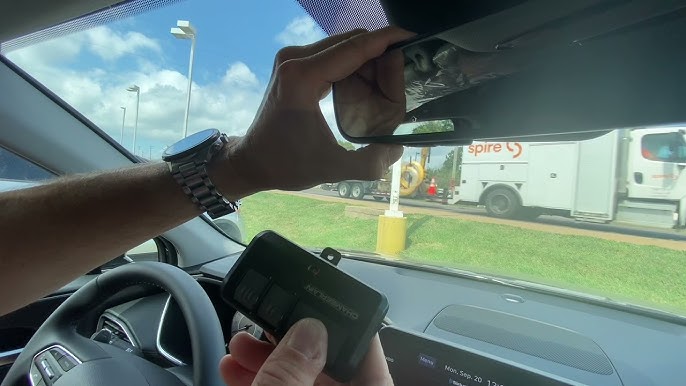
- Hold your original garage door remote 1–3 inches away from the HomeLink buttons.
- Simultaneously press and hold both the handheld remote button AND the chosen HomeLink button.
- Watch the HomeLink indicator light closely. It will transition from a slow flash to a rapid flash (or solid light, depending on region).
- This transition typically takes 5–30 seconds. Once the light changes, release both buttons.
Step 4: Test the Connection
Press the newly programmed HomeLink button once.
- Success: The garage door activates, and the indicator light stays solid for 2 seconds.
- Failure: The light flashes rapidly without door movement. Proceed to the Rolling Code section below.
Handling Rolling Code Openers: The Critical Extra Step
Most garage door openers manufactured after 1996 use rolling code technology. If Step 4 resulted in a rapid flash but no door movement, your opener requires this additional synchronization.
| Indicator Light Behavior | Meaning | Required Action |
|---|---|---|
| Slow Flash → Solid | Fixed Code (Older) | Programming Complete |
| Rapid Flash → Solid | Rolling Code Detected | Proceed to Learn Button Step |
| No Light Change | Signal Not Received | Check Remote Battery & Distance |
| Solid Immediately | Already Programmed | Test or Reprogram |
Activating the Garage Motor’s Learn Button
- Locate the “Learn” or “Smart” button on your garage door motor unit (usually on the back or side panel). Colors vary: yellow, purple, orange, or red.
- Press and release the Learn button. You typically have 30 seconds to complete the next step before the motor exits learning mode.
- Return to your vehicle immediately.
- Press and hold the programmed HomeLink button for 2 seconds, then release.
- Repeat this press-hold-release cycle up to 3 times until the door moves.
Expert Insight: Some newer LiftMaster or Chamberlain units with yellow learn buttons require you to press the HomeLink button four times in succession rather than holding. Consult your specific garage motor manual if three attempts fail.
Troubleshooting Common Programming Issues
Even professionals encounter hiccups. Here are solutions to the most frequent problems when figuring out how to program 2023 Hyundai Santa Fe garage door opener systems:
- Light Flashes But Door Won’t Move: Usually indicates incompatible frequency or uncompleted rolling code step. Verify your opener operates on 315 MHz or 390 MHz (standard for US HomeLink).
- Works Intermittently: Replace handheld remote batteries even if they seem fine. Also, check for LED bulb interference; some cheap LED garage lights emit RF noise that blocks signals. Switch to RF-shielded bulbs.
- HomeLink Buttons Unresponsive: Check your vehicle’s fuse panel. A blown accessory fuse can disable the module. Also, ensure the vehicle is not in valet mode.
- Door Opens Partially Then Reverses: This is a sensor alignment issue, not a programming issue. Clean the photo-eye sensors at floor level and ensure nothing obstructs the beam.
Frequently Asked Questions (FAQ)
Q1: Can I program my 2023 Santa Fe HomeLink without an original remote?
Generally, no. The HomeLink system requires the original transmitter to clone the frequency and code format. However, if your garage opener has a direct “HomeLink Compatible” label and supports direct Wi-Fi or Bluetooth setup via manufacturer apps (like myQ), you may bypass the traditional method. Check your opener’s manual for alternative pairing options.
Q2: Will programming HomeLink erase my existing garage door remotes?
No. Programming your vehicle adds a new authorized device to your garage motor’s memory. Your existing keypads, wall consoles, and handheld remotes will continue to function normally. Most modern openers support 10+ devices simultaneously.
Q3: How many garage doors can my 2023 Santa Fe store?
The HomeLink system provides three programmable channels. You can store three separate garage doors, gates, or even compatible smart home devices like lighting or security systems. Each button operates independently.
Q4: Is HomeLink compatible with all garage door brands?
HomeLink is compatible with nearly all major US manufacturers including LiftMaster, Chamberlain, Genie, Craftsman, and Overhead Door. Compatibility covers approximately 99% of openers sold since 1996. For pre-1996 fixed-code units, you may need a compatibility bridge adapter.
Q5: My indicator light never changes during programming. What’s wrong?
This usually indicates a dead remote battery, incorrect distance (too close or too far), or incompatible frequency. Try holding the remote at varying distances (1 inch to 6 inches) while pressing both buttons. If unsuccessful, test with a known-working remote from a neighbor to isolate whether the issue is your remote or the vehicle module.
Q6: Do I need to reprogram HomeLink after changing my car battery?
Typically, no. HomeLink memory is non-volatile and retains programming through battery disconnection. However, if you experience issues after a battery replacement, performing a full reset and reprogramming often resolves any corrupted data.
Conclusion
Mastering how to program 2023 Hyundai Santa Fe garage door opener functionality transforms your daily arrival experience from mundane to effortless. By following this comprehensive guide—from pre-programming preparation through rolling code synchronization—you have unlocked one of your vehicle’s most practical luxury features. Remember, patience during the training phase prevents frustration later, and always prioritize safety by keeping the programming area clear.
Your newfound convenience deserves to be shared! If this guide helped you finally ditch that extra remote, please share it on social media to help fellow Hyundai owners streamline their routines. Tag us with your success stories—we love celebrating small wins that make driving more enjoyable. Safe travels and happy parking! 🚗🏡
Leave a Reply