Introduction
There is nothing quite as frustrating as pulling into your driveway after a long day, only to realize you cannot get your new vehicle’s built-in transmitter to communicate with your garage. If you are currently searching for how to program 2022 Lexus RX 350 garage door opener functions, please know that this is a very common hurdle for new owners, and the solution is usually just a few button presses away. We understand that dealing with vehicle manuals can be overwhelming, so we have created this empathetic, jargon-free guide to help you sync your HomeLink system quickly and safely, getting you back to the convenience of keyless entry without the headache.
Understanding the 2022 Lexus RX 350 HomeLink System
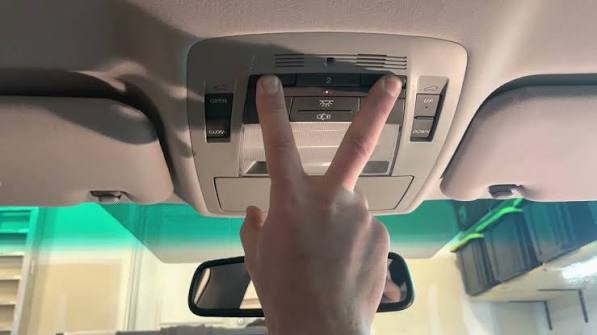
Before diving into the programming steps, it is vital to understand what you are actually working with. The 2022 Lexus RX 350 comes equipped with the HomeLink Universal Transceiver, typically located in the overhead console near the rearview mirror or integrated directly into the mirror assembly. This system replaces the need for separate handheld remotes by using radio frequency (RF) signals to communicate with your garage door motor, gate operators, or even home lighting systems.
Unlike older vehicles that used DIP switches, the 2022 model utilizes rolling code technology. This means the security code changes every time you use the system, preventing thieves from capturing your signal. According to automotive safety standards, this rolling code encryption is now mandatory for all modern transmitters to ensure homeowner security. Because of this technology, the programming process requires a specific “handshake” sequence between your car and the garage door motor unit itself, not just the remote.
Expert Note: Always verify that your garage door opener has functional safety reverse sensors before programming. Programming a door without active safety sensors can create a hazardous environment for pets and children.
Prerequisites Before You Start Programming
To ensure success when learning how to program 2022 Lexus RX 350 garage door opener buttons, gather the following items first. Skipping these checks is the number one reason programming fails.
- Fresh Remote Battery: Ensure your original handheld garage door remote has a new battery. Weak signals cause sync failures.
- Clear Line of Sight: Park outside the garage with a direct view of the motor unit. Do not program through closed doors.
- Ladder or Step Stool: You will likely need physical access to the “Learn” button on the garage motor ceiling unit.
- Vehicle Ignition ON: The 2022 RX 350 requires the ignition to be in the “ON” position (engine running or accessory mode) for the HomeLink module to receive power.
- Patience: The process involves timed holds. Rushing the button presses resets the cycle.
Quick Checklist: Pros vs. Cons of Built-In Transmitters
| Feature | Pros | Cons |
|---|---|---|
| Convenience | No extra remote clutter; always with the car | Cannot take it inside the house like a fob |
| Security | Rolling code encryption; no lost remotes | Requires reprogramming if car battery dies (rare) |
| Compatibility | Works with 95% of openers post-1996 | Older fixed-code openers may need a bridge |
| Cost | Included standard in 2022 RX 350 trim | Replacement mirror/console is expensive if broken |
Step-by-Step: How to Program 2022 Lexus RX 350 Garage Door Opener
Follow these precise instructions. This method applies to the three programmable buttons found in your overhead console.
Step 1: Clear Previous Codes (Recommended for Used Vehicles)
If this is not a brand-new vehicle, previous owner data may interfere. Press and hold the two outer HomeLink buttons simultaneously for approximately 10 seconds until the indicator light changes from solid to rapidly flashing. Release immediately. Your system is now in factory reset mode. Skip this step if programming a brand-new vehicle for the first time.
Step 2: Position Your Vehicle and Remote
Park outside the garage. Hold your original handheld remote 1–3 inches away from the HomeLink button you wish to program. The angle matters; aim the remote directly at the button face.
Step 3: Initiate the Training Mode
Simultaneously press and hold both the chosen HomeLink button AND your handheld remote button. Keep holding both. Watch the HomeLink indicator light above the buttons. It will flash slowly at first, then transition to a rapid flash (or turn solid green, depending on your specific trim). This rapid change indicates the car has learned the frequency. Release both buttons.
Step 4: Test the Signal
Press the newly programmed HomeLink button once. If the garage door activates, you have a fixed-code opener and are finished. However, most 2022-compatible openers use rolling codes. If the light flashes rapidly but the door does not move, proceed to Step 5.
Step 5: Complete the Rolling Code Handshake
This is the critical step many users miss. Locate the “Learn” or “Smart” button on your actual garage door motor unit (usually on the back or side panel, often colored yellow, red, purple, or orange).
- Press and release the “Learn” button on the motor unit. You typically have 30 seconds to complete the next action.
- Return to your vehicle immediately.
- Press and hold the programmed HomeLink button for 2 seconds, then release.
- Repeat this press-hold-release cycle up to three times within the 30-second window.
On the third successful press, the garage door should activate, confirming the rolling code sync is complete. For more technical background on how these radio frequencies operate, you can refer to the Wikipedia entry on Garage Door Openers, which details the evolution of RF safety standards.
Troubleshooting Common Programming Failures
Even when following the guide on how to program 2022 Lexus RX 350 garage door opener systems, issues arise. Here are data-backed solutions:
- Light Flashes But Door Won’t Move: This almost always indicates an incomplete rolling code handshake. Repeat Step 5, ensuring you press the motor’s Learn button before returning to the car. Speed is essential.
- No Light Response During Training: Your handheld remote battery is likely dead, or you are holding it too far away. Try pressing the remote directly against the HomeLink button surface. Also, verify your vehicle is in “IGNITION ON” mode, not just accessory.
- Door Opens Partially Then Reverses: This is a safety sensor issue, not a programming issue. Check that the photo-eye sensors at the floor level are aligned and unobstructed. Clean the lenses with a soft cloth.
- Works Intermittently: LED bulbs in the garage opener can sometimes emit RF interference that blocks HomeLink signals. If you recently switched to LEDs, try removing one bulb to test, or install an RF shield kit recommended by your opener manufacturer.
- Older Opener Incompatibility: If your garage motor was manufactured before 1996, it may use fixed-code technology incompatible with modern rolling-code receivers. You may need to purchase a HomeLink Compatibility Bridge adapter.
Frequently Asked Questions (FAQ)
Can I program multiple garage doors to my 2022 Lexus RX 350?
Yes. The 2022 RX 350 HomeLink system features three independent programmable buttons. Each button can store a different device, allowing you to program your primary garage, a detached workshop, and a community gate simultaneously. Simply repeat the programming steps for each button individually.
Will disconnecting my car battery erase the HomeLink memory?
Generally, no. HomeLink memory is stored in non-volatile memory and should survive a standard battery replacement. However, a complete electrical system reset or ECU reflash at a dealership could potentially wipe the codes. It is wise to note down your programming status before major electrical service.
Do I need my original garage door remote to program HomeLink?
In most cases, yes. The original remote acts as the frequency donor during the initial training phase. If you have lost your original remote, some newer Chamberlain/LiftMaster motors allow direct-to-motor programming without a donor remote, but this varies by model. Consult your garage door opener’s manual for “remote-less” programming options.
Why does my HomeLink work for the garage but not my front gate?
Gate operators often use different frequencies or require extended hold times due to longer activation cycles. Try holding the HomeLink button for a full 3–4 seconds instead of a quick press. Additionally, some community gates use encrypted commercial systems that require property manager authorization codes rather than standard residential programming.
Is there a subscription fee for using HomeLink in the 2022 RX 350?
No. Unlike some connected vehicle services, HomeLink is a hardware-based RF transmitter with no ongoing subscription costs. Once programmed, it functions indefinitely without cellular data, Wi-Fi, or monthly fees. This distinguishes it from app-based smart garage controllers that may require premium plans.
Can I program HomeLink to control indoor lights or fans?
Absolutely. Many homeowners use the third HomeLink button to trigger X10 or compatible smart home devices. You will need a HomeLink-compatible receiver module plugged into your home outlet. This allows you to turn on porch lights or entryway lamps simply by pressing a button as you approach your house.
Conclusion
Mastering how to program 2022 Lexus RX 350 garage door opener functionality transforms your daily arrival experience from a fumbling chore into seamless automation. By understanding the rolling code handshake, preparing your equipment properly, and following our step-by-step protocol, you can achieve reliable sync in under ten minutes. Remember that patience during the 30-second learning window is the single most important factor for success.
Your 2022 RX 350 was designed to make life easier, and a properly programmed HomeLink system is one of its most satisfying conveniences. If this guide helped you reclaim your keyless entry, please share it on social media to help fellow Lexus owners avoid the same programming frustrations. Tag us in your posts—we love seeing our community succeed! Safe driving and happy parking.
Leave a Reply