Introduction
There is nothing quite as frustrating as pulling into your driveway after a long day, only to realize you cannot get your new vehicle’s built-in system to sync with your home. If you are struggling to figure out how to program 2022 Jeep Grand Cherokee garage door opener buttons, please know that you are not alone; this is one of the most common questions new owners ask. The good news is that the 2022 Grand Cherokee features the updated HomeLink version 5 system, which makes the process significantly faster and more compatible than older models when you follow the correct sequence. This guide will walk you through every step with empathy and precision, ensuring you can open your garage with a simple touch of your overhead console by the end of this article.
Understanding HomeLink Version 5 in the 2022 Grand Cherokee
Before diving into the buttons, it is vital to understand what makes the 2022 model unique. Unlike vehicles from a decade ago, the 2022 Jeep Grand Cherokee utilizes HomeLink Version 5. This iteration offers enhanced security protocols, two-way communication capabilities, and broader compatibility with modern rolling-code garage door openers.
According to automotive technology standards, HomeLink is an integrated universal transceiver that replaces handheld remotes. It operates on radio frequencies typically between 288-390 MHz for North American markets. Understanding this helps explain why certain older “dip switch” remotes may require a different programming approach than modern “rolling code” systems. For a deeper technical understanding of how these radio frequency identification systems work within vehicular contexts, you can refer to the comprehensive overview on Wikipedia.
Key Features of the 2022 System
- Two-Way Confirmation: LED indicators provide real-time feedback during programming.
- Rolling Code Compatibility: Automatically detects and syncs with security-enhanced openers.
- Three Programmable Buttons: Allows control for multiple doors, gates, or lighting systems.
- Battery-Free Operation: Draws power directly from the vehicle’s electrical system.
Preparation: What You Need Before Starting
Programming fails usually happen due to lack of preparation. Gather these items before sitting in the driver’s seat:
- Original Handheld Remote: Even if batteries are dead, having the physical remote helps identify the opener type.
- Fresh Batteries: Install new batteries in your handheld remote before starting. Weak signals are the #1 cause of sync failure.
- Ladder or Safe Access: You may need to reach the “Learn” button on the garage door motor unit.
- Vehicle Owner’s Manual: Keep it handy for specific dashboard navigation references.
- Patience: The process takes 5–15 minutes. Rushing leads to errors.
⚠️ Safety Warning: Always ensure the garage door area is clear of people, pets, and obstacles before testing. Never stand directly under a moving door during the programming verification phase.
Step-by-Step: How to Program Rolling Code Openers
Most garage door openers manufactured after 1996 use rolling code technology. This is the standard method for learning how to program 2022 Jeep Grand Cherokee garage door opener functions for modern homes.
Phase 1: Clear Previous Codes (Recommended)
If this is a used vehicle or you are reprogramming a button, start fresh.
- Press and hold the two outer HomeLink buttons simultaneously.
- Hold for approximately 10 seconds until the indicator light changes from solid to flashing.
- Release both buttons. The system is now reset.
Phase 2: Initial Training
- Turn the ignition to ON/RUN mode (engine does not need to be running, but accessory power must be active).
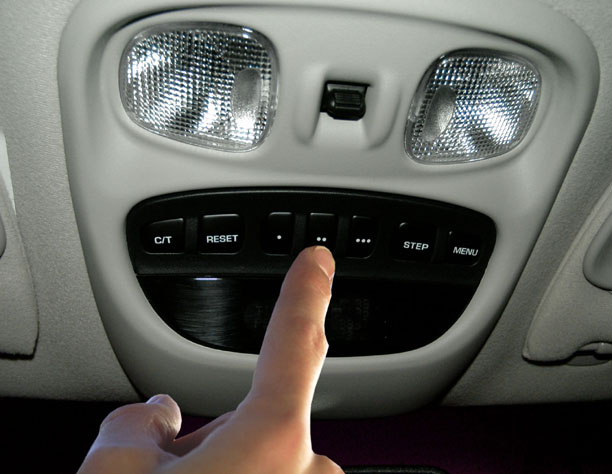
- Hold your handheld remote 1–3 inches away from the HomeLink buttons on the overhead console.
- Simultaneously press and hold the desired HomeLink button AND the button on your handheld remote.
- Watch the HomeLink indicator light. It will flash slowly at first, then rapidly once the signal is captured.
- Release both buttons once rapid flashing occurs.
Phase 3: Syncing with the Garage Door Motor
This is the critical step many users miss.
- Locate the “Learn” or “Smart” button on your garage door opener motor unit (usually near the antenna wire or light cover). Colors vary: yellow, purple, red, orange, or green.
- Press and release the Learn button. You have exactly 30 seconds to complete the next step.
- Return to your Jeep and firmly press and hold the programmed HomeLink button for 2 seconds, then release.
- Repeat the press-hold-release cycle up to three times if the door does not activate immediately.
- Test the button. If the door moves, programming is complete.
Programming Fixed-Code (Dip Switch) Openers
If your garage door opener was manufactured before 1996 and has internal dip switches rather than a Learn button, follow this alternate method:
- Complete Phase 1 and Phase 2 above.
- Instead of pressing a Learn button on the motor, locate the dip switches inside your handheld remote and on the motor unit.
- Ensure the switch patterns match exactly.
- After initial training in the Jeep, press and hold the HomeLink button while simultaneously toggling the corresponding switch on the motor unit (if accessible), or simply test after Phase 2 as fixed-code systems often do not require motor-side syncing.
Note: Less than 5% of 2022 Jeep owners will need this method. If unsure, assume you have a rolling code system.
Troubleshooting Common Programming Issues
Even experts encounter hiccups. Use this table to diagnose problems quickly:
| Symptom | Likely Cause | Solution |
|---|---|---|
| Light flashes slowly, never rapidly | Weak remote battery or wrong frequency | Replace remote battery; verify opener compatibility |
| Rapid flash achieved, but door won’t open | Missed 30-second Learn window | Restart Phase 3; press Learn button again immediately |
| Door opens partially then reverses | Safety sensor misalignment | Check photo-eye sensors at floor level; clean lenses |
| HomeLink works intermittently | Signal interference | Reposition remote during training; check for LED bulb interference |
| All buttons stopped working | System glitch or fuse issue | Perform full factory reset (Phase 1); check vehicle fuse panel |
Expert Tip: LED Bulb Interference
Modern LED garage door light bulbs can emit RF noise that blocks HomeLink signals. If programming succeeds but operation is unreliable, try removing the LED bulb temporarily to test. If functionality returns, replace the bulb with an RF-shielded garage door LED specifically rated for opener compatibility.
Frequently Asked Questions (FAQ)
Q1: Can I program my 2022 Jeep Grand Cherokee without the original remote?
Yes, but it requires accessing the garage door motor unit directly. Press the Learn button on the motor, then within 30 seconds, press and hold the desired HomeLink button in your Jeep until the indicator flashes rapidly. This bypasses the handheld remote training phase entirely. However, success rates are lower without the original remote for signal cloning.
Q2: Why does my HomeLink work for the garage but not my community gate?
Community gates often use different frequencies or require a separate receiver module. Some gates operate on 300-390 MHz while others use 433 MHz. Verify your gate’s frequency matches HomeLink’s supported range. Additionally, some HOA gates require a specialized external antenna adapter available through HomeLink’s compatibility bridge program.
Q3: How many devices can the 2022 Grand Cherokee HomeLink store?
The system supports three programmable buttons, each capable of storing one device. You can mix garage doors, entry gates, security lights, and smart home devices across these three slots. Each button operates independently and retains its programming even after vehicle battery replacement.
Q4: Is HomeLink compatible with Chamberlain MyQ and LiftMaster systems?
Absolutely. Chamberlain/LiftMaster units with yellow, purple, or red Learn buttons are fully compatible with HomeLink Version 5. Follow the standard rolling code procedure outlined above. For MyQ-enabled openers, HomeLink controls the physical door mechanism, while the MyQ app provides remote smartphone access—both systems coexist without conflict.
Q5: Do I need to reprogram HomeLink after changing my car battery?
No. HomeLink memory is stored in non-volatile flash memory that persists without power. However, if you experience issues post-battery change, perform a quick system reset (Phase 1) and retrain, as voltage fluctuations during replacement can occasionally corrupt stored codes.
Q6: What if my garage door opener brand isn’t listed in the manual?
HomeLink Version 5 supports over 95% of North American garage door opener brands manufactured since 1996. Brand listing is not exhaustive. Attempt the rolling code procedure regardless of brand. Only vintage pre-1996 units or proprietary European/Asian systems typically face incompatibility.
Conclusion
Mastering how to program 2022 Jeep Grand Cherokee garage door opener functionality transforms daily convenience and eliminates the clutter of handheld remotes. By understanding your HomeLink Version 5 system, preparing properly, and following the precise rolling code sequence, you can achieve reliable operation in under 15 minutes. Remember that patience during the 30-second Learn window and fresh remote batteries solve the vast majority of issues.
Your 2022 Grand Cherokee is engineered for seamless integration with your modern lifestyle, and HomeLink is a perfect example of that philosophy in action. Once programmed, the satisfaction of touching a single button and watching your garage door respond is genuinely rewarding.
Found this guide helpful? Share it with fellow Jeep owners on Facebook, Twitter, or your favorite Jeep forum! Tag a friend who just bought a 2022 Grand Cherokee and save them hours of frustration. Your share might be the exact solution someone needs today. Drive safely and enjoy the convenience! 🚙✨
Leave a Reply