Introduction
Struggling to sync your garage door with your 2022 Jeep Gladiator? You’re not alone. Many Jeep owners find the HomeLink programming process confusing, but learning how to program 2022 Jeep Gladiator garage door opener is simpler than you think. This comprehensive guide will walk you through every step, ensuring you can open your garage door directly from your vehicle’s overhead console within minutes.
The HomeLink system in your Jeep Gladiator provides convenient hands-free access to your garage, gate, or other automated doors. Whether you’re a first-time Jeep owner or upgrading from an older model, understanding this feature enhances your daily driving experience significantly.
Understanding the HomeLink System in Your 2022 Jeep Gladiator
Before diving into the programming process, it’s essential to understand what HomeLink is and how it works in your vehicle. HomeLink is a universal transceiver system that allows your Jeep to communicate with various radio-controlled devices, including garage door openers, gate operators, and home lighting systems.
What Is HomeLink?
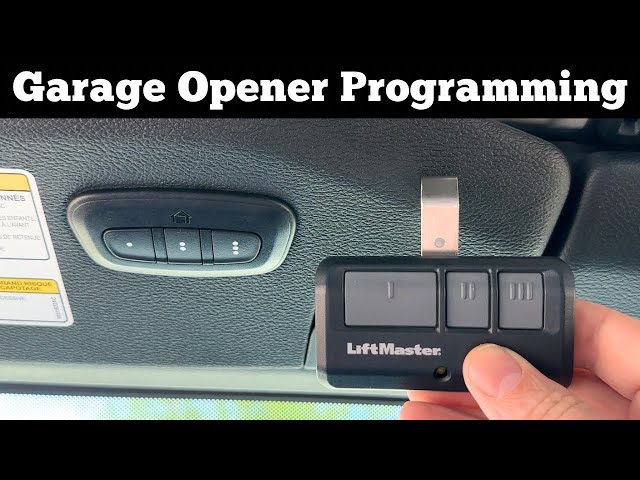
HomeLink technology uses radio frequency signals to mimic your existing remote control. The system in the 2022 Jeep Gladiator typically features three programmable buttons located on the overhead console near the rearview mirror. Each button can be programmed to control a different device, giving you flexibility for multiple garage doors or gates.
According to Wikipedia, HomeLink was first introduced in 1992 and has since become standard equipment in many vehicles, including all Jeep Gladiator models from 2020 onwards.
Compatible Garage Door Openers
Not all garage door openers work seamlessly with HomeLink. Most modern openers manufactured after 1993 are compatible, but you should verify compatibility before starting:
- Chamberlain/LiftMaster: Generally compatible with rolling code technology
- Genie: Most models work, though some older units may require additional steps
- Craftsman: Compatible with most newer models
- Linear: Works with most standard systems
- Stanley: Compatible with rolling code and fixed code systems
If your garage door opener uses rolling code technology (common in units made after 1993), you’ll need to follow specific programming steps outlined below. Rolling code systems change the access code each time you use the remote, providing enhanced security.
Step-by-Step Guide: How to Program 2022 Jeep Gladiator Garage Door Opener
Now let’s get into the practical steps. Follow these instructions carefully for successful programming.
Step 1: Prepare Your Vehicle and Garage Door Opener
Before beginning, ensure the following:
- Park your Jeep Gladiator outside your garage with the engine running
- Have your original garage door remote handy
- Clear any obstacles from the garage door path
- Ensure your garage door opener has fresh batteries if battery-operated
Important: Keep your garage door visible during programming so you can confirm it responds correctly.
Step 2: Clear Existing HomeLink Memory (If Necessary)
If your HomeLink buttons have been previously programmed, clear them first:
- Press and hold the two outer HomeLink buttons simultaneously
- Continue holding for approximately 20 seconds
- Watch for the indicator light to flash rapidly, then turn off
- Release both buttons when the light changes
This reset ensures no conflicting codes remain in the system.
Step 3: Program the HomeLink Button
Follow these precise steps for programming:
- Position yourself comfortably in the driver’s seat with clear visibility of the garage door
- Hold your original garage remote 1-3 inches from the HomeLink button you wish to program
- Press and hold both the HomeLink button and your remote’s button simultaneously
- Continue holding until the HomeLink indicator light changes from slow blinking to rapid flashing (this may take 20-90 seconds)
- Release both buttons once the light flashes rapidly
Pro Tip: If the light doesn’t change after 90 seconds, try moving the remote closer or farther from the HomeLink sensor. Different remotes transmit at varying strengths.
Step 4: Test the Programming
After successful programming:
- Press the programmed HomeLink button
- Observe whether the garage door responds
- If using rolling code technology, you may need to complete an additional synchronization step at your garage door motor unit
Step 5: Complete Rolling Code Synchronization (If Required)
For garage door openers with rolling code technology:
- Locate the “Learn” or “Smart” button on your garage door motor unit (usually found on the back or side of the unit)
- Press and release the Learn button (the indicator light will illuminate)
- Within 30 seconds, return to your Jeep and press the programmed HomeLink button three times
- Wait for the garage door to respond
This final step synchronizes the changing codes between your vehicle and garage opener.
Troubleshooting Common Programming Issues
Even with careful following of instructions, problems can occur. Here are solutions to common issues:
Problem: HomeLink Light Doesn’t Flash Rapidly
Solutions:
- Ensure you’re holding both buttons simultaneously
- Try different distances between remote and HomeLink sensor (1-6 inches)
- Check that your garage remote has fresh batteries
- Verify you’re pressing the correct HomeLink button
Problem: Garage Door Doesn’t Respond After Programming
Solutions:
- Confirm you completed the rolling code synchronization if required
- Check that your garage door opener is powered and functioning
- Try reprogramming from scratch, ensuring you clear memory first
- Verify compatibility between your opener and HomeLink system
Problem: Programming Takes Too Long or Fails Repeatedly
Solutions:
- Some older garage door openers may not be fully compatible
- Consider purchasing a HomeLink compatibility bridge module
- Contact your garage door opener manufacturer for specific HomeLink instructions
- Consult your Jeep Gladiator owner’s manual for model-specific guidance
HomeLink Programming: Quick Reference Table
| Step | Action | Expected Result | Time Required |
|---|---|---|---|
| 1 | Clear memory | Indicator light flashes rapidly, then off | 20 seconds |
| 2 | Position remote | Remote 1-3 inches from HomeLink button | N/A |
| 3 | Press both buttons | Hold simultaneously | 20-90 seconds |
| 4 | Wait for light change | Slow blink to rapid flash | Varies |
| 5 | Test function | Garage door opens/closes | Immediate |
| 6 | Rolling code sync | Press Learn button, then HomeLink 3x | 30 seconds |
Advanced Tips for Optimal HomeLink Performance
To ensure long-term reliability of your HomeLink system:
Maintain Signal Strength:
- Keep the overhead console area clean and unobstructed
- Avoid placing metallic objects near the HomeLink sensors
- Periodically test all programmed buttons to ensure functionality
Security Best Practices:
- Only program HomeLink for devices you personally own
- Clear unused buttons to prevent accidental activation
- If you sell your Jeep, clear all HomeLink memory before transfer
Multiple Device Programming: You can program up to three different devices using the three HomeLink buttons. Label each button mentally or with small stickers to remember which controls which device. Common configurations include:
- Button 1: Primary garage door
- Button 2: Secondary garage door or gate
- Button 3: Home lighting or security system
Frequently Asked Questions
Q1: Can I program my 2022 Jeep Gladiator HomeLink without the original remote?
A: Unfortunately, no. You must have the original garage door remote to program HomeLink. The system learns the signal from your existing remote. If you’ve lost your remote, contact your garage door opener manufacturer to obtain a replacement before attempting HomeLink programming.
Q2: How many devices can I program in my 2022 Jeep Gladiator?
A: The 2022 Jeep Gladiator HomeLink system supports up to three different devices. Each of the three buttons can control a separate garage door, gate, lighting system, or other compatible radio-controlled device. You can reprogram any button at any time if your needs change.
Q3: Why won’t my HomeLink program on the first attempt?
A: Several factors can cause initial programming failures:
- Incorrect distance between remote and HomeLink sensor
- Weak batteries in your garage remote
- Interference from other electronic devices
- Incomplete clearing of previous programming
- Compatibility issues with older garage door openers
Try adjusting the remote position, replacing batteries, and ensuring you follow each step precisely. Patience is key—some systems require multiple attempts.
Q4: Is HomeLink programming permanent, or do I need to reprogram periodically?
A: HomeLink programming is permanent and doesn’t require regular reprogramming. The stored codes remain in memory even when the vehicle is turned off. However, you may need to reprogram if:
- You replace your garage door opener
- You clear the HomeLink memory intentionally
- Your vehicle’s battery is disconnected for extended periods
- You experience signal interference issues
Q5: Can I program HomeLink for non-garage door devices?
A: Yes! HomeLink is versatile and can control various radio-frequency devices including:
- Gate operators
- Exterior lighting systems
- Home security alarms
- Pool covers
- Outdoor shades or awnings
The programming process remains the same regardless of the device type. Simply ensure the device is compatible with HomeLink’s frequency range.
Q6: What should I do if my garage door uses an older fixed-code system?
A: Older fixed-code garage door openers (typically pre-1993) may require a compatibility bridge module. These modules convert the fixed code to a rolling code that HomeLink can understand. Contact your garage door opener manufacturer or visit their website to determine if you need this additional hardware. Some manufacturers offer these modules free of charge for HomeLink compatibility.
Conclusion
Learning how to program 2022 Jeep Gladiator garage door opener doesn’t have to be complicated. With this comprehensive guide, you now have all the information needed to successfully sync your HomeLink system with your garage door opener. Remember to prepare properly, follow each step carefully, and troubleshoot methodically if issues arise.
The convenience of opening your garage door directly from your Jeep Gladiator enhances your daily routine and adds value to your vehicle ownership experience. Take advantage of this powerful feature and enjoy seamless access to your home.
Did you find this guide helpful? Share it with fellow Jeep owners on social media who might be struggling with HomeLink programming. Your share could save someone hours of frustration! Don’t forget to bookmark this page for future reference when programming additional devices.
Have questions or success stories? Drop a comment below—we’d love to hear about your HomeLink programming experience!
Leave a Reply