Introduction
There is nothing quite as frustrating as pulling into your driveway after a long day, only to realize you cannot get your new vehicle’s built-in transmitter to sync with your home. If you are struggling to figure out how to program 2022 Hyundai Santa Fe garage door opener systems, please know that you are not alone; this is one of the most common questions new owners face during their first month of ownership. The good news is that the process is straightforward once you understand the specific sequence required for the 2022 model year, and we are here to walk you through it with empathy and precision. This guide will eliminate the guesswork, helping you achieve seamless entry without needing to visit a dealership or hire a technician.
Understanding the HomeLink System in Your 2022 Santa Fe
Before diving into buttons and lights, it is vital to understand what you are actually programming. The 2022 Hyundai Santa Fe does not use a proprietary “Hyundai” garage signal. Instead, it utilizes the HomeLink Universal Transceiver, an industry-standard integrated system found in millions of vehicles across North America.
According to technical documentation, HomeLink operates on radio frequencies typically between 288 MHz and 390 MHz, though newer rolling-code systems may utilize different bands. Understanding this distinction matters because your programming method depends entirely on whether your home garage door opener uses a Fixed Code (older models pre-1996) or a Rolling Code (most modern openers).
Expert Note: Always verify your garage door opener’s manufacturing date. Openers made after 1996 almost exclusively use rolling code technology for security, which requires an additional synchronization step at the garage motor unit itself.
For comprehensive background information on how these universal transceivers integrate with automotive electrical systems, you can refer to the Wikipedia entry on HomeLink, which details the evolution of in-car remote technology and frequency standards.
Pre-Programming Checklist: Safety and Preparation
Safety and preparation are the foundations of successful programming. Rushing this phase leads to failed syncs and unnecessary frustration. Please complete these steps before pressing any buttons inside your Santa Fe.
- Clear the Area: Ensure no people, pets, or objects are in the path of the garage door. The door will cycle during testing.
- Locate the Learn Button: Find the “Learn,” “Smart,” or “Program” button on your actual garage door motor unit (usually hanging from the ceiling). Note its color (yellow, purple, red, or orange) as this indicates the brand and protocol.
- Check Batteries: Replace the battery in your original handheld garage remote. A weak signal from the original remote is the #1 cause of programming failure.
- Position Your Vehicle: Park outside the garage but within range (typically 5–15 feet). Keep the engine running or ignition in ACC mode to maintain power to the HomeLink module.
- Erase Previous Codes (Recommended): If this is a used vehicle or you have tried programming before, clear the memory first. Press and hold the two outer HomeLink buttons in your Santa Fe for approximately 10 seconds until the indicator light flashes rapidly. Release immediately.
Step-by-Step: How to Program Rolling Code Openers
The vast majority of 2022 Hyundai Santa Fe owners will need this section. Rolling code openers change their access code every time they are used, requiring a handshake between the car, the remote, and the garage motor.
Phase 1: Training the Vehicle
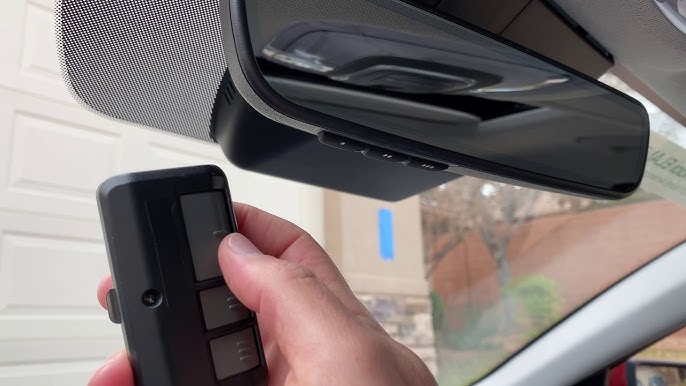
- Hold your original handheld remote 1–3 inches away from the HomeLink buttons on your Santa Fe’s overhead console or rearview mirror.
- Simultaneously press and hold the desired HomeLink button AND the button on your handheld remote.
- Watch the HomeLink indicator light. It will flash slowly at first, then rapidly (or turn solid, depending on trim). This rapid flash confirms the vehicle has learned the signal.
- Release both buttons. Test by pressing the programmed HomeLink button once. The garage door should move slightly or the light should flash, indicating partial success.
Phase 2: Synchronizing with the Garage Motor
This is the critical step many tutorials omit. Without this, the door will not open fully.
- Go to your garage door motor unit. Locate the “Learn” or “Smart” button.
- Press and release the Learn button. You typically have 30 seconds to complete the next step. The LED on the motor will illuminate or blink.
- Return to your Santa Fe immediately. Firmly press and hold the programmed HomeLink button for 2 seconds, then release.
- Repeat the press-hold-release cycle up to three times within the 30-second window. Some brands (like LiftMaster or Chamberlain) require multiple presses to complete the rolling code handshake.
- Test the system. Press the HomeLink button once. The door should operate smoothly.
| Indicator Light Behavior | Meaning | Action Required |
|---|---|---|
| Slow Flash | Signal being received/training | Continue holding buttons |
| Rapid Flash / Solid | Training complete | Proceed to motor sync |
| No Light | Power issue or wrong button | Check fuse/ignition status |
| Flashes Then Stops | Fixed code detected | Skip motor sync phase |
Programming Fixed Code and Legacy Openers
If your garage was built before 1996, or you have a legacy gate operator, the process is simpler. Follow Phase 1 above exactly. However, if the indicator light becomes solid (not flashing rapidly) after training, you have a fixed-code system. In this case, skip Phase 2 entirely. The solid light means the code is stored and ready to use. Test immediately. If it fails, your original remote battery is likely too weak to transmit a clean signal during the training phase.
Troubleshooting Common Programming Failures
Even professionals encounter hiccups. Here are data-backed solutions for the most frequent issues when learning how to program 2022 Hyundai Santa Fe garage door opener systems.
- Light Never Flashes Rapidly: You may be holding the buttons too far apart. Reduce distance to 0.5 inches. Alternatively, try angling the original remote at 45 degrees relative to the HomeLink buttons. Signal polarization can affect reception.
- Door Opens Partially Then Reverses: This is rarely a programming issue. It usually indicates obstructed safety sensors or incorrect travel limit settings on the garage motor. Reprogramming will not fix this; consult your garage door manual.
- Works Intermittently: Interference from LED bulbs in the garage fixture is a documented problem. Incandescent or RF-shielded LED bulbs are recommended. Also, ensure your vehicle’s antenna (if external) is undamaged.
- Third Press Fails During Sync: You may have exceeded the 30-second learn window. Simply press the Learn button on the motor again to restart the timer. Do not hold the motor’s Learn button; a quick press-and-release is all that is needed.
- HomeLink Buttons Unresponsive: Verify your 2022 Santa Fe’s ignition is in ACC or ON. Some trims disable HomeLink when the vehicle is completely off to preserve battery life.
Frequently Asked Questions (FAQ)
Can I program my 2022 Santa Fe HomeLink without the original remote?
Generally, no. The original remote acts as the signal donor. However, if your garage opener supports direct Wi-Fi or Bluetooth setup via a manufacturer app (e.g., MyQ), some newer HomeLink versions allow cloud-based pairing. Check your specific opener’s compatibility list. For traditional RF systems, the original remote is mandatory.
How many devices can the 2022 Hyundai Santa Fe HomeLink store?
The 2022 Santa Fe HomeLink system supports up to three distinct channels. This allows you to program a garage door, a front gate, and exterior lighting or a second garage simultaneously. Each channel operates independently.
Will programming HomeLink erase my existing garage door remotes?
No. Programming your vehicle adds a new authorized device; it does not delete previously paired remotes or keypads. However, pressing the “Learn” button on the garage motor during Phase 2 may temporarily put the system into pairing mode. All existing remotes will continue to function normally afterward.
Why does my HomeLink work for the garage but not my community gate?
Community gates often use different frequencies or require commercial-grade transmitters not compatible with consumer HomeLink systems. Additionally, some HOA gates use encrypted protocols that block universal transceivers for security. Contact your property management to confirm HomeLink compatibility before attempting repeated programming.
Is there a reset procedure if I make a mistake during programming?
Yes. To erase a single channel, press and hold the specific HomeLink button for approximately 10 seconds until the light flashes. To erase all three channels, hold the two outer buttons simultaneously for 10 seconds. This factory reset allows you to start fresh without visiting a dealer.
Does the 2022 Santa Fe support HomeLink version 5 or newer?
Most 2022 Hyundai models ship with HomeLink Version 5, which offers improved compatibility with newer rolling-code systems and enhanced range. You can verify your version by checking the small text printed near the HomeLink buttons or consulting your owner’s manual under the “Universal Transmitter” section.
Conclusion
Mastering how to program 2022 Hyundai Santa Fe garage door opener functionality transforms daily convenience and eliminates the clutter of extra remotes on your visor. By following the phased approach outlined above—preparation, vehicle training, and motor synchronization—you can achieve reliable operation in under ten minutes. Remember that patience during the 30-second learn window and ensuring fresh batteries in your donor remote are the two most impactful factors for success.
Your time is valuable, and your vehicle’s technology should serve you effortlessly. If this guide helped you regain seamless access to your home, please share it with fellow Hyundai owners on social media or automotive forums. Helping another driver avoid dealership service fees is a small act of community that makes ownership better for everyone. Safe driving and happy syncing!
Leave a Reply