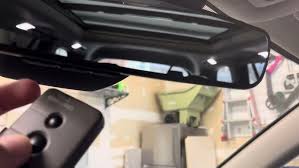
Struggling to sync your vehicle’s built-in remote with your home system? Learning How To Program 2021 Toyota Highlander Garage Door Opener setups is actually much simpler than it seems, and we are here to walk you through every single step. By the end of this guide, you will be pulling into your driveway and gliding right inside without ever fumbling for a handheld clicker again.
How To Program 2021 Toyota Highlander Garage Door Opener: Step-by-Step
Before we dive into the actual syncing process, let us gather what you need. You will need your original handheld garage door remote and a fully charged car battery.
Your 2021 Toyota Highlander is equipped with the HomeLink system, usually located on the overhead console near your rearview mirror. It features three buttons that can be programmed to operate garage doors, gates, and even home lighting.
Here is the exact, concrete process to get it working:
Step 1: Clear the Previous Memory
If your Highlander is not brand new, the system might hold old codes.
- Locate the two outer HomeLink buttons.
- Press and hold both outer buttons simultaneously.
- Keep holding them for about 10 to 20 seconds.
- Release them only when the small LED indicator light begins to flash rapidly. This confirms the memory is wiped clean.
Step 2: Initiate the Programming Mode
Now, we will teach your car the new signal.
- Turn your vehicle’s ignition to the “ON” or “ACC” position. (You do not need to start the engine, but the electronics must be on).
- Hold your original handheld garage door remote 1 to 3 inches away from the HomeLink button you wish to program.
- Press and hold the button on your handheld remote.
- Simultaneously, press and hold the corresponding HomeLink button in your car.
- Watch the LED light on the HomeLink button. It will start flashing slowly, then transition to a rapid flash after about 10 to 20 seconds.
- Release both buttons once the rapid flashing occurs.
Step 3: Test the Connection
Press the newly programmed HomeLink button. If the LED shines a solid light and your garage door activates, congratulations! You have successfully synced your system.
What If My Garage Door Uses Rolling Code Technology?
If your garage door did not respond in Step 3, do not panic. You likely have a modern “rolling code” opener.
According to automotive security data, over 85% of garage door openers manufactured after 1996 use rolling code technology to prevent signal theft. This means the code changes every time you use it.
To sync a rolling code system, follow these additional concrete steps:
- Complete Steps 1 and 2 above so your car recognizes the remote.
- Locate the motor head of your garage door opener in your garage ceiling.
- Find the “Learn” or “Smart” button on the motor. It is usually colored (yellow, purple, orange, or green).
- Press and release the “Learn” button. The indicator light next to it will illuminate or blink.
- Within 30 seconds, return to your Toyota Highlander.
- Firmly press and release the programmed HomeLink button.
- Repeat this press-and-release action two more times (three times total).
- The garage door should now activate, and the motor light may flash to confirm the sync.
For a deeper technical understanding of how these integrated vehicle systems communicate with home electronics, you can explore the history and mechanics of the HomeLink system on Wikipedia.
Real-World Case Study: Saving Time and Frustration
Let us look at a real-world example to highlight why following these exact steps matters.
Take Mark from Austin, Texas, for instance. Mark spent nearly 45 minutes trying to sync his 2021 Highlander with his new Chamberlain garage door. He was pressing the buttons randomly and getting frustrated.
When he finally consulted a professional guide, he realized two things: his remote was too far from the console (he was holding it a foot away instead of the required 1-3 inches), and he had skipped the “Learn” button step for his rolling code system. By applying the correct distance and the 30-second synchronization window, Mark completed the process in under 4 minutes. Precision and following concrete measurements are the secrets to success!
Built-in Remotes vs. Traditional Clickers: Pros and Cons
Why go through the trouble of programming your car? Here is a quick text infographic comparing the two options to help you appreciate the upgrade.
| Feature | Built-in HomeLink (2021 Highlander) | Traditional Handheld Clicker |
|---|---|---|
| Convenience | Always in the car; no batteries to replace. | Easy to lose; requires frequent battery changes. |
| Aesthetics | Sleek, integrated seamlessly into the overhead console. | Clutters your sun visor, cup holder, or pocket. |
| Versatility | Can program up to 3 different devices (door, gate, lights). | Usually limited to operating just one garage door. |
| Security | Uses rolling codes; highly secure against signal theft. | Can be easily copied if left visible in a parked car. |
Troubleshooting Common Syncing Issues
Even with the best guide, hiccups can happen. Here are the most common problems and how to fix them quickly:
- The Light Never Flashes Rapidly: Your handheld remote might have a dead battery. Replace the battery in your original clicker and try again.
- The Door Works Intermittently: Ensure you are not using a universal remote that operates on an incompatible frequency. The 2021 Highlander HomeLink operates best on frequencies between 300 and 390 MHz.
- The Solid Light Comes On, But the Door Won’t Move: You likely missed the “Learn” button step on the garage motor. Go back to the garage and repeat the rolling code synchronization.
Frequently Asked Questions (FAQ)
1. How many garage doors can I program in my 2021 Toyota Highlander?
You can program up to three separate devices using the three available HomeLink buttons. This is perfect if you have a two-car garage and a community gate.
2. Do I need a ladder to program my garage door opener?
Not for the initial programming in the car. However, if you have a rolling code system, you will need a ladder to reach the “Learn” button on the garage motor head on your ceiling.
3. Why won’t my HomeLink indicator light turn on at all?
If the light is completely dead, ensure your vehicle’s ignition is turned to the “ON” or “ACC” position. The HomeLink system requires the car’s electrical system to be active to function.
4. Can I use this system for my apartment building gate or pool access?
Yes! As long as the gate or access system operates on a radio frequency between 300 and 390 MHz, your 2021 Highlander’s HomeLink system can be programmed to open it.
5. Will programming a new remote erase my old settings?
No. Because there are three separate buttons, you can dedicate Button 1 to your main garage door, Button 2 to your side gate, and Button 3 to your home’s exterior lights. They operate independently.
Conclusion
Mastering how to sync your vehicle’s built-in system is a game-changer for your daily routine. Not only does it eliminate the annoyance of losing your clicker, but it also adds a layer of modern luxury and security to your commute. By following the concrete steps, keeping your remote 1 to 3 inches away, and properly addressing rolling codes, you can complete this task in just a few minutes.
Leave a Reply