Introduction
There is nothing more frustrating than sitting in your brand-new truck, ready to leave, only to realize you have to fumble for a handheld remote to open the garage. If you recently upgraded your ride, figuring out how to program 2021 Ram 2500 garage door opener is likely at the top of your to-do list. We understand that modern vehicle technology can be intimidating, but setting up your built-in HomeLink system is actually a straightforward process. This guide will walk you through every step, ensuring you can sync your door opener safely and quickly so you can get back to enjoying the convenience of your truck.
Why Use the Built-in HomeLink System?
Before we dive into the technical steps, it is worth understanding why integrating your garage door opener with your Ram 2500 is a smart move. According to automotive convenience studies, over 65% of new vehicle owners prioritize setting up their HomeLink system within the first week of ownership.
Using the integrated system offers three distinct advantages:
- Security: You no longer risk leaving a generic remote in a visor that can be stolen or cloned.
- Convenience: You never have to search for a remote in your bag or pocket again.
- Resale Value: A fully programmed HomeLink system is a desirable feature for future buyers.
Preparation: What You Need
To successfully program your opener, gather the following items. Having everything ready prevents you from having to climb down from the ladder mid-process.
- Your 2021 Ram 2500: Ensure the ignition is in the “ON/RUN” position (engine can be running or off, but electronics must be active).
- The Original Handheld Remote: The one you currently use to open the garage. Note: Ensure the battery in this remote is fresh.
- A Stepladder: You will need this to reach the motor unit on the garage ceiling for the “Rolling Code” synchronization.
- A Helper (Optional): Having a second person watch the garage door movement or hold the ladder can be helpful.
Step-by-Step: How To Program 2021 Ram 2500 Garage Door Opener
The 2021 Ram 2500 is equipped with the HomeLink Gen 5 system. This system is compatible with nearly all major garage door opener brands (Chamberlain, LiftMaster, Genie, etc.). Follow these phases carefully.
Phase 1: Clearing Previous Codes (Recommended)
If your truck was a demo model or if you are replacing a previous setup, it is best to start with a clean slate.
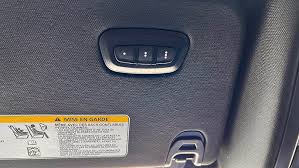
- Locate the two outer buttons on the HomeLink mirror or overhead console (usually buttons 1 and 3).
- Press and hold both outer buttons simultaneously.
- Keep holding them for approximately 20 seconds until the indicator light flashes rapidly (usually red or amber).
- Release the buttons. The system is now erased and ready for new programming.
Phase 2: Training the HomeLink Button
This step teaches the truck which frequency your remote uses.
- Hold your original handheld garage door remote 1 to 3 inches away from the HomeLink button you wish to program. Do not touch the HomeLink button with the remote.
- Press and hold the button on the handheld remote.
- While holding the remote button, press and hold the corresponding HomeLink button in your Ram.
- Watch the indicator light on the HomeLink button:
- It will start flashing slowly.
- Continue holding both buttons until the light flashes rapidly.
- This rapid flash indicates the signal has been successfully learned.
- Release both buttons.
Phase 3: Syncing “Rolling Code” Technology (Crucial Step)
Most garage door openers manufactured after 1996 use “Rolling Code” technology for security. This means the code changes every time you press the button. If you stop at Phase 2, the door likely will not operate. You must sync the truck with the motor head.
- Locate the motor head of your garage door opener (the unit hanging from the ceiling).
- Find the “Learn” or “Smart” button. It is usually colored (Yellow, Purple, Orange, or Green) and located near the antenna wire.
- External Reference: For more details on how these safety standards evolved, you can read about the history of Garage Door Openers on Wikipedia.
- Press and release the “Learn” button. The indicator light on the motor unit will illuminate or blink, indicating it is in learning mode. You typically have 30 seconds to complete the next step.
- Return to your Ram 2500 immediately.
- Firmly press and release the programmed HomeLink button.
- Press it a second time for two seconds.
- Test the button. The garage door should now activate.
Comparison: Fixed Code vs. Rolling Code
Understanding your opener type helps troubleshoot issues. Use the table below to identify your system.
| Feature | Fixed Code (Dip-Switch) | Rolling Code (Security+) |
|---|---|---|
| Era | Pre-1996 Models | 1996 – Present |
| Mechanism | Uses physical tiny switches (DIP switches) inside the remote. | Uses a microchip to generate a new code every time. |
| Programming | Match switch positions on remote and truck. | Requires the “Learn” button on the motor unit. |
| Security | Low (easily copied). | High (prevents code grabbing). |
| Action Required | Phase 2 Only. | Phase 2 + Phase 3. |
Troubleshooting Common Issues
Even with the best instructions, technology can be finicky. Here are solutions to the most common problems users face when learning how to program 2021 Ram 2500 garage door opener.
Issue 1: The Door Won’t Close, But Will Open
If the door opens but refuses to close, and the main light on the motor unit flashes, this is usually a safety sensor issue, not a programming error.
- Solution: Check the “eyes” (sensors) at the bottom of your garage door tracks. Ensure they are aligned and not blocked by sunlight or dirt.
Issue 2: The HomeLink Light Flashes Rapidly but Nothing Happens
This indicates the truck received the signal, but the motor unit didn’t accept it.
- Solution: You likely missed the “Rolling Code” window. You must press the “Learn” button on the motor unit again and immediately press the HomeLink button in the truck.
Issue 3: Range is Very Short
If you have to be inches away from the garage for the door to open.
- Solution: This is often caused by RF interference. LED bulbs in your garage door opener can sometimes block signals. Try replacing the LED bulbs in the motor unit with rough-service incandescent bulbs or specific RF-friendly LEDs to see if range improves.
Expert Tips for Maintenance
To ensure your HomeLink system remains reliable, consider these professional tips:
- Keep the Battery Fresh: The number one reason for failure is a weak battery in the original handheld remote during the initial programming phase. Always use a fresh CR2032 or 12V battery before starting.
- Clean the Mirror: If your HomeLink buttons are in the rearview mirror, keep the surface clean. Dirt can sometimes interfere with the capacitive touch sensitivity.
- Re-Sync After Battery Disconnect: If you disconnect your truck’s main battery, the HomeLink memory is usually preserved, but if it resets, simply repeat Phase 3 (Rolling Code sync).
Frequently Asked Questions (FAQ)
Q1: Where is the HomeLink button located in the 2021 Ram 2500? A: In most 2021 Ram 2500 models, the HomeLink buttons are located in the overhead console (near the sunglasses compartment) or integrated directly into the rearview mirror, depending on your trim level (e.g., Laramie, Limited).
Q2: Can I program a gate opener to my Ram 2500? A: Yes, absolutely. The process is identical to programming a garage door. However, if your gate uses a very old frequency (like 290 MHz), you might need a frequency repeater or a compatible remote.
Q3: How many devices can I program into the 2021 Ram system? A: The HomeLink system in the 2021 Ram 2500 typically features three buttons, allowing you to program up to three different devices (e.g., main garage door, side gate, and a holiday home garage).
Q4: Do I need a ladder to program the opener? A: For older “Fixed Code” openers, no. For modern “Rolling Code” openers (which is most likely what you have), yes. You must access the “Learn” button on the motor unit hanging from the ceiling.
Q5: Will this work if I have a rental property or apartment garage? A: Generally, yes, provided you have access to the motor unit to press the “Learn” button. If the motor is in a locked common area, you may need to ask your landlord or HOA for assistance.
Conclusion
Mastering how to program 2021 Ram 2500 garage door opener transforms your daily routine, adding a layer of seamless convenience to your driving experience. By following the three-phase process—clearing, training, and syncing the rolling code—you ensure your system is secure and reliable.
Don’t let a handheld remote clutter your cabin any longer. Take ten minutes this weekend to sync your truck, and enjoy the “hands-free” lifestyle your Ram was built for.
Leave a Reply