Struggling to connect your garage door to your new truck? You’re not alone. Many 2021 Ram 1500 owners find the HomeLink programming process confusing at first. This comprehensive guide will walk you through how to program 2021 Ram 1500 garage door opener systems quickly and safely, so you can enjoy the convenience of opening your garage without fumbling for remotes.
Understanding the HomeLink System in Your 2021 Ram 1500
Before diving into the programming steps, it’s essential to understand what you’re working with. The 2021 Ram 1500 comes equipped with the HomeLink universal transceiver, a built-in system that can control up to three different garage doors, gate operators, or home lighting systems.
HomeLink technology has been around since the 1990s and is now standard in most modern vehicles. According to Wikipedia’s comprehensive overview of HomeLink, this system uses radio frequency signals compatible with most major garage door opener brands, including Chamberlain, LiftMaster, Genie, and Craftsman.
Where to Find Your HomeLink Buttons
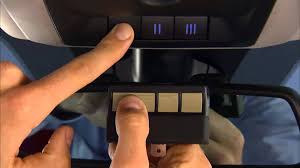
In the 2021 Ram 1500, you’ll typically find three HomeLink buttons located on the overhead console near the rearview mirror. These buttons are usually labeled 1, 2, and 3, allowing you to program multiple devices. Some trim levels may have additional features like indicator lights that show programming status.
Step-by-Step Guide: How to Program 2021 Ram 1500 Garage Door Opener
Programming your HomeLink system doesn’t require special tools or technical expertise. Follow these detailed steps carefully for successful setup.
Step 1: Prepare Your Equipment
Before starting, gather the following:
- Your original garage door remote control
- A ladder (if needed to reach your garage door opener motor)
- Your 2021 Ram 1500 parked outside the garage
Important: Ensure your vehicle’s ignition is in the “ON” or “RUN” position. The engine doesn’t need to be running, but the electrical system must be active.
Step 2: Clear Previous Programming (If Necessary)
If your HomeLink buttons were previously programmed, clear them first:
- Press and hold the two outer HomeLink buttons simultaneously
- Continue holding for approximately 20 seconds
- Watch for the indicator light to flash rapidly, then turn off
- Release both buttons when the light changes
This reset ensures you’re starting with a clean slate.
Step 3: Choose Your Programming Method
There are two primary methods for programming HomeLink, depending on your garage door opener type:
Method A: Standard Programming (For Most Openers)
- Position yourself correctly: Sit in your driver’s seat with the garage door remote in hand
- Select a button: Choose which HomeLink button (1, 2, or 3) you want to program
- Begin training mode: Press and hold your chosen HomeLink button
- Add the remote signal: While holding the HomeLink button, press and hold your garage door remote button
- Watch the indicators: Continue holding both buttons until the HomeLink indicator light changes from slow blinking to rapid flashing (this takes about 20-30 seconds)
- Release both buttons once the rapid flashing begins
Method B: Rolling Code Programming (For Newer Openers)
Many garage door openers manufactured after 1996 use rolling code technology for enhanced security. If Method A doesn’t work, try this approach:
- Complete Steps 1-5 from Method A above
- Locate the “Learn” or “Smart” button on your garage door opener motor unit (usually found on the back or side)
- Press the Learn button once (the indicator light on the motor will illuminate)
- Return to your vehicle within 30 seconds
- Press and hold the programmed HomeLink button for 2 seconds, release, then repeat this action two more times
- Test the system by pressing the HomeLink button
Step 4: Test Your Programming
After completing the programming sequence:
- Park your Ram 1500 outside the garage
- Press the programmed HomeLink button
- Observe whether the garage door responds
- Test from different distances to ensure reliable operation
Pro Tip: If the door doesn’t respond immediately, don’t panic. Try the programming sequence again, ensuring you’re holding the buttons for the correct duration.
Common Programming Challenges and Solutions
Even with careful following of instructions, you might encounter issues. Here are the most common problems and their solutions:
| Problem | Possible Cause | Solution |
|---|---|---|
| No response from garage door | Incorrect programming sequence | Restart from Step 2, ensure proper timing |
| Intermittent operation | Weak remote battery | Replace remote battery and reprogram |
| Works only when very close | Signal interference | Check for LED bulbs in garage causing interference |
| Multiple attempts fail | Incompatible opener | Verify opener brand compatibility with HomeLink |
Dealing with Security+ and Rolling Code Systems
If you have a Chamberlain or LiftMaster opener with Security+ technology, you may need to perform additional steps:
- After initial programming, locate the learn button on your opener
- Press and release the learn button
- Within 30 seconds, press the HomeLink button in your Ram 1500 three times
- Wait for confirmation (usually a click or light change on the opener)
Advanced Tips for Optimal Performance
To ensure your HomeLink system works reliably long-term, consider these expert recommendations:
Maintain Proper Distance During Programming: Stay within 1-3 feet of your garage door opener motor during the learning process. This proximity ensures strong signal transmission.
Check Your Remote Battery: A weak battery in your original remote can cause programming failures. Replace it with a fresh battery before attempting to program HomeLink.
Avoid Interference Sources: LED light bulbs, especially those in garage door opener units, can interfere with radio signals. If you experience issues, try temporarily replacing LED bulbs with incandescent ones during programming.
Program One Device at a Time: Don’t attempt to program multiple devices simultaneously. Complete one programming sequence fully before moving to the next button.
Frequently Asked Questions
How many garage doors can I program to my 2021 Ram 1500?
Your 2021 Ram 1500 HomeLink system can store up to three different devices. This means you can program three separate garage doors, or a combination of garage doors, gates, and home lighting systems. Each button operates independently.
What if my garage door opener is older than 1996?
Older garage door openers (pre-1996) typically use fixed-code technology, which is actually easier to program. Use Method A from our step-by-step guide. These older systems don’t require the additional “Learn button” step that rolling code systems need.
Can I program HomeLink without the original remote?
Unfortunately, you cannot program HomeLink without access to the original remote control or knowledge of the specific dip-switch settings (for very old systems). The original remote is essential for transmitting the correct signal to your vehicle’s HomeLink receiver.
Why does my HomeLink only work when I’m very close to the garage?
This issue typically indicates one of several problems: weak remote battery during programming, interference from LED lights, or incomplete programming sequence. Try reprogramming with a fresh remote battery and ensure you’re following the timing instructions precisely. If problems persist, check for LED bulbs in your garage opener unit.
Is HomeLink programming safe? Will it compromise my garage security?
HomeLink programming is completely safe and doesn’t compromise security. In fact, rolling code systems actually enhance security by changing the access code with each use. The programming process simply teaches your vehicle to send the same encrypted signals as your original remote.
What should I do if none of the programming methods work?
If standard troubleshooting doesn’t resolve your issue:
- Consult your garage door opener manual for specific HomeLink instructions
- Visit the official HomeLink website for brand-specific guidance
- Contact Ram customer support at 1-800-423-6343
- Consider professional installation from a garage door specialist
Some older or unusual opener brands may require specific adapters or alternative programming approaches.
Conclusion
Learning how to program 2021 Ram 1500 garage door opener systems doesn’t have to be complicated. With the right approach and patience, you can have your HomeLink system operational in under 15 minutes. Remember to identify your opener type, follow the appropriate programming method, and test thoroughly before relying on the system daily.
The convenience of opening your garage directly from your Ram 1500 is worth the initial setup effort. No more searching for remotes in bags or pockets, no more exposure to harsh weather while manually entering codes. Your vehicle becomes a true command center for home access.
Did this guide help you successfully program your HomeLink system? Share your experience on social media and help other Ram 1500 owners master this useful feature. Tag us with your success story, and let us know if you encountered any unique challenges we should address in future updates!
Remember, if you run into persistent issues, don’t hesitate to consult your vehicle’s owner manual or contact professional support. Happy driving, and enjoy the seamless integration of your 2021 Ram 1500 with your home automation system!
Leave a Reply