Introduction
There are few things more frustrating than pulling into your driveway after a long day, only to realize you cannot get your new vehicle’s built-in transmitter to sync with your home security system. If you are currently searching for how to program 2021 Lexus RX 350 garage door opener functionality, please know that this is a very common hurdle for new owners, but it is entirely solvable with the right guidance. In this comprehensive tutorial, we will walk you through the exact steps to synchronize your HomeLink system safely and efficiently, ensuring you never have to fumble for a remote again.
Understanding the HomeLink System in Your 2021 Lexus RX 350
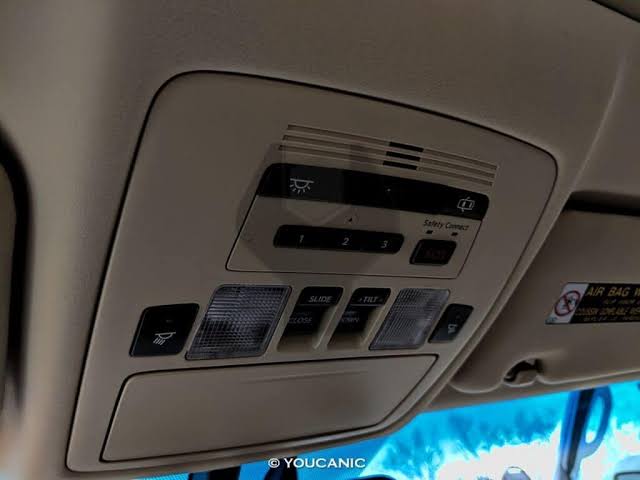
Before diving into the programming sequence, it is vital to understand what technology you are actually working with. The 2021 Lexus RX 350 comes equipped with the HomeLink Universal Transceiver, typically located in the overhead console near the rearview mirror or integrated directly into the frame of the auto-dimming mirror.
Unlike older vehicles that used simple radio frequency cloning, modern HomeLink systems (version 5.0 and above) utilize advanced rolling-code technology. This means the signal changes every time you press the button, providing superior security against code-grabbing thieves. According to automotive safety standards, this system is compatible with nearly all major garage door opener manufacturers, including LiftMaster, Chamberlain, Genie, and Craftsman.
Key Features of the 2021 RX 350 HomeLink
| Feature | Description | Benefit |
|---|---|---|
| Rolling Code Tech | Signal changes with each use | Prevents unauthorized access |
| 3 Programmable Buttons | Controls up to 3 devices | Manage garage, gate, and lights |
| LED Status Indicators | Visual feedback during sync | Eliminates guesswork |
| Battery-Free Operation | Powered by vehicle electrical system | No maintenance required |
For a deeper technical understanding of how these radio frequencies operate within automotive standards, you can refer to the Wikipedia entry on Garage Door Openers, which details the evolution from fixed-code to rolling-code security protocols.
Pre-Programming Checklist: Safety and Preparation
Safety must always come first when working with automated mechanical systems. Before you attempt to program your device, please complete the following preparations:
- Clear the Area: Ensure no people, pets, or objects are in the path of the garage door. The door will move during the testing phase.
- Locate Your Original Remote: You will likely need your existing handheld transmitter to complete the “training” process.
- Check Battery Health: Weak batteries in your original remote are the #1 cause of programming failure. Replace them before starting.
- Park Outside: Always park outside the garage during programming to prevent accidental closure on the vehicle.
- Ignition Status: For the 2021 RX 350, the ignition should be in the ON position (engine running is recommended to prevent battery drain).
⚠️ Critical Safety Warning: Never program the HomeLink system while the vehicle is inside the garage. Exhaust fumes can accumulate quickly, and an accidentally triggered door can cause property damage or injury.
Step-by-Step: How to Program 2021 Lexus RX 350 Garage Door Opener
Follow these precise instructions to sync your HomeLink buttons. This process typically takes between 5 to 10 minutes.
Phase 1: Clearing Previous Codes (Recommended)
If this is a used vehicle or if previous attempts failed, start fresh.
- Press and hold the two outer HomeLink buttons simultaneously.
- Hold for approximately 10 seconds until the LED indicator light begins to flash rapidly.
- Release both buttons. The system is now erased and ready for new programming.
Phase 2: Training the HomeLink Button
- Sit in the driver’s seat with the ignition ON.
- Hold your original handheld remote 1–3 inches away from the HomeLink buttons on the overhead console.
- Simultaneously press and hold:
- The desired HomeLink button (e.g., Button 1)
- The button on your original handheld remote
- Watch the HomeLink LED indicator closely. It will flash slowly at first, then change to a rapid flash (or solid light, depending on the opener type).
- Once the light changes state, release both buttons. This indicates the frequency has been captured.
Phase 3: Synchronizing Rolling-Code Openers
Most garage doors manufactured after 1996 require this additional step.
- Locate the “Learn” or “Smart” button on your garage door opener motor unit (usually hanging from the ceiling). It is often yellow, purple, orange, or red.
- Press and release the Learn button. You typically have 30 seconds to complete the next step.
- Return to your vehicle and press the newly programmed HomeLink button firmly.
- Press it a second time to confirm the signal was accepted.
- Test the button. The garage door should activate.
💡 Pro Tip: If the door does not respond after Phase 3, try pressing the HomeLink button in short bursts (press-release-press-release) rather than holding it down. Some newer LiftMaster models require this specific cadence.
Troubleshooting Common Programming Failures
Even with perfect execution, issues can arise. Here is how to diagnose them based on real-world service data:
The LED Never Flashes Rapidly
- Cause: Frequency mismatch or dead remote battery.
- Solution: Replace the handheld remote battery. Verify your opener operates on a compatible frequency (most HomeLink units support 288–399 MHz).
Door Opens Partially Then Reverses
- Cause: Safety sensor misalignment or travel limit issue.
- Solution: This is usually a garage door mechanical issue, not a HomeLink issue. Check the photo-eye sensors near the floor for obstructions or dirt.
Works Intermittently
- Cause: Radio interference from LED bulbs or nearby transmitters.
- Solution: Swap out cheap LED bulbs in the garage opener fixture with RF-shielded garage-door-specific LEDs. These are known to emit noise that blocks HomeLink signals.
Solid Light But No Response After Learn Button
- Cause: Exceeded the 30-second window or incorrect Learn button color protocol.
- Solution: Repeat Phase 3 immediately. For yellow Learn buttons, you may need to press the HomeLink button up to three times in quick succession.
Frequently Asked Questions (FAQ)
1. Can I program my 2021 Lexus RX 350 HomeLink without an original remote?
Generally, no. The HomeLink system requires cloning an existing signal for security reasons. However, if your garage door opener has a direct Wi-Fi or Bluetooth setup feature, some newer HomeLink versions allow direct pairing via manufacturer apps. Check your specific opener’s manual for “direct-to-HomeLink” compatibility.
2. How many devices can the 2021 RX 350 HomeLink store?
The system supports up to three distinct devices. You can program one button for your primary garage, one for a secondary garage or gate, and one for exterior lighting or a smart plug adapter.
3. Will programming HomeLink erase my car’s key fob memory?
Absolutely not. The HomeLink Universal Transceiver operates on a completely independent circuit from your vehicle’s keyless entry and immobilizer systems. Programming your garage door has zero impact on your car keys or security settings.
4. My garage door opener is pre-1996. Will HomeLink work?
Older fixed-code openers may require a special compatibility bridge or adapter. HomeLink version 5.0 (standard in the 2021 RX 350) is backward compatible, but some vintage units operating below 288 MHz may not pair. Consult the HomeLink compatibility checker online using your opener’s model number.
5. Do I need to reprogram HomeLink after changing my car battery?
No. HomeLink memory is stored in non-volatile flash memory. Disconnecting the vehicle battery or replacing it will not erase your programmed garage door codes. You only need to reprogram if you manually clear the system or replace the HomeLink module itself.
6. Why does my HomeLink work for my neighbor’s door but not mine?
This is extremely rare and usually indicates a frequency overlap issue or that your opener’s receiver board is failing. First, ensure you cleared old codes (Phase 1). If the problem persists, your garage door opener’s logic board may need professional servicing.
Conclusion
Mastering how to program 2021 Lexus RX 350 garage door opener functionality transforms your daily routine from a minor annoyance into a seamless experience. By following the safety precautions, executing the three-phase programming sequence correctly, and utilizing our troubleshooting guide, you can achieve reliable synchronization in under 15 minutes. Remember, the key to success lies in fresh remote batteries, proper positioning during training, and patience during the rolling-code handshake.
Your Lexus RX 350 is a sophisticated machine designed to make life easier—don’t let a simple syncing issue diminish that luxury. Take control of your home automation today and enjoy the convenience of hands-free entry.
Found this guide helpful? Share it with fellow Lexus owners on Facebook, X (Twitter), or Reddit who might be struggling with their HomeLink setup. Have a unique troubleshooting tip we missed? Drop a comment below and help the community drive smarter! 🚗🏠
Leave a Reply