Introduction
There is nothing quite as frustrating as pulling into your driveway after a long day, only to realize you still have to fumble for a separate remote or get out of the car to open the garage manually. If you are searching for how to program 2021 Jeep Grand Cherokee garage door opener functionality, you are likely ready to streamline your daily routine and embrace the convenience of the integrated HomeLink system. We understand that vehicle technology can sometimes feel overwhelming, but rest assured that syncing your overhead door to your SUV is a straightforward process designed for everyday drivers. This guide will walk you through every step with clarity and patience, ensuring you get back to enjoying seamless home access without the technical headaches.
Understanding the HomeLink System in Your 2021 Jeep
Before diving into buttons and indicators, it is helpful to understand what makes the 2021 model unique. The 2021 Jeep Grand Cherokee utilizes the HomeLink Wireless Control System, typically integrated directly into the rearview mirror or the overhead console. Unlike older universal remotes that use DIP switches, this system uses radio frequency (RF) signals to communicate with your garage door motor.
According to automotive connectivity standards, HomeLink is compatible with nearly all major garage door opener brands manufactured after 1993. However, the programming method differs slightly depending on whether your home system uses fixed-code (older) or rolling-code (newer/security-enhanced) technology. Identifying which type you have is the first step toward successful synchronization. For a deeper technical understanding of how these wireless protocols function, you can refer to the Wikipedia entry on Garage Door Openers, which outlines the evolution of RF safety standards.
Fixed-Code vs. Rolling-Code: What’s the Difference?
| Feature | Fixed-Code (Pre-1996) | Rolling-Code (Post-1996) |
|---|---|---|
| Security | Static signal; easier to intercept | Signal changes with every use |
| Programming Steps | Vehicle-only sync | Vehicle sync + Motor “Learn” button press |
| Indicator Light | Solid light when programmed | Rapid flash during sync, solid when complete |
| Common Brands | Older Genie, Stanley | LiftMaster, Chamberlain, Craftsman, newer Genie |
Note: Over 90% of garage openers in US homes today are rolling-code. If your opener has a purple, orange, red, or yellow “Learn” button on the motor unit, you have a rolling-code system.
Step-by-Step: How to Program 2021 Jeep Grand Cherokee Garage Door Opener
Follow these precise instructions to ensure a successful connection. Safety First: Ensure your garage door area is clear of people, pets, and obstacles before beginning. Keep the vehicle ignition in the “ON/RUN” position throughout the process.
Phase 1: Clear Previous Codes (Recommended)
If you purchased the vehicle used or are reprogramming a button, start fresh to avoid signal conflicts.
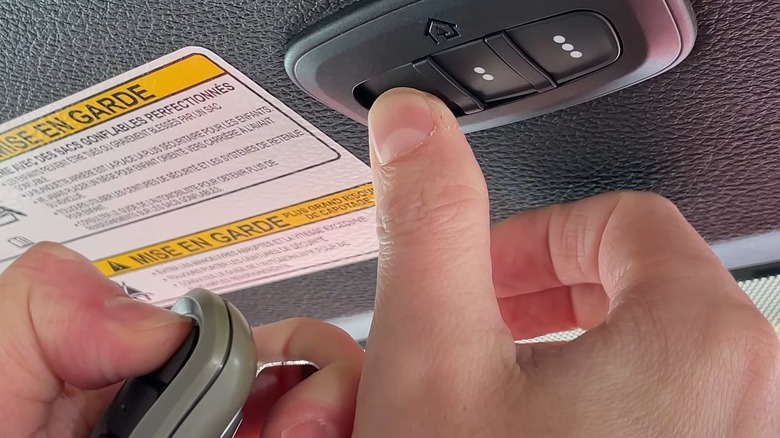
- Locate the three HomeLink buttons on your rearview mirror or overhead console.
- Press and hold the two outer buttons simultaneously.
- Hold for approximately 10–20 seconds until the indicator LED begins to flash rapidly.
- Release both buttons. The system is now erased and ready for new programming.
Phase 2: Program the Vehicle Transmitter
This phase teaches your Jeep the specific frequency of your handheld remote.
- Hold your original garage door remote 1–3 inches away from the HomeLink buttons.
- Simultaneously press and hold the desired HomeLink button AND your handheld remote button.
- Watch the HomeLink indicator light closely:
- It will flash slowly at first.
- After 5–10 seconds, it will flash rapidly.
- Once the rapid flashing occurs, release both buttons.
- Test the programmed button. If the door moves, you have a fixed-code system and are finished. If the light flashes rapidly but the door does not move, proceed to Phase 3.
Phase 3: Sync Rolling-Code Motors (Crucial Step)
Most 2021 Jeep owners will need to complete this step to finalize the handshake between the vehicle and the modern security protocol.
- Locate the “Learn” or “Smart” button on your garage door motor unit (usually hanging from the ceiling). It is often colored yellow, purple, orange, or red.
- Press and release the Learn button. You typically have 30 seconds to complete the next step before the motor exits learning mode.
- Return to your vehicle immediately.
- Firmly press and hold the programmed HomeLink button for 2 seconds, then release.
- Repeat the press-hold-release cycle up to three times if necessary.
- The garage door should activate, confirming the rolling-code sync is complete.
Troubleshooting Common Programming Issues
Even with perfect instructions, variables like battery strength or signal interference can cause hiccups. Here is how to resolve them based on real-world service data.
The Indicator Light Never Flashes Rapidly
- Check Remote Battery: A weak battery in your handheld transmitter is the #1 cause of programming failure. Replace it before retrying.
- Adjust Distance: Move the remote closer (touching the mirror) or slightly further away. Some frequencies require precise positioning.
- Verify Compatibility: Ensure your opener isn’t an obscure commercial brand incompatible with consumer HomeLink systems.
Door Opens Partially or Reverses Immediately
- Safety Sensor Alignment: Check the photo-eye sensors near the floor. If they are misaligned or dirty, the door will reverse as a safety precaution regardless of programming success.
- Travel Limits: Your opener’s travel limit settings may need adjustment via the motor unit’s dials or digital menu.
HomeLink Works Intermittently
- Signal Interference: LED bulbs in garage fixtures can emit RF noise that blocks HomeLink signals. Try turning off garage lights to test. If it works, switch to RF-shielded LED bulbs specifically rated for garage door openers.
- Reprogram: Perform a full reset (Phase 1) and reprogram. Sometimes the initial handshake was incomplete.
Expert Tips for Optimal Performance
Automotive technicians and garage door specialists recommend these best practices to maintain reliability:
- Annual Battery Check: While HomeLink draws power from the vehicle, your handheld remote’s battery degrades. Replace it yearly to prevent weak-signal training issues.
- Avoid Extreme Temperatures During Programming: Lithium batteries in remotes perform poorly below 32°F (0°C). Program in moderate conditions for best results.
- Document Your Settings: Keep a note in your glovebox indicating which HomeLink button corresponds to which device (e.g., “Button 1 = Main Garage, Button 2 = Gate”). This saves time during future reprogramming.
- Update Uconnect Software: Occasionally, Fiat Chrysler Automobiles (Stellantis) releases firmware updates that improve HomeLink compatibility. Check with your dealer during routine service.
Frequently Asked Questions (FAQ)
1. Can I program my 2021 Jeep Grand Cherokee without the original remote?
Generally, no. The HomeLink system requires cloning the signal from an existing working transmitter. If you’ve lost all remotes, you must first purchase a compatible replacement remote and program it to your garage door motor using the motor’s Learn button before syncing it to your Jeep. Some newer smart openers with Wi-Fi connectivity offer alternative app-based pairing methods, but traditional RF programming requires a source signal.
2. Why does my HomeLink work for the gate but not the garage door?
Each HomeLink button operates independently. You may have successfully programmed one button to your gate’s frequency while another button remains unprogrammed or incorrectly synced to the garage. Simply repeat the programming phases for the specific button assigned to your garage door. Also verify that both devices operate on compatible frequencies; some older gates use different bands than residential garage openers.
3. Is there a difference between programming a 2021 vs. older Jeep Grand Cherokees?
Yes, subtly. The 2021 model features updated HomeLink hardware with improved signal range and faster rolling-code recognition compared to pre-2018 models. Additionally, the 2021 WK2 generation places HomeLink buttons in the rearview mirror assembly rather than the overhead console in most trims, changing the physical ergonomics but not the fundamental programming logic. Always follow 2021-specific guidance rather than outdated YouTube tutorials for earlier generations.
4. My garage door opener has no visible “Learn” button. What should I do?
Some vintage openers (pre-1993) use DIP switches instead of a Learn button. In this case, you must manually match the switch positions inside your handheld remote to the corresponding settings in the HomeLink module—a process detailed in your Jeep owner’s manual under “Fixed-Code Programming.” Alternatively, consider upgrading to a modern rolling-code opener for enhanced security and easier vehicle integration. Many utilities offer rebates for energy-efficient smart openers.
5. Will programming HomeLink erase my existing garage door remotes?
No. Programming your Jeep adds a new authorized transmitter to your opener’s memory without affecting previously paired remotes or keypads. Most modern openers store 10–30 unique codes. Only performing a factory reset on the garage motor itself would erase all connected devices. Your Jeep simply becomes another recognized user.
6. Can I program multiple garage doors to my 2021 Jeep Grand Cherokee?
Absolutely. Your vehicle has three programmable HomeLink buttons, allowing you to store up to three separate devices. This could include your primary garage, a detached workshop, a community gate, or even smart lighting systems compatible with HomeLink. Each button is programmed independently using the same phased approach outlined above.
Conclusion
Mastering how to program 2021 Jeep Grand Cherokee garage door opener functionality transforms a minor daily annoyance into effortless convenience. By understanding the distinction between fixed and rolling-code systems, following the three-phase programming sequence precisely, and applying expert troubleshooting when needed, you can achieve reliable integration in under 15 minutes. Remember that safety and preparation—clearing old codes, checking batteries, and ensuring sensor alignment—are just as important as the button presses themselves.
Your 2021 Grand Cherokee was engineered to simplify your life, and HomeLink is one of its most practical yet underutilized features. Now that you’ve unlocked this capability, enjoy the seamless transition from road to home. Found this guide helpful? Share it on Facebook, Twitter, or your favorite Jeep forum to help fellow owners ditch the clutter of extra remotes! Safe driving and happy programming!
Leave a Reply