Introduction
If you just bought a 2021 Hyundai Palisade and want to sync your garage door opener with the built-in Homelink system, you’re not alone. Many new owners find the setup process confusing, especially when dealing with rolling code technology. Don’t worry — this guide will walk you through exactly how to program 2021 Hyundai Palisade garage door opener step by step, so you can open your garage without ever pulling out a remote again.
What Is Homelink in the 2021 Hyundai Palisade?
The 2021 Hyundai Palisade comes equipped with the Homelink wireless control system, which is integrated directly into the rearview mirror. According to Parks Associates, more than 43 million households in the United States use remote-operated garage door systems
www.marketreportsworld.com. This system allows you to:
- Open and close your garage door
- Control home lighting systems
- Activate security systems
- Operate gate entry systems
The Homelink system in the Palisade features three programmable buttons, meaning you can control up to three different devices from your vehicle
www.suntruphyundaisouth.com.
Which 2021 Palisade Trims Include Homelink?
The 2021 Hyundai Palisade is available in four trim levels: SE, SEL, Limited, and Calligraphy
www.headquarterhyundai.com. The Homelink garage door opener system is typically included in the Limited and Calligraphy trims as a standard feature, while it may be available as part of a premium package on lower trims
www.pohankahyundai.com.
| Trim Level | Homelink Availability |
|---|---|
| SE | Optional (package dependent) |
| SEL | Optional (package dependent) |
| Limited | Standard |
| Calligraphy | Standard |
Step-by-Step: How To Program 2021 Hyundai Palisade Garage Door Opener
Before you begin, make sure your garage door area is clear of people and objects. You’ll need your existing garage door remote and about 5 minutes of time.
Step 1: Clear Previous Homelink Codes
Before programming a new device, you should erase any previously saved codes from the system
www.suntruphyundaisouth.com.
- Turn your vehicle’s ignition to the ON/RUN position (you don’t need to start the engine).
- Locate the three Homelink buttons on your rearview mirror.
- Press and hold the two outer buttons (the first and third buttons) simultaneously.
- Keep holding for approximately 20 seconds until the indicator light begins to flash rapidly www.suntruphyundaisouth.com.
- Release the buttons — the system is now reset and ready for new programming.
Step 2: Program the Homelink Button to Your Garage Door Remote
Now it’s time to sync your remote with the Palisade’s Homelink system.
- Position your vehicle in front of the closed garage door.
- Turn the ignition to the ON/RUN position.
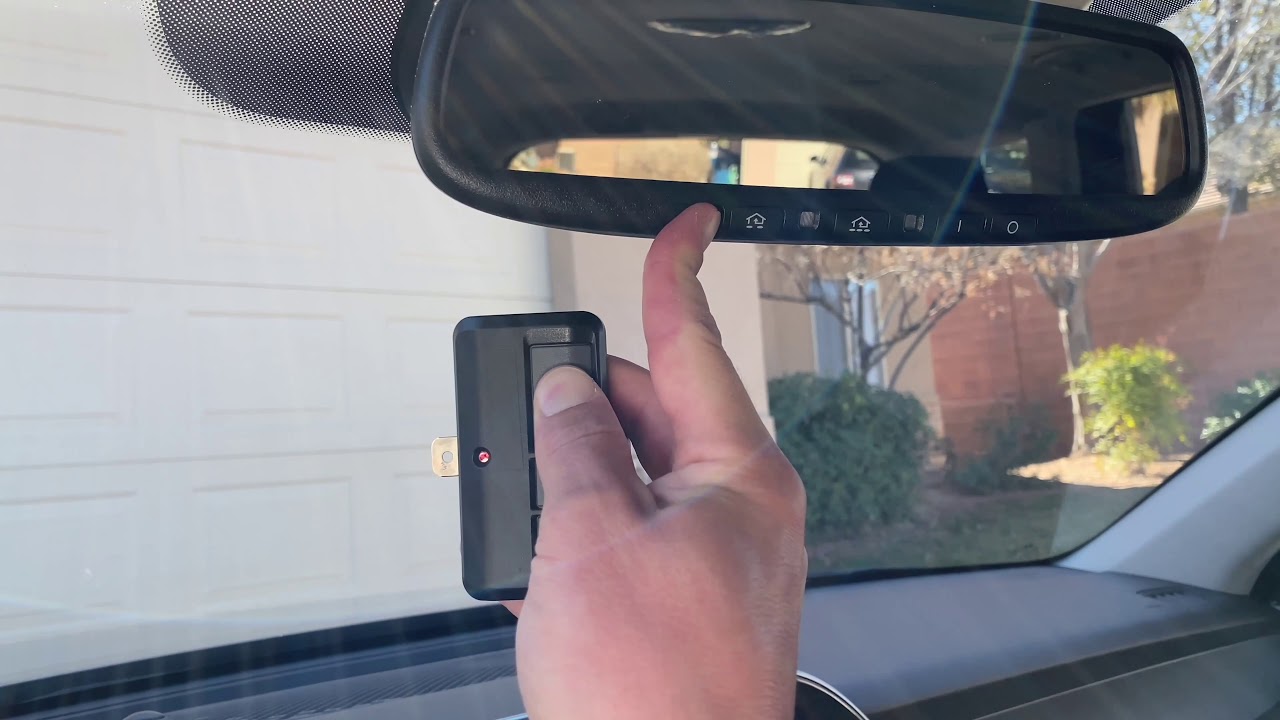
- Hold your existing garage door remote 1–3 inches away from the Homelink buttons on the mirror.
- Press and hold both the desired Homelink button AND the button on your garage door remote at the same time www.suntruphyundaisouth.com.
- Watch the Homelink indicator light:
- Slow blink = still syncing
- Rapid blink or solid light = programming successful
- Release both buttons once the light changes behavior www.suntruphyundaisouth.com.
- Test the button by pressing it to see if the garage door responds.
Step 3: Sync With Rolling Code Garage Door Openers
Most modern garage door openers manufactured after the mid-1990s use rolling code technology for enhanced security
www.geniecompany.com. If your door didn’t respond in Step 2, you likely need this additional step.
- Locate the “Learn” or “Smart” button on your garage door opener motor unit. This is usually found under the light cover or on the rear panel of the unit hanging from your garage ceiling www.suntruphyundaisouth.com.
- Press and release the “Learn” button. The indicator LED on the motor will start blinking www.suntruphyundaisouth.com.
- You now have 30 seconds to complete the sync www.suntruphyundaisouth.com.
- Return to your Palisade and press the programmed Homelink button four times firmly www.suntruphyundaisouth.com.
- You should see the garage door opener lights flash or hear a click, confirming the sync was successful.
Pro Tip: According to Chamberlain Group, rolling code technology generates a new code from more than 100 billion possible combinations each time you press the remote, making it virtually impossible for hackers to intercept
support.chamberlaingroup.com
.
Troubleshooting Common Programming Issues
Even with careful steps, things can sometimes go wrong. Here are the most common issues Palisade owners face and how to fix them.
The Homelink Light Won’t Stop Blinking Slowly
This usually means the remote wasn’t close enough during programming. Try again, but this time hold the remote within 1 inch of the Homelink buttons. Also, make sure your remote has fresh batteries.
The Garage Door Doesn’t Respond After Programming
- Check if your opener uses rolling code technology — if yes, you must complete Step 3.
- Verify that you’re within range (typically up to 100 feet for Homelink).
- Make sure nothing is blocking the signal between your car and the opener.
The System Erases Codes Randomly
If your Homelink keeps forgetting programmed devices, the vehicle battery may have been disconnected recently. Simply reprogram the system following the steps above.
Pros and Cons of Using Homelink in Your Palisade
| Advantages | Limitations |
|---|---|
| No need to carry a separate remote | Only works with compatible garage door openers |
| Controls up to 3 devices | Requires rolling code sync for newer openers |
| Works from up to 100 feet away | Initial setup can be confusing for first-timers |
| Integrated cleanly into the rearview mirror | Not available on all Palisade trim levels |
| Adds resale value to your vehicle | May need reprogramming after battery disconnect |
Expert Tips for a Successful Setup
- Read your garage door opener’s manual first. Different brands (Chamberlain, LiftMaster, Genie, Craftsman) have slightly different “Learn” button locations and behaviors www.statista.com.
- Use fresh batteries in your handheld remote before starting the programming process.
- Park close to the garage during initial setup — ideally within 10 feet for the strongest signal.
- Test from your normal parking spot after programming to confirm range is adequate.
- If you have multiple garage doors, program each one to a separate Homelink button.
FAQ Section
Q1: How many devices can I program into my 2021 Hyundai Palisade Homelink?
The Homelink system in the 2021 Palisade has three programmable buttons, allowing you to control up to three different devices — such as your main garage door, a gate, or home lighting system
www.suntruphyundaisouth.com.
Q2: Do I need a special remote to program the Palisade Homelink?
No, you don’t need any special equipment. You only need the original garage door remote that came with your opener. The Homelink system learns the signal directly from your existing remote
www.suntruphyundaisouth.com.
Q3: Why does my Homelink work sometimes but not others?
Intermittent operation is usually caused by low remote battery, signal interference from nearby electronics, or the vehicle being parked too far from the opener. Try replacing the remote battery and reprogramming the system.
Q4: Can I program Homelink without the original garage remote?
Technically, it’s very difficult without the original remote. However, many garage door opener manufacturers sell universal learning remotes that can be used as an intermediary. You can also contact your opener’s manufacturer for assistance.
Q5: Will Homelink work with my smart garage door opener?
Most smart garage door openers (like those from Chamberlain MyQ, Genie Aladdin, etc.) are compatible with Homelink. However, some Wi-Fi-only models may require a Homelink Compatibility Bridge for proper integration. Check your opener’s manual for specific compatibility information.
Q6: How do I know if my garage door uses rolling code technology?
If your garage door opener was manufactured after 1996, it almost certainly uses rolling code technology
www.geniecompany.com. You can also look for a “Learn” or “Smart” button on the motor unit — if it has one, it uses rolling codes. Major brands like LiftMaster, Chamberlain, Genie, and Craftsman switched to rolling codes in the mid-to-late 1990s
www.statista.com.
Conclusion
Learning how to program 2021 Hyundai Palisade garage door opener is a straightforward process that takes just a few minutes once you understand the steps. The Homelink system transforms your daily routine — no more fumbling for remotes in the rain, no more dead batteries at the worst possible moment. By following this guide, you’ll have your garage door syncing perfectly with your Palisade in no time.
If you found this guide helpful, share it with fellow Palisade owners on social media! Drop a comment below if you have questions or want to share your own setup experience. Happy driving!
Leave a Reply