Introduction
There is nothing quite as frustrating as pulling into your driveway after a long day, only to realize you still have to dig for a separate remote or manually open the garage. If you are struggling with how to program 2021 Honda CR-V garage door opener settings, please know that you are not alone; many owners find the initial HomeLink synchronization process slightly counterintuitive at first. This comprehensive guide is designed to walk you through the setup with empathy and precision, ensuring you enjoy the seamless convenience your vehicle was built to provide.
Understanding the 2021 Honda CR-V HomeLink System
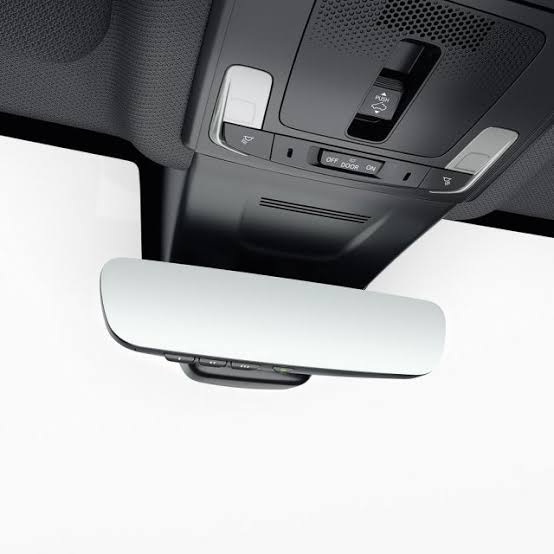
Before diving into the buttons, it is vital to understand what you are actually programming. The 2021 Honda CR-V does not use a proprietary “Honda” garage signal. Instead, it utilizes the HomeLink Wireless Control System, an industry-standard integrated transceiver located in the overhead console or rearview mirror assembly.
According to technical documentation, HomeLink operates on radio frequencies typically ranging from 288 MHz to 390 MHz. It is compatible with nearly all major garage door opener brands sold in the United States, including LiftMaster, Chamberlain, Genie, and Craftsman. However, the programming method differs significantly depending on whether your home garage system uses Fixed Code (older technology) or Rolling Code (newer security technology).
Expert Note: Approximately 90% of garage door openers manufactured after 1996 utilize Rolling Code technology. If your 2021 Honda CR-V pairs but the door doesn’t open, or opens only once, you likely have a Rolling Code system requiring a secondary synchronization step at the motor unit itself.
For a deeper technical understanding of how these radio frequency protocols evolved, you can refer to the Wikipedia entry on Garage Door Openers, which details the shift from fixed DIP switches to modern encrypted rolling codes.
Preparation: What You Need Before Starting
Success in learning how to program 2021 Honda CR-V garage door opener functions relies heavily on preparation. Do not skip this checklist, as missing one item is the most common cause of failure.
- Your Original Handheld Remote: Even though you want to ditch it, you need it for the initial handshake. Ensure it has fresh batteries.
- Clear Line of Sight: Park outside the garage with the engine running. Never program inside a closed garage due to carbon monoxide risks.
- Ladder or Step Stool: Required for the Rolling Code synchronization step at the ceiling motor.
- Patience and Timing: The HomeLink indicators require specific hold times. Rushing causes resets.
- Vehicle Ignition ON: The accessory power must be active. For the 2021 CR-V, press the ENGINE START/STOP button twice without touching the brake pedal to enter Accessory Mode.
Step-by-Step: Programming Fixed Code Openers
If your home garage door opener is older (pre-1996) or uses fixed DIP switches, follow this streamlined process. This is the foundational layer of understanding how to program 2021 Honda CR-V garage door opener systems.
- Initiate Clear Mode: Press and hold the two outer HomeLink buttons simultaneously for approximately 20 seconds until the indicator light flashes rapidly. Release immediately. Note: Only do this if you wish to erase previous programming.
- Position Remotes: Hold your original handheld remote 1–3 inches away from the HomeLink panel. Angle it so the LED faces the panel.
- Simultaneous Press: Press and hold both the desired HomeLink button AND your handheld remote’s transmit button.
- Watch the Indicator: The HomeLink light will flash slowly, then rapidly. Once it flashes rapidly (solid or quick blink), release both buttons. This usually takes 5–15 seconds.
- Test: Press the programmed HomeLink button. If the door activates, you are finished. If not, proceed to the Rolling Code section below.
Step-by-Step: Programming Rolling Code Openers (Most Common)
This is where most 2021 Honda CR-V owners encounter difficulty. If Step 5 above resulted in a flashing light but no door movement, your system requires this additional training phase.
Phase 1: Vehicle Pairing
Complete Steps 1–4 from the Fixed Code section above. Even if the door didn’t open, the vehicle has likely captured the rolling code seed. Proceed immediately to Phase 2.
Phase 2: Motor Unit Synchronization
You have a strict 30-second window for this phase. Have your ladder ready before starting.
- Locate the “Learn” or “Smart” button on your garage door motor unit. It is typically colored yellow, purple, orange, red, or green and located near the antenna wire or light lens.
- Press and release the Learn button. An LED will illuminate or begin blinking, indicating the motor is in pairing mode.
- Immediately return to your vehicle and press the programmed HomeLink button firmly. Hold for 2 seconds, release, and repeat up to 3 times within the 30-second window.
- On the third press, the garage door should activate. The motor unit light may flash or click to confirm acceptance.
Critical Safety Warning: Always ensure the garage door path is completely clear of people, pets, and objects before testing. The 2021 Honda CR-V HomeLink system cannot detect obstructions; only the garage door motor’s safety sensors can. Never bypass photo-eye sensors during programming.
Troubleshooting: When Programming Fails
Even experts encounter hiccups. Use this diagnostic table to resolve issues when figuring out how to program 2021 Honda CR-V garage door opener settings.
| Symptom | Likely Cause | Recommended Solution |
|---|---|---|
| Light never flashes rapidly | Weak remote battery or wrong frequency | Replace handheld remote battery; verify opener compatibility on HomeLink website |
| Flashes rapidly but door won’t open | Rolling Code sync incomplete | Repeat Phase 2 within 30 seconds; try pressing HomeLink 4-5 times instead of 3 |
| Works intermittently | Signal interference or range issue | Reposition vehicle during programming; check for LED bulb interference in garage fixture |
| Programs but erases after car restart | Did not complete full cycle | Ensure ignition was in ACC/ON mode throughout entire process |
| Solid light, no response | Incompatible protocol | Verify opener uses standard RF; some European/Canadian models require bridge adapter |
The LED Bulb Interference Factor
A frequently overlooked issue involves LED lighting. Many modern LED bulbs emit radio frequency noise that jams HomeLink signals. If your 2021 Honda CR-V programs successfully but has severely reduced range (less than 5 feet), try temporarily unscrewing the LED bulbs in your garage opener fixture. If functionality returns, replace them with RF-shielded garage-door-specific LED bulbs.
Advanced Tips for Optimal Performance
Once you have mastered how to program 2021 Honda CR-V garage door opener basics, consider these enhancements:
- Program Multiple Devices: Your 2021 CR-V HomeLink supports three distinct channels. Use Button 1 for the primary garage, Button 2 for a gate or second garage, and Button 3 for outdoor lighting or smart home triggers.
- Battery Backup Awareness: If your garage opener has a battery backup, test HomeLink operation during a simulated power outage. Some units reduce RF power when on battery, affecting range.
- Annual Re-sync: Rolling code algorithms can occasionally drift. If performance degrades over months, simply repeat Phase 2 (motor unit sync) without reprogramming the vehicle. This takes less than 30 seconds.
- Valet Mode Consideration: Remember that HomeLink remains active even when using valet parking. If security concerns exist, you can temporarily disable HomeLink by holding the two outer buttons until the light flashes (clearing memory), then reprogram upon retrieval.
Frequently Asked Questions (FAQ)
Can I program my 2021 Honda CR-V HomeLink without the original remote?
Generally, no. The original handheld remote is required to transfer the frequency and code seed to the vehicle. However, if your garage opener has a direct “Learn” button and supports direct-to-vehicle pairing (rare, mostly newer MyQ-enabled units), you may bypass the remote. Consult your opener’s manual for “direct HomeLink programming” instructions.
Why does my HomeLink work for my neighbor’s door but not mine?
This indicates successful vehicle programming but failed motor synchronization. Your vehicle learned the signal correctly, but your specific garage motor hasn’t accepted it. Focus exclusively on repeating the Rolling Code Phase 2 steps, ensuring you press the Learn button before returning to the vehicle.
Is there a difference between HomeLink versions in the 2021 CR-V?
The 2021 Honda CR-V typically ships with HomeLink Version 5, which offers improved compatibility with newer Security+ 2.0 and MyQ systems compared to older versions. However, the physical programming procedure remains identical across versions. Check your owner’s manual supplement for version-specific notes.
How do I reset HomeLink if I’m selling my 2021 Honda CR-V?
Press and hold the two outer HomeLink buttons for 20+ seconds until the indicator flashes rapidly. This erases all stored codes and restores factory defaults. Always perform this reset before transferring vehicle ownership to prevent unauthorized garage access.
Can HomeLink control smart home devices beyond garage doors?
Yes. HomeLink Version 5 in the 2021 CR-V can interface with compatible smart plugs, lights, and locks that support RF triggering. However, most modern smart home integration now occurs via smartphone apps rather than HomeLink’s RF protocol. Check device packaging for “HomeLink Compatible” certification.
Does extreme weather affect HomeLink programming?
Cold temperatures below freezing can slow battery chemistry in handheld remotes, weakening transmission strength during programming. If programming fails in winter, warm the remote indoors for 10 minutes before attempting. Vehicle-side HomeLink is unaffected by temperature.
Conclusion
Mastering how to program 2021 Honda CR-V garage door opener functionality transforms daily convenience and eliminates unnecessary clutter from your keychain. By understanding the distinction between Fixed and Rolling Code systems, preparing properly, and following the phased synchronization approach, virtually every 2021 CR-V owner can achieve reliable HomeLink operation in under 15 minutes. Remember that patience during the 30-second motor sync window is the single most important factor in success.
Now that you’ve reclaimed seamless garage access, why not help fellow Honda owners who are still fumbling with remotes? Share this guide on Facebook, Twitter, or your favorite Honda CR-V forum to spread the knowledge. Your share might save someone a cold evening in the driveway! Safe driving and happy programming! 🚗🏠
Leave a Reply