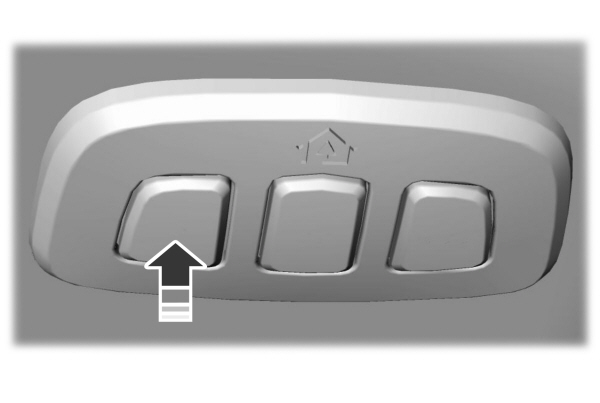
Programming your vehicle’s built-in garage door opener can feel intimidating, especially when you’re dealing with a sophisticated system like the one in your 2021 Ford Expedition. Many owners struggle with unclear instructions or outdated online guides that don’t match their specific model year. If you’re wondering how to program 2021 Ford Expedition garage door opener, you’ve come to the right place. This comprehensive guide will walk you through every step, ensuring you get your HomeLink system working perfectly without unnecessary frustration.
What Is the HomeLink System in the 2021 Ford Expedition?
The 2021 Ford Expedition comes equipped with the HomeLink universal transceiver, a built-in system that allows your vehicle to communicate with garage door openers, gate operators, and even home lighting systems. Unlike aftermarket remote controls, HomeLink is integrated directly into your rearview mirror or overhead console, providing a sleek, factory-installed solution.
According to Wikipedia, HomeLink technology has been licensed by Johnson Controls since 1992 and is now standard in over 60 million vehicles worldwide. The system operates on multiple radio frequencies, typically between 288-433 MHz, making it compatible with most major garage door opener brands including Chamberlain, LiftMaster, Genie, and Craftsman.
Key Features of the 2021 Expedition HomeLink:
- Three programmable buttons for different devices
- Rolling code technology for enhanced security
- Compatible with 95% of garage door openers manufactured after 1995
- No batteries required – powered by your vehicle’s electrical system
What Tools and Information Do You Need Before Starting?
Before diving into the programming process, gather these essential items to ensure a smooth experience:
Required Items:
- Your garage door opener remote (the original handheld unit)
- A ladder or step stool (if your garage door motor unit is mounted high)
- Your 2021 Ford Expedition owner’s manual (for reference)
- Patience and about 15-20 minutes of uninterrupted time
Important Information to Have Ready:
- Brand and model number of your garage door opener (usually found on the motor unit)
- Frequency of your opener (check the label on the back of your remote)
- Whether your opener uses rolling codes (most modern units do)
Pro Tip: Take a photo of your garage door opener’s information label before starting. This will save you time if you need to reference specific details during programming.
Step-by-Step Guide: How to Program Your 2021 Ford Expedition HomeLink
Follow these detailed steps carefully. The entire process typically takes 10-15 minutes per button.
Step 1: Clear Existing HomeLink Memory (If Necessary)
If your HomeLink buttons have been previously programmed, you’ll need to clear them first:
- Turn your ignition to the “ON” position (engine doesn’t need to be running)
- Press and hold the two outer HomeLink buttons simultaneously
- Continue holding for approximately 20 seconds until the indicator light begins to flash rapidly
- Release both buttons when the light changes from slow to rapid flashing
This clears all three buttons. If you only want to reprogram one button, skip this step and proceed directly to programming that specific button.
Step 2: Position Your Vehicle Correctly
Proper positioning is crucial for successful programming:
- Park your Expedition outside your garage, facing the door
- Ensure you’re within 10-15 feet of the garage door opener motor unit
- Keep your vehicle’s engine running or ignition in the “ON” position
- Close all doors and windows to minimize interference
Step 3: Begin the Programming Sequence
Now comes the actual programming process:
- Press and hold the desired HomeLink button you wish to program
- While continuing to hold the HomeLink button, bring your original garage remote within 1-3 inches of the HomeLink buttons (located on your rearview mirror or overhead console)
- Press and hold the button on your garage remote that operates the door
- Continue holding both buttons until the HomeLink indicator light changes from slow blinking to rapid flashing (this may take 20-30 seconds)
- Release both buttons once you see the rapid flash
Step 4: Test the Basic Programming
After completing Step 3:
- Press the programmed HomeLink button once
- Observe your garage door – it should activate
- If nothing happens, repeat Steps 3-4, ensuring you’re holding the buttons close together
Note: For older fixed-code openers, this basic programming may be all you need. However, most 2021-era garage door openers use rolling code technology, requiring an additional step.
Step 5: Complete Rolling Code Programming (If Required)
If your garage door didn’t respond in Step 4, or if you know your opener uses rolling codes:
- Locate the “Learn” or “Smart” button on your garage door opener motor unit (inside your garage, on the hanging unit)
- Press and release the Learn button (the indicator light will illuminate or blink)
- You have 30 seconds to complete the next step
- Return to your Expedition and press the programmed HomeLink button firmly
- Hold for 2-3 seconds, then release
- Wait 2-3 seconds, then press and hold again for 2-3 seconds
- Repeat this press-hold-release cycle 2-3 times
- Your garage door should activate, confirming successful programming
Step 6: Final Testing and Verification
Complete the setup with these final checks:
- Test the HomeLink button 3-5 times to ensure consistent operation
- Verify the door opens and closes completely each time
- Test from different distances (close up and from driveway)
- Program additional buttons for other devices if needed
Troubleshooting Common Programming Issues
Even with careful following of instructions, you might encounter problems. Here are solutions to the most common issues:
| Problem | Possible Cause | Solution |
|---|---|---|
| HomeLink light doesn’t flash | Weak vehicle battery or blown fuse | Check battery voltage; inspect fuse box |
| Remote won’t program | Buttons not held close enough | Position remote within 1 inch of HomeLink |
| Door responds inconsistently | Interference from LED bulbs | Replace garage opener light bulb with incandescent |
| Rolling code won’t sync | Missed the 30-second window | Restart from Step 5, work quickly |
| Only works from very close range | Antenna issue on opener | Check opener antenna; ensure it hangs down |
Additional Troubleshooting Tips:
LED Bulb Interference: Modern LED bulbs in garage door openers can create radio frequency interference. If programming fails repeatedly, temporarily replace the LED bulb with a standard incandescent bulb during setup, then switch back afterward.
Battery Issues: Ensure your Expedition’s battery is fully charged. A weak battery can prevent proper HomeLink function. If your battery is more than three years old, consider testing it before programming.
Distance Problems: If the HomeLink only works when you’re extremely close to the garage, your opener’s antenna may need adjustment. Consult your garage door opener manual for antenna positioning guidelines.
Frequently Asked Questions
How many devices can I program to my 2021 Ford Expedition HomeLink?
The 2021 Ford Expedition HomeLink system features three independent buttons, allowing you to program up to three different devices. This could include your primary garage door, a second garage door or gate, and a home lighting system or third garage door.
Can I program HomeLink without the original garage door remote?
Unfortunately, no. You must have access to the original working remote control for your garage door opener to complete the programming process. The HomeLink system learns the signal from your existing remote. If you’ve lost your remote, contact your garage door opener manufacturer to purchase a replacement before attempting HomeLink programming.
Why won’t my HomeLink program on the first attempt?
Several factors can cause initial programming failures:
- Insufficient proximity between the remote and HomeLink buttons
- Timing issues with rolling code synchronization
- Radio frequency interference from nearby electronics
- Weak batteries in either the vehicle or garage remote
Don’t get discouraged – most users succeed within 2-3 attempts. Ensure you’re following the steps precisely, particularly keeping the remote within 1-3 inches of the HomeLink buttons.
Is HomeLink programming different for Chamberlain vs. LiftMaster openers?
While Chamberlain and LiftMaster are actually the same company (Chamberlain Group owns LiftMaster), the programming process is essentially identical for both brands. Both use similar rolling code technology and Learn button procedures. The main difference might be the color or location of the Learn button, but the HomeLink programming steps remain the same regardless of brand.
Will programming HomeLink affect my existing garage door remotes?
No, programming your HomeLink system will not affect your existing handheld remotes. All devices can operate independently. However, if you’re experiencing issues with old remotes after programming HomeLink, you may need to reprogram those remotes as well using your opener’s Learn button, as some systems have a limited memory capacity.
How do I reset HomeLink if I sell my 2021 Ford Expedition?
To protect your privacy and security, always clear your HomeLink memory before selling or trading in your vehicle:
- Turn ignition to “ON”
- Press and hold the two outer HomeLink buttons for 20 seconds
- Release when the indicator light flashes rapidly
- Verify all buttons are cleared by testing each one
This ensures the new owner cannot access your garage or other programmed devices.
Conclusion
Learning how to program 2021 Ford Expedition garage door opener doesn’t have to be complicated. With the HomeLink system’s user-friendly design and this step-by-step guide, you can have your garage door integrated with your vehicle in under 20 minutes. The convenience of opening your garage with a simple button press on your rearview mirror is worth the initial setup effort.
Remember to keep your original garage remote accessible during programming, follow the rolling code steps if necessary, and don’t hesitate to try the process 2-3 times if you don’t succeed immediately. Most importantly, test your setup thoroughly before relying on it exclusively.
Leave a Reply