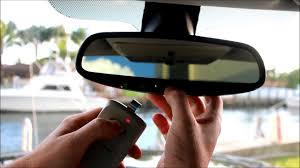
Have you ever pulled into your driveway, pressed the button on your ceiling, and watched in frustration as your garage door stayed firmly shut? It is a common annoyance for many luxury car owners who expect seamless integration between their vehicle and home. If you are struggling to sync your systems, learning how to program 2020 Range Rover garage door opener features can save you time and restore the convenience you paid for.
This guide will walk you through the process clearly and safely. We will cover everything from initial setup to troubleshooting common errors, ensuring your HomeLink system works perfectly every time you arrive home.
Understanding the HomeLink System in Your 2020 Range Rover
Before we dive into the buttons and sequences, it is helpful to understand what you are working with. The 2020 Range Rover uses a system called HomeLink. This is not just a simple remote; it is a universal transceiver that mimics the signal of your existing garage door remote.
According to Wikipedia, HomeLink is a wireless control system located in vehicles that allows users to operate devices such as garage door openers, gate operators, and home lighting systems. In the 2020 Range Rover, this system is typically integrated into the rearview mirror or the overhead console, depending on your specific trim level.
Why Programming Can Be Tricky
Many owners assume that pressing the button once will work. However, modern garage doors use “rolling codes” for security. This means the code changes every time you press the button. Your Range Rover must learn this changing pattern to communicate effectively with your garage door motor. If the synchronization fails, the door will not respond.
Preparation: What You Need Before Starting
Success lies in preparation. Do not start the programming process until you have gathered the following items and ensured your environment is ready.
- Your Original Garage Door Remote: Keep this handy. You will need it to transmit the signal to your car.
- A Step Ladder (Optional): If your garage door motor unit is high up, you may need to reach the “Learn” button on the motor itself.
- Clear Workspace: Ensure your vehicle is parked outside the garage or in a position where the door can move freely without hitting the car.
- Patience: The process can take 5–10 minutes. Rushing often leads to errors.
Safety Note: Always keep your hands and feet clear of the garage door tracks while testing. Ensure no children or pets are near the moving door.
Step-by-Step: How to Program 2020 Range Rover Garage Door Opener
Follow these steps precisely. The 2020 model year may have slight variations depending on whether you have the standard HomeLink or the newer Homelink with CarSync, but the core process remains similar.
Step 1: Clear Existing Memory (If Necessary)
If you are replacing an old remote or if the buttons were previously programmed, you must clear them first.
- Turn your ignition to the “On” position (you do not need to start the engine).
- Press and hold the two outer HomeLink buttons simultaneously.
- Hold them for about 20 seconds until the indicator light begins to flash rapidly.
- Release the buttons. The memory is now cleared.
Step 2: Initiate Training Mode
Now, choose the button you wish to program (Button 1, 2, or 3).
- Press and hold the chosen HomeLink button in your Range Rover.
- While holding it, bring your original garage door remote within 1–3 inches of the HomeLink buttons.
- Press and hold the button on your original remote.
- Keep both buttons held down. Watch the HomeLink indicator light. It will slowly flash, then change to a rapid flash.
- Once it flashes rapidly, release both buttons.
Step 3: Test the Basic Signal
Press the programmed HomeLink button in your Range Rover three times.
- If the garage door moves: You are done! Skip to the “Finalizing” section.
- If the garage door does NOT move: You likely have a rolling code system. Proceed to Step 4.
Step 4: Syncing Rolling Codes (The Critical Step)
Most garage doors installed after 1996 use rolling codes. This requires a second step at the garage door motor unit.
- Locate the “Learn” or “Smart” button on your garage door opener motor unit (hanging from the ceiling). It is usually colored yellow, purple, or red.
- Press and release the “Learn” button. You typically have 30 seconds to complete the next step.
- Return to your Range Rover quickly.
- Press and hold the programmed HomeLink button for 2 seconds, then release.
- Repeat this press-and-release cycle three times.
- Your garage door lights should flash, or the door should move, indicating successful synchronization.
Troubleshooting Common Issues
Even with careful following, things can go wrong. Here is a comparison of common problems and their solutions.
| Issue | Possible Cause | Solution |
|---|---|---|
| Light flashes but door doesn’t move | Rolling code not synced | Perform Step 4 again at the motor unit. |
| Light does not flash at all | Battery issue or wrong mode | Check remote batteries; ensure ignition is On. |
| Door moves partially then stops | Safety sensor blocked | Check garage sensors for dirt or obstruction. |
| Programming fails repeatedly | Interference | Move closer to the motor unit; try different angles. |
Expert Tip: Dealing with Interference
LED light bulbs in your garage can sometimes emit frequencies that interfere with HomeLink signals. If you recently switched to LED bulbs in your garage opener, try turning them off temporarily during programming. If this solves the issue, consider using shielded LED bulbs designed for garage door openers.
Frequently Asked Questions (FAQ)
Here are answers to the most common questions US drivers ask about their Range Rover HomeLink systems.
1. Can I program multiple garage doors to my 2020 Range Rover?
Yes. The HomeLink system in the 2020 Range Rover typically has three separate buttons. You can program each button to a different device, such as one for your home garage, one for a vacation home, and one for a gate operator.
2. Why does my HomeLink work sometimes but not others?
This is often a sign of weak batteries in your original remote or a misalignment in the antenna. Try replacing the battery in your handheld remote. Also, ensure you are parking in the same spot each time, as distance affects signal strength.
3. Do I need a professional to program my Range Rover HomeLink?
No. Programming HomeLink is a DIY-friendly task that requires no special tools. However, if you have an older garage door opener (pre-1996) with dip switches, the process is simpler and does not require the “Learn” button step.
4. What if my garage door opener doesn’t have a “Learn” button?
If your opener is very old and uses dip switches, you simply need to match the switch positions on your handheld remote to the HomeLink system. Consult your garage door manual for specific dip switch instructions. For newer systems without a visible button, consult the manufacturer’s website, as some brands hide the button under a light lens.
5. Is it safe to leave my garage door opener programmed in my car?
Generally, yes. HomeLink uses encrypted signals that are difficult to intercept. However, if you sell your vehicle, always clear the HomeLink memory using the steps in Section 1 to protect your home security.
6. Does the 2020 Range Rover require the engine to be running?
No, the engine does not need to be running. However, the ignition must be in the “On” or “Accessory” position to provide power to the HomeLink module during programming.
Conclusion
Learning how to program 2020 Range Rover garage door opener systems is a small task that yields significant daily convenience. By understanding the difference between fixed and rolling codes, and by carefully following the synchronization steps at your motor unit, you can ensure reliable operation every time you pull into your driveway.
Remember, patience is key. If the first attempt fails, clear the memory and start again. Most issues are resolved by ensuring you are close enough to the motor unit during the final syncing phase.
Did this guide help you get your garage door working? Share this article with fellow Range Rover owners on social media who might be struggling with their HomeLink setup. Your experience could save them hours of frustration!
Leave a Reply