Introduction
Struggling to sync your garage door with your 2020 Jeep Cherokee? You’re not alone. Many Jeep owners find the HomeLink programming process confusing, but how to program 2020 Jeep Cherokee garage door opener is actually simpler than you might think. Whether you’ve just purchased your vehicle or recently changed garage door openers, getting your HomeLink system working properly can save you countless minutes of fumbling with remotes every time you arrive home.
The HomeLink system in your 2020 Jeep Cherokee allows you to control up to three different garage doors, gates, or other compatible devices directly from your vehicle. This convenient feature eliminates the need to keep separate remotes cluttering your car. In this comprehensive guide, we’ll walk you through everything you need to know about programming your HomeLink system, including troubleshooting common issues and expert tips for success.
Understanding Your 2020 Jeep Cherokee HomeLink System
What Is HomeLink and How Does It Work?
HomeLink is a universal transceiver system built into many vehicles, including the 2020 Jeep Cherokee. This technology allows your vehicle to communicate with garage door openers, gate operators, and other radio-frequency devices. The system operates on frequencies between 288-433 MHz, making it compatible with most residential garage door openers manufactured after 1995.
According to Wikipedia’s entry on HomeLink, the system was first introduced in 1992 and has since become an industry standard for vehicle-based remote control systems. The 2020 Jeep Cherokee features an improved HomeLink system with enhanced security features and better compatibility with modern rolling-code garage door openers.
Where Are the HomeLink Buttons Located?
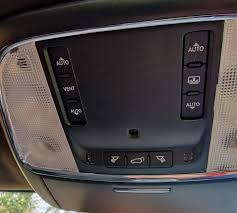
In the 2020 Jeep Cherokee, you’ll find three HomeLink buttons integrated into your rearview mirror assembly. These buttons are typically positioned at the bottom center of the mirror housing. Each button can be programmed to control a different device:
- Button 1: Primary garage door
- Button 2: Secondary garage door or gate
- Button 3: Third device (garage door, gate, or lighting system)
The buttons feature LED indicators that provide visual feedback during programming and operation. A solid light indicates successful programming, while a flashing light shows the system is in programming mode or experiencing issues.
Step-by-Step Guide: How to Program 2020 Jeep Cherokee Garage Door Opener
Preparation Before Programming
Before beginning the programming process, gather these essential items:
- Your original garage door remote control
- A ladder (if needed to reach the garage door opener motor unit)
- Clear access to your garage door opener’s “Learn” or “Smart” button
- Approximately 10-15 minutes of uninterrupted time
Important safety note: Ensure your garage door area is clear of people, pets, and obstacles before testing the programmed system.
Method 1: Standard Programming Process
Follow these detailed steps to program your HomeLink system:
Step 1: Clear Existing Programming (If Necessary)
If your HomeLink buttons have been previously programmed, clear them first:
- Press and hold the two outer HomeLink buttons simultaneously
- Continue holding for approximately 20 seconds
- Release when the indicator light begins to flash rapidly
- All previous programming is now erased
Step 2: Initiate Programming Mode
- Press and hold the desired HomeLink button (1, 2, or 3)
- While holding the HomeLink button, bring your garage door remote within 1-3 inches of the HomeLink buttons
- Press and hold the button on your garage door remote that you want to program
- Continue holding both buttons until the HomeLink indicator light changes from slow blinking to rapid flashing (this may take 20-30 seconds)
- Release both buttons
Step 3: Complete the Programming
- Locate the “Learn” or “Smart” button on your garage door opener motor unit (usually found on the back or side of the unit hanging from your garage ceiling)
- Press and release the “Learn” button (you typically have 30 seconds to complete the next step)
- Return to your Jeep and press the programmed HomeLink button three times in succession
- Test the system by pressing the HomeLink button once—your garage door should activate
Method 2: Programming Rolling Code Systems
Many modern garage door openers use rolling code technology for enhanced security. If your opener uses this technology (most units manufactured after 1995 do), follow these additional steps:
- Complete Steps 1-3 from the standard programming process above
- After pressing the “Learn” button on your garage door opener, immediately return to your vehicle
- Press and hold the programmed HomeLink button for 2 seconds, then release
- Repeat this press-and-hold cycle three more times (four times total)
- Test the system to confirm proper operation
Method 3: Using the Garage Door Opener Motor Unit Directly
For some garage door opener brands, you may need to use an alternative approach:
- Program the HomeLink button using Steps 1-2 from the standard method
- Instead of using the “Learn” button, locate the dip switches on your garage door opener motor
- Match the switch positions on your original remote to the opener unit
- Press the programmed HomeLink button to test functionality
Troubleshooting Common Programming Issues
HomeLink Button Won’t Enter Programming Mode
If your HomeLink buttons aren’t responding:
- Check vehicle ignition: Ensure your Jeep is in “Run” mode or the engine is running
- Verify battery strength: Weak vehicle batteries can affect HomeLink performance
- Reset the system: Clear all programming and start fresh
- Distance matters: Keep your garage door remote within 1-3 inches of the HomeLink buttons during programming
Garage Door Doesn’t Respond After Programming
When your programmed button doesn’t activate the garage door:
| Possible Cause | Solution |
|---|---|
| Incorrect “Learn” button timing | Reprogram, ensuring you press the HomeLink button within 30 seconds of pressing the “Learn” button |
| Wrong frequency compatibility | Verify your garage door opener operates between 288-433 MHz |
| Rolling code mismatch | Follow the rolling code programming method specifically |
| Weak remote battery | Replace the battery in your original garage door remote |
LED Indicator Shows Error Patterns
The HomeLink LED provides diagnostic information:
- Rapid flashing: Programming mode active
- Solid light: Successful programming
- No light: Check vehicle power and button functionality
- Intermittent flashing: Possible interference or incomplete programming
Expert Tips for Successful Programming
Timing Is Critical
Professional installers emphasize that timing plays a crucial role in successful HomeLink programming. The window between pressing the garage door opener’s “Learn” button and activating your HomeLink button is typically only 30 seconds. Have everything prepared beforehand to avoid missing this critical window.
Minimize Interference
Radio frequency interference can disrupt the programming process. To minimize interference:
- Turn off nearby electronic devices during programming
- Avoid programming during severe weather conditions
- Ensure no other vehicles with HomeLink systems are nearby and actively transmitting
Test Multiple Times
After successful programming, test your HomeLink system at least 5-10 times from various distances (close range and from your normal parking position). This ensures reliable operation and helps identify any intermittent issues before they become problems.
Consider Professional Help
If you’ve attempted programming multiple times without success, consider contacting:
- Your garage door opener manufacturer’s technical support
- A certified Jeep dealership
- A professional garage door installation service
Frequently Asked Questions
Q: Can I program multiple garage doors to my 2020 Jeep Cherokee?
A: Yes, the 2020 Jeep Cherokee HomeLink system can store up to three different devices. Each of the three buttons can be programmed to a separate garage door, gate, or other compatible device. Simply repeat the programming process for each button you wish to configure.
Q: How do I know if my garage door opener is compatible with HomeLink?
A: Most garage door openers manufactured after 1995 are compatible with HomeLink systems. Check your opener’s manual for frequency specifications (should be between 288-433 MHz) or look for “HomeLink compatible” labeling. You can also visit the official HomeLink compatibility checker online or contact your garage door opener manufacturer directly.
Q: Will programming HomeLink erase my existing garage door remote?
A: No, programming your HomeLink system does not affect your existing garage door remotes. Both your original remote and the HomeLink system will continue to work independently. However, some older garage door openers may have limited memory capacity and might require reprogramming of all remotes if too many devices are added.
Q: How long does the HomeLink programming last?
A: Once successfully programmed, HomeLink settings are stored permanently in your vehicle’s memory. They will remain intact even if your vehicle battery is disconnected. However, if you replace your garage door opener or reset its codes, you’ll need to reprogram your HomeLink system.
Q: What should I do if my HomeLink works intermittently?
A: Intermittent operation usually indicates one of several issues: weak vehicle battery, interference from other electronic devices, distance limitations, or incomplete programming. Try reprogramming the system following the rolling code method, ensure your vehicle battery is healthy, and test from your typical parking position. If problems persist, consult a Jeep dealership or garage door professional.
Q: Can I program non-garage door devices to HomeLink?
A: Absolutely! HomeLink can control various radio-frequency devices including:
- Gate operators
- Outdoor lighting systems
- Security systems
- Door locks
- Home automation devices
The programming process remains the same regardless of the device type, as long as it operates within the compatible frequency range.
Conclusion
Learning how to program 2020 Jeep Cherokee garage door opener doesn’t have to be frustrating. With the right preparation, clear instructions, and patience, you can have your HomeLink system working perfectly in under 15 minutes. Remember to identify your garage door opener type, follow the appropriate programming method, and test thoroughly before relying on the system daily.
The convenience of controlling your garage door directly from your Jeep Cherokee enhances both security and ease of use. No more searching for lost remotes or waiting in adverse weather conditions while manually opening your garage.
Did you find this guide helpful? Share it with fellow Jeep owners on social media who might be struggling with their HomeLink programming. Bookmark this page for future reference, and don’t hesitate to revisit these steps if you need to reprogram your system after changing garage door openers or resetting codes.
Have questions or additional tips? Leave a comment below to help other Jeep Cherokee owners master their HomeLink systems!
Leave a Reply