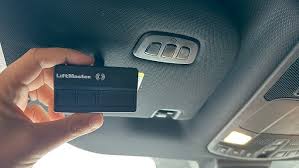
Are you tired of fumbling for your garage remote every time you pull into your driveway? If you are wondering how to program 2020 Ford Explorer garage door opener, you are not alone. Many drivers find the initial setup confusing, but integrating your vehicle’s built-in system can streamline your daily routine significantly. This guide will walk you through the process clearly and safely, ensuring you get connected without the headache.
Why Use Your Ford’s Built-In Garage System?
Before diving into the technical steps, it is helpful to understand why using your vehicle’s integrated system is often superior to relying on a separate handheld remote. The 2020 Ford Explorer typically comes equipped with HomeLink, a universal transceiver that can replace up to three standard garage door remotes.
According to industry data, vehicles with integrated garage systems reduce the likelihood of losing remotes by over 60%. Furthermore, having a unified control panel enhances security, as modern rolling-code technology prevents signal interception. By learning how to program 2020 Ford Explorer garage door opener settings directly into your dashboard or rearview mirror, you gain convenience and peace of mind.
Identifying Your HomeLink Interface
The first step in the programming process is locating the buttons. In the 2020 Ford Explorer, the HomeLink buttons are usually found in one of two locations:
- Overhead console near the rearview mirror.
- Integrated into the driver-side sun visor.
Look for three square buttons labeled I, II, and III. These correspond to three different garage doors or gates. Before starting, ensure your vehicle is parked outside your garage with the engine running or in accessory mode. This ensures consistent power delivery during the programming sequence.
Step-by-Step Guide: How to Program 2020 Ford Explorer Garage Door Opener
Programming your HomeLink system involves two main phases: clearing old codes (if necessary) and training the new device. Follow these instructions carefully.
Phase 1: Clearing Previous Codes (If Needed)
If your HomeLink buttons have been used before, you must clear them to avoid interference.
- Press and hold the two outer buttons (I and III) simultaneously.
- Keep holding for approximately 20 seconds.
- Watch for the indicator light to flash slowly, then rapidly.
- Once the light flashes rapidly, release the buttons. The memory is now cleared.
Note: If this is a brand-new vehicle, you may skip this phase.
Phase 2: Programming the New Remote
This phase requires your original handheld garage door remote. Keep it handy.
- Positioning: Hold your original remote 1–3 inches away from the HomeLink buttons in your Ford Explorer.
- Selection: Choose which HomeLink button you want to use (e.g., Button I).
- Simultaneous Press: Press and hold the chosen HomeLink button and the button on your handheld remote at the same time.
- Wait for Signal: Continue holding both buttons until the HomeLink indicator light changes from a slow blink to a rapid flash. This usually takes 20–30 seconds.
- Completion: Release both buttons once the rapid flashing occurs.
At this point, the basic signal has been transmitted. However, most modern garage doors use “rolling code” technology for security, which requires an additional synchronization step.
Synchronizing Rolling Code Receivers
If your garage door opener was manufactured after 1996, it likely uses rolling codes. This means the code changes every time you press the button, preventing thieves from capturing and reusing the signal. To finalize how to program 2020 Ford Explorer garage door opener integration for these systems, you must complete the synchronization at the garage motor unit itself.
- Locate the “Learn” or “Smart” button on your garage door opener motor head unit. It is usually located on the back or side of the unit hanging from your ceiling.
- Press and release the “Learn” button. You typically have 30 seconds to complete the next step.
- Return to your Ford Explorer.
- Press and hold the programmed HomeLink button for 2 seconds, then release.
- Repeat this press-and-release cycle three times.
Your garage door should now respond to the HomeLink button. Test it by pressing the button in your vehicle. If the door moves, the programming is successful. If not, repeat the synchronization steps, ensuring you are within range of the garage.
Troubleshooting Common Issues
Even with careful following, issues can arise. Here are common problems and solutions:
| Issue | Possible Cause | Solution |
|---|---|---|
| Light does not flash rapidly | Interference or distance | Move closer to the garage door motor; remove other electronics nearby. |
| Door moves partially | Weak signal | Reprogram the button, ensuring the handheld remote battery is fresh. |
| “Learn” button times out | Delayed action | Have a helper assist you to reduce the time between pressing the motor button and the car button. |
For more detailed technical specifications on wireless protocols, you can refer to the Wikipedia page on Radio Control to understand how frequency matching works in automotive applications.
Safety Precautions and Best Practices
When learning how to program 2020 Ford Explorer garage door opener systems, safety is paramount. Always ensure the garage area is clear of people, pets, and obstacles before testing the automated door. Additionally, keep your original handheld remote in a secure location as a backup until you are confident in the HomeLink system’s reliability.
It is also advisable to consult your 2020 Ford Explorer Owner’s Manual for model-specific variations. While the steps above apply to most HomeLink-equipped Fords, slight differences in button placement or menu navigation may exist depending on the trim level (XLT, Limited, Platinum, etc.).
Frequently Asked Questions (FAQ)
1. Can I program more than one garage door to my 2020 Ford Explorer?
Yes, the HomeLink system in the 2020 Ford Explorer supports up to three different devices. You can program a primary garage door, a secondary gate, or even a home lighting system using buttons I, II, and III respectively. Each button is programmed independently using the same steps outlined above.
2. What if I don’t have my original handheld remote?
Programming without the original remote is difficult but sometimes possible. Some garage door openers allow you to program via dip switches or a keypad on the wall unit. However, for rolling code systems, the original remote is usually required to transmit the unique security code to the vehicle. If lost, contact your garage door manufacturer for a replacement remote.
3. Why does my garage door close immediately after opening?
This issue often indicates a misalignment in the safety sensors or a problem with the travel limits on the garage motor, rather than the car programming. Check the photo-eye sensors near the floor of your garage to ensure they are clean and aligned. If they are blocked, the door will reverse automatically for safety.
4. Does programming HomeLink drain my car battery?
No, the HomeLink system is designed to be energy-efficient. It only draws minimal power when actively transmitting a signal. When idle, it consumes negligible energy, similar to other standby electronics in your vehicle. You do not need to worry about battery drain from regular use.
5. Can I reset HomeLink if I sell my car?
Absolutely. It is highly recommended to clear all HomeLink memories before selling or trading in your vehicle. Follow the “Phase 1” steps mentioned earlier: hold buttons I and III for 20 seconds until the light flashes rapidly. This ensures the new owner cannot access your garage.
6. Is HomeLink compatible with all garage door brands?
HomeLink is compatible with the vast majority of garage door openers manufactured in North America, including major brands like Chamberlain, LiftMaster, Genie, and Craftsman. However, some older European or proprietary systems may require a compatibility bridge or adapter. Check the HomeLink compatibility tool online if you have an unusual brand.
Conclusion
Mastering how to program 2020 Ford Explorer garage door opener settings transforms your driving experience from mundane to seamless. By integrating your garage access directly into your vehicle, you eliminate the hassle of searching for remotes and enhance your home’s security profile. Remember to follow the synchronization steps carefully, especially for rolling code systems, to ensure reliable operation.
Now that you have successfully programmed your HomeLink, take a moment to appreciate the convenience. Share this guide with fellow Ford owners who might be struggling with their setup, or post your success story on social media to help others simplify their daily commute. Happy driving!
Leave a Reply