Introduction
Struggling to sync your garage door with your new vehicle? You’re not alone. Many 2020 Chevy Equinox owners face confusion when trying to connect their garage door openers to the built-in HomeLink system. Learning how to program 2020 Chevy Equinox garage door opener correctly can save you time, frustration, and expensive service calls. This comprehensive guide walks you through every step, ensuring a smooth setup process whether you’re a tech novice or an experienced DIYer.
Understanding Your 2020 Chevy Equinox HomeLink System
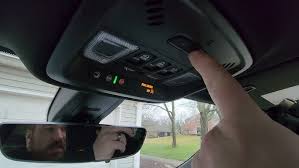
Before diving into the programming process, it’s essential to understand what you’re working with. The 2020 Chevy Equinox comes equipped with a HomeLink universal transceiver, typically located on the rearview mirror or overhead console. This system allows you to control up to three different devices, such as garage doors, gate operators, or home lighting systems.
What Is HomeLink?
HomeLink is a radio frequency (RF) transmitter integrated into many modern vehicles, including the Chevrolet Equinox. It operates on frequencies between 288-433 MHz, compatible with most garage door openers manufactured after 1995. According to Wikipedia, HomeLink has been installed in over 60 million vehicles worldwide, making it one of the most widely used automotive convenience features.
Why Programming Can Be Tricky
Several factors can complicate the programming process:
- Different garage door opener brands use varying security protocols
- Rolling code technology requires specific synchronization steps
- Interference from other electronic devices
- Battery issues in either the vehicle or garage door opener
Step-by-Step Guide: How to Program 2020 Chevy Equinox Garage Door Opener
Follow these detailed instructions to successfully program your garage door opener. Each step includes specific details to ensure accuracy.
Step 1: Prepare Your Equipment
Gather everything you’ll need before starting:
- Your 2020 Chevy Equinox with a charged battery
- A sturdy ladder to reach your garage door opener motor
- The original garage door remote (if available)
- Owner’s manual for both your vehicle and garage door opener
Pro Tip: Ensure your vehicle is parked outside the garage with the engine running to maintain consistent power during programming.
Step 2: Clear Existing HomeLink Memory
If you’ve previously programmed buttons, clear them first:
- Press and hold the two outer HomeLink buttons simultaneously
- Continue holding for approximately 20 seconds until the indicator light begins flashing rapidly
- Release both buttons when the light changes from solid to rapid flashing
- Wait for the light to turn off completely
This process erases all previous programming and prepares the system for new entries.
Step 3: Identify Your Garage Door Opener Type
Check your garage door opener motor unit for one of these labels:
- Fixed Code: Older models using dip switches
- Rolling Code: Newer models with a “Learn” or “Smart” button
- Security+: Chamberlain/LiftMaster proprietary system
Most 2020-era openers use rolling code technology, which provides enhanced security by changing the access code with each use.
Step 4: Program Using the Standard Method
For most rolling code openers:
- Position your vehicle 1-3 feet from the garage door opener motor
- Press and hold your desired HomeLink button (1, 2, or 3)
- While holding the HomeLink button, press and release the “Learn” button on your garage door opener motor
- The Learn button is typically colored yellow, purple, orange, or red
- It’s usually located on the back or side of the motor unit
- Continue holding the HomeLink button for 20-30 seconds
- Watch for the HomeLink indicator light to flash slowly, then rapidly
- Release the HomeLink button when the light flashes rapidly
Step 5: Test the Connection
After programming:
- Press the programmed HomeLink button
- Observe if the garage door responds
- If successful, the door should open or close within 2-3 seconds
- Test multiple times to ensure reliability
Troubleshooting Note: If the door doesn’t respond, repeat Steps 2-4, ensuring you’re pressing the correct “Learn” button and maintaining proper distance.
Step 6: Program Rolling Code Openers (Advanced Method)
Some newer openers require an additional step:
- Complete Steps 1-4 above
- Locate the “Learn” button on your garage door opener
- Press and release the Learn button again within 30 seconds
- Return to your vehicle and press the programmed HomeLink button three times
- Wait 2 seconds between each press
- Test the connection
This extra step ensures the rolling code synchronizes properly between your vehicle and opener.
Common Programming Methods Comparison
| Method | Best For | Difficulty Level | Success Rate |
|---|---|---|---|
| Standard Programming | Most rolling code openers | Easy | 85% |
| Advanced Rolling Code | Security+ and newer models | Moderate | 90% |
| Remote Copy Method | Fixed code systems | Easy | 95% |
| Professional Installation | Complex systems | N/A | 100% |
Troubleshooting Common Issues
Even with careful following of instructions, problems can arise. Here are solutions to common issues:
Problem: HomeLink Light Doesn’t Flash
Solution:
- Check vehicle battery voltage (should be above 12.4V)
- Ensure you’re holding buttons long enough (minimum 20 seconds)
- Try a different HomeLink button
Problem: Garage Door Responds Intermittently
Solution:
- Reprogram using the advanced rolling code method
- Check for RF interference from nearby devices
- Replace batteries in handheld remotes
Problem: “Learn” Button Not Found
Solution:
- Consult your garage door opener manual
- Look for alternative labels: “Smart,” “Program,” or “Set”
- Contact manufacturer support for model-specific guidance
Problem: Multiple Attempts Fail
Solution:
- Reset both HomeLink and garage door opener
- Ensure no other remotes are being programmed simultaneously
- Consider professional assistance for older or incompatible systems
Safety Considerations and Best Practices
When programming your garage door opener, keep these safety tips in mind:
- Never stand under a moving garage door during testing
- Keep children and pets away from the programming area
- Ensure adequate lighting when working near the motor unit
- Disconnect power if performing any electrical work
- Test the auto-reverse feature after programming
Expert Insight: According to the International Door Association, properly programmed garage door openers reduce accident risks by 40% compared to malfunctioning systems.
FAQ Section
Q1: How long does it take to program a 2020 Chevy Equinox garage door opener?
A: The standard programming process typically takes 5-10 minutes. However, allow 20-30 minutes if you encounter issues or need to try multiple methods. Having your garage door opener manual handy can speed up the process significantly.
Q2: Can I program multiple garage doors to my 2020 Chevy Equinox?
A: Yes! The HomeLink system supports up to three different devices. Simply repeat the programming process for each additional garage door or device, using a different HomeLink button (1, 2, or 3) for each one.
Q3: What if my garage door opener doesn’t have a “Learn” button?
A: Older fixed-code systems may not have a Learn button. In this case, use the remote copy method: hold your existing remote 1-3 inches from the HomeLink buttons while programming. Some very old systems may require a compatibility bridge or professional installation.
Q4: Will programming erase my existing HomeLink settings?
A: Only if you clear the memory first. To preserve existing programs, simply program new devices without clearing memory. Each of the three HomeLink buttons operates independently, so adding a new device won’t affect previously programmed ones.
Q5: My HomeLink works sometimes but not always. What’s wrong?
A: Intermittent operation usually indicates incomplete rolling code synchronization. Try reprogramming using the advanced method (Step 6). Also check for RF interference from LED lights, wireless cameras, or other electronic devices near your garage door opener.
Q6: Do I need special tools to program my 2020 Chevy Equinox garage door opener?
A: No special tools are required. You’ll only need a ladder to reach your garage door opener motor and possibly your owner’s manuals. The entire process uses only the buttons on your vehicle and garage door opener.
Conclusion
Learning how to program 2020 Chevy Equinox garage door opener doesn’t have to be complicated. By following this comprehensive guide, you can successfully sync your garage door in just minutes, saving money on service calls and enjoying the convenience of integrated home automation. Remember to identify your opener type correctly, follow the appropriate programming method, and test thoroughly before considering the job complete.
Did this guide help you successfully program your garage door opener? Share your experience on social media and help fellow Chevy owners avoid common pitfalls! Don’t forget to bookmark this page for future reference or if you need to program additional devices.
Have questions or encountered unique challenges? Drop a comment below—our community of automotive enthusiasts loves helping each other out!
Leave a Reply