Introduction
Struggling to get your new luxury SUV to talk to your garage door? You are not alone. Many owners find the initial setup slightly confusing, but knowing how to program 2020 BMW X5 garage door opener correctly can save you from daily frustration. This guide breaks down the process into simple, manageable steps so you can pull into your garage with ease.
Understanding the BMW HomeLink System
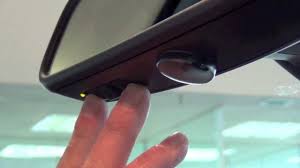
Before diving into the buttons, it is essential to understand what you are working with. The 2020 BMW X5 comes equipped with the HomeLink® Universal Transceiver. This system is built directly into your rearview mirror or overhead console, depending on your specific trim level.
Unlike older universal remotes that required complex dip-switch settings, HomeLink uses a rolling code technology. This provides enhanced security by changing the access code every time you use it. According to HomeLink’s official documentation, this technology is compatible with over 95% of garage door openers manufactured since 1995.
Why Is It Important to Get It Right?
- Security: Proper programming ensures only your car can open your garage.
- Convenience: No more digging for plastic remotes in your bag.
- Safety: Prevents accidental openings due to signal interference.
Preparation: What You Need Before Starting
Rushing into programming without preparation is the most common cause of failure. Ensure you have the following ready before you sit in your driver’s seat.
- Your Existing Garage Door Remote: You must have a working handheld remote for your garage door.
- A Step Ladder (Optional): If your garage door motor unit is high up, you may need to reach the “Learn” button on the motor itself.
- Patience: The process involves timing. Do not rush the button presses.
- Clear Garage Area: Ensure no people or pets are near the garage door during testing.
Pro Tip: Check your garage door opener’s manual to identify the brand and model. Some brands, like Chamberlain or LiftMaster, have specific “Learn” button colors that dictate the programming method.
Step-by-Step: How to Program 2020 BMW X5 Garage Door Opener
Follow these instructions precisely. The 2020 X5 interface may vary slightly between the iDrive 7.0 system updates, but the physical HomeLink buttons remain consistent.
Step 1: Clear Previous Settings (If Necessary)
If you are replacing an old vehicle or if the buttons were previously programmed, clear them first.
- Turn on your BMW X5 ignition (press the start button without foot on brake, or just enter accessory mode).
- Press and hold the two outer HomeLink buttons simultaneously.
- Hold them for about 20 seconds until the indicator light begins to flash rapidly.
- Release the buttons. The memory is now cleared.
Step 2: Initiate Training Mode
Now, we will teach the car to recognize your garage door remote.
- Sit in your driver’s seat with your garage door remote in hand.
- Choose one of the three HomeLink buttons (1, 2, or 3) you wish to assign.
- Press and hold the chosen HomeLink button.
- While holding the HomeLink button, bring your handheld garage remote within 1–3 inches of the HomeLink buttons.
- Press and hold the button on your handheld remote.
- Keep both buttons held down. Watch the HomeLink indicator light.
- It will change from a slow blink to a rapid flash.
- Once it flashes rapidly, release both buttons.
Step 3: Syncing with the Garage Door Motor
This is the critical step where the car communicates with the actual door mechanism.
- Locate the “Learn” or “Smart” button on your garage door opener motor unit (hanging from your garage ceiling).
- Press the “Learn” button briefly. You usually have 30 seconds to complete the next step.
- Return to your BMW X5.
- Press and hold the programmed HomeLink button for two seconds, then release.
- Repeat this press-and-hold cycle three times.
- Your garage door should move (open or close). If it does, the programming is successful.
Troubleshooting Common Issues
If the door did not move, do not panic. Here is a quick comparison of common issues and solutions.
| Issue | Possible Cause | Solution |
|---|---|---|
| Light blinks slowly | Not in training mode | Clear memory and restart Step 2. |
| Door moves partially | Signal strength weak | Move car closer to the garage door. |
| No response from motor | Wrong “Learn” button | Check motor manual; try pressing “Learn” again. |
| Rolling Code Error | Security mismatch | You may need to repeat Step 3 twice. |
Advanced Tips for Specific Garage Door Brands
Not all garage doors are created equal. Here is how to handle specific scenarios for popular US brands.
Chamberlain and LiftMaster
These brands often use a yellow, purple, or orange “Learn” button.
- Yellow Button: Requires standard programming as described above.
- Purple/Orange Button: These use Security+ 2.0. You may need to press the HomeLink button in the car twice quickly after pressing the Learn button on the motor.
Genie Openers
Genie units typically have a red or purple button.
- Ensure you are within range. Genie signals can be sensitive to distance.
- If it fails, try holding the HomeLink button for longer durations (up to 5 seconds) during the final sync.
Craftsman
Similar to LiftMaster, as they share manufacturing technology.
- Look for the “Program” button on the back of the motor head.
- Ensure your car is parked directly in front of the door for the strongest signal path.
Safety and Maintenance Best Practices
Programming your garage door is not just about convenience; it is about safety.
- Test the Reverse Mechanism: After programming, place a roll of paper towels under the door. Close the door using your BMW. The door should reverse immediately upon touching the object. If it does not, recalibrate your garage door opener immediately.
- Update Regularly: If you change your garage door opener battery, you may need to re-sync the HomeLink system.
- Keep Manuals Handy: Store your garage door opener manual in your glove box. It contains specific codes needed if the standard procedure fails.
FAQ Section
1. Can I program multiple garage doors to my 2020 BMW X5?
Yes, the HomeLink system has three independent buttons. You can program up to three different devices, such as two garage doors and a gate, or a garage door and a home lighting system.
2. What if my garage door opener does not have a “Learn” button?
Older openers (pre-1995) may not have a learn button. In this case, you may need to install a universal receiver kit compatible with HomeLink. Consult a professional installer for older hardware.
3. Why is my HomeLink light flashing rapidly but the door won’t move?
This usually indicates that the car has learned the remote signal, but the garage motor has not accepted the new code. Ensure you press the “Learn” button on the motor unit within 30 seconds of returning to the car.
4. Does programming the garage door drain my BMW battery?
No. The HomeLink system only draws power when the vehicle is in accessory or ignition mode. It does not draw significant power when the car is locked and off.
5. Can I reset the HomeLink system if I sell my car?
Absolutely. It is highly recommended to clear the memory before selling. Follow the “Clear Previous Settings” steps in Section 3 to wipe all stored codes.
6. Is it safe to program the garage door while the engine is running?
Yes, it is safe. However, ensure the car is in “Park” and the parking brake is engaged to prevent any accidental movement while you are focused on the programming process.
Conclusion
Learning how to program 2020 BMW X5 garage door opener is a straightforward process that enhances your daily driving experience. By following the steps outlined above, you can integrate your smart home features seamlessly with your luxury vehicle. Remember to prioritize safety by testing the reverse mechanism and keeping your manuals accessible.
Did this guide help you get connected? Share this article with fellow BMW owners on social media who might be struggling with their HomeLink setup. Drive safe and enjoy the convenience!
Leave a Reply