Is your Chamberlain garage door remote suddenly unresponsive? You’re not alone—thousands of homeowners face this frustrating issue every month. Learning how to change battery in Chamberlain garage door opener remotes is a simple DIY task that can save you time, money, and the hassle of calling a technician. In this comprehensive guide, we’ll walk you through everything you need to know to get your garage door working perfectly again.
Why Does Your Chamberlain Remote Need a New Battery?
Before diving into the replacement process, it’s helpful to understand why batteries die and when you should replace them. Most Chamberlain garage door opener remotes use standard lithium or alkaline batteries that typically last between 1-3 years, depending on usage frequency.
According to industry data from the International Door Association, approximately 60% of garage door service calls are related to simple issues like dead remote batteries or misaligned sensors—problems that homeowners can easily fix themselves.
Common Signs Your Battery Is Dying
- Weak signal range: You need to stand closer to the garage door for it to respond
- Intermittent operation: The remote works sometimes but not others
- Complete failure: No response whatsoever when pressing buttons
- Dim LED indicator: If your remote has a light, it appears weaker than usual
Recognizing these signs early can prevent being locked out of your garage at inconvenient times.
What Type of Battery Does Your Chamberlain Remote Use?
Identifying the correct battery type is crucial before starting the replacement process. Chamberlain manufactures several remote models, each requiring specific battery types.
Common Battery Types by Model
| Remote Model | Battery Type | Voltage | Typical Lifespan |
|---|---|---|---|
| Security+ 2.0 (Most Common) | CR2032 | 3V | 2-3 years |
| Older 3-Button Remotes | 303/357 or A23 | 9V or 12V | 1-2 years |
| Mini Remote Controls | CR2016 | 3V | 1-2 years |
| Keychain Remotes | CR2032 | 3V | 1-2 years |
Pro Tip: Always check your remote’s battery compartment or user manual for the exact specification. Using the wrong battery type can damage your remote or cause poor performance.
The CR2032 lithium coin cell is the most common battery used in modern Chamberlain remotes. These batteries are widely available at hardware stores, pharmacies, and online retailers for approximately $2-$5 per battery.
Step-by-Step Guide: How to Change Battery in Chamberlain Garage Door Opener Remote
Now let’s get to the practical part. Follow these detailed steps to successfully replace your remote’s battery.
Step 1: Gather Your Supplies
Before beginning, ensure you have:
- The correct replacement battery (check your model first)
- A small flathead screwdriver or coin (for some models)
- A clean, well-lit workspace
- Optional: Tweezers for handling small batteries
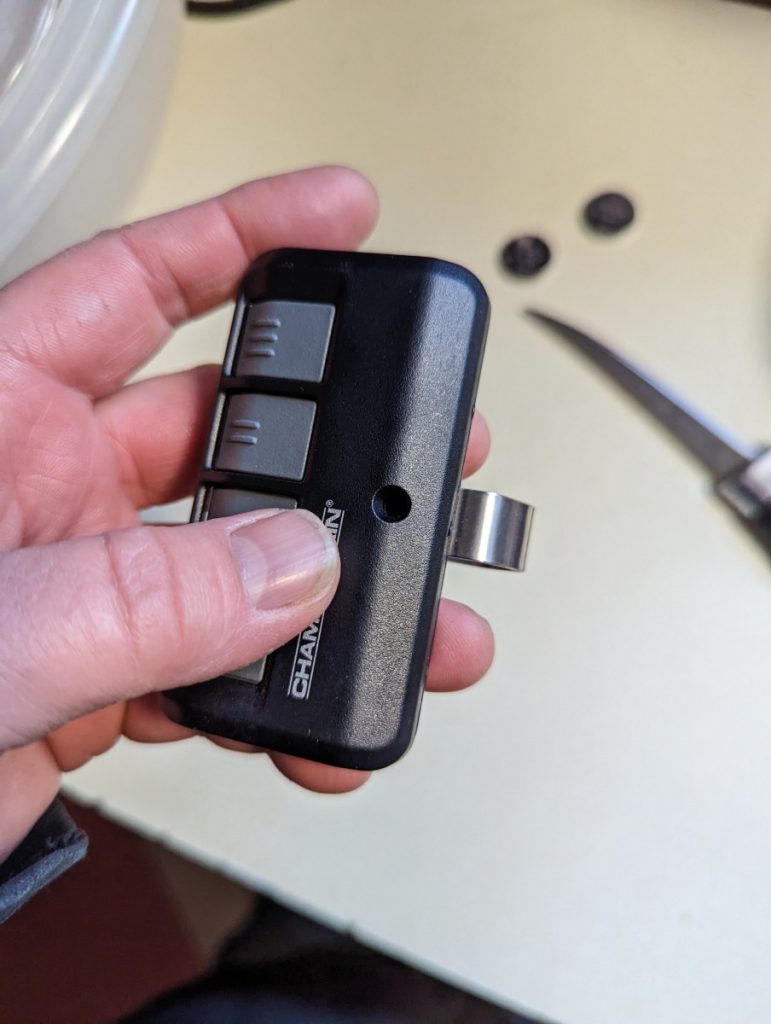
Step 2: Open the Remote Housing
For Slide-Open Models:
- Locate the seam along the side of the remote
- Gently slide the cover downward or sideways
- The battery compartment should now be visible
For Screw-Type Models:
- Find the small screw on the back of the remote
- Use a Phillips-head screwdriver to remove it carefully
- Lift off the back cover
For Snap-Open Models:
- Insert a flathead screwdriver or coin into the notch
- Gently pry the two halves apart
- Work around the edges until the cover releases
Be careful not to apply excessive force, as this can crack the plastic housing.
Step 3: Remove the Old Battery
- Note the battery’s orientation (positive/+ side facing up or down)
- Use your fingernail or a non-metallic tool to lift the battery out
- Dispose of the old battery properly at a recycling center
Important: Take a photo of the battery orientation before removing it. This serves as a reference if you forget which way it should face.
Step 4: Insert the New Battery
- Clean the battery contacts with a dry cloth if they appear corroded
- Insert the new battery with the correct orientation (match your photo)
- Ensure the battery sits flush in the compartment
- Double-check the positive (+) and negative (-) markings
Step 5: Reassemble the Remote
- Align the two halves of the remote housing
- Press firmly until you hear a click (for snap models)
- Replace and tighten the screw (for screw-type models)
- Ensure there are no gaps in the housing
Step 6: Test Your Remote
- Stand within 10-15 feet of your garage door
- Press the button once
- Observe if the door responds
- Test from various distances to confirm proper signal strength
If the remote doesn’t work immediately, don’t panic. Proceed to the troubleshooting section below.
Troubleshooting Common Issues After Battery Replacement
Even after following the steps correctly, you might encounter problems. Here’s how to address them:
Remote Still Doesn’t Work
- Recheck battery orientation: Even experienced users sometimes install batteries backward
- Test the battery: Use a multimeter to verify the new battery has proper voltage
- Try another battery: Occasionally, new batteries can be defective
- Clean the contacts: Corrosion can prevent proper electrical connection
Weak Signal Range
- Ensure battery is seated properly: A loose battery causes intermittent connections
- Check for interference: LED bulbs, Wi-Fi routers, and other electronics can interfere with signals
- Reprogram the remote: Sometimes a fresh programming session improves performance
Remote Works Intermittently
- Inspect battery contacts: Look for corrosion or debris
- Verify housing is sealed: Moisture can damage internal components
- Consider remote age: Older remotes may need complete replacement
When to Reprogram Your Chamberlain Remote
After changing the battery, reprogramming is usually unnecessary. However, you should reprogram if:
- The remote still doesn’t work after battery replacement
- You’ve purchased a brand-new remote
- Multiple remotes are experiencing issues
- You recently reset your garage door opener
The reprogramming process varies by model but generally involves pressing the “Learn” button on your garage door opener motor unit and then pressing the remote button within 30 seconds. Consult your owner’s manual for model-specific instructions.
Preventive Maintenance Tips for Longer Battery Life
Extend your remote’s battery life and overall functionality with these expert recommendations:
Best Practices
- Avoid extreme temperatures: Don’t leave remotes in hot cars or freezing garages
- Keep it dry: Moisture accelerates battery corrosion
- Use quality batteries: Brand-name lithium batteries last longer than generic alternatives
- Remove battery during storage: If not using the remote for extended periods, remove the battery
Warning Signs to Watch For
- Unusual clicking sounds from the remote
- Visible corrosion around battery contacts
- Cracked or damaged housing
- Buttons that feel sticky or unresponsive
Addressing these issues early prevents complete remote failure.
Frequently Asked Questions
Q1: How often should I change the battery in my Chamberlain remote?
A: Most Chamberlain remote batteries last 2-3 years with normal use. However, you should replace the battery immediately when you notice reduced range or intermittent operation. Heavy users (multiple daily operations) may need to replace batteries annually.
Q2: Can I use a rechargeable battery in my Chamberlain remote?
A: While technically possible, rechargeable batteries are not recommended. They typically provide lower voltage (1.2V vs. 3V for lithium cells) and may not deliver consistent power. Standard lithium coin cells are more reliable and cost-effective for this application.
Q3: What should I do if my remote works after battery change but only from very close range?
A: This usually indicates either incorrect battery installation, weak battery quality, or interference. First, verify the battery orientation. Second, try a different brand of battery. Third, check for nearby electronic devices causing interference. If problems persist, the remote itself may be failing and need replacement.
Q4: Is it safe to dispose of old remote batteries in regular trash?
A: No. Lithium and alkaline batteries contain materials that can harm the environment. Most communities offer battery recycling programs at hardware stores, pharmacies, or municipal collection centers. Proper disposal protects both the environment and public health.
Q5: Can a dead remote battery damage my garage door opener?
A: No, a dead remote battery cannot damage your garage door opener unit. The remote simply sends a signal; it doesn’t control the opener’s mechanical or electrical systems. However, repeatedly attempting to use a dying battery may eventually drain it completely, leaving you unable to operate the door remotely.
Q6: Where can I buy replacement batteries for Chamberlain remotes?
A: Replacement batteries are widely available at hardware stores (Home Depot, Lowe’s), pharmacies (CVS, Walgreens), big-box retailers (Walmart, Target), and online (Amazon, eBay). CR2032 batteries typically cost $2-$5 individually or less when purchased in multi-packs.
Conclusion
Learning how to change battery in Chamberlain garage door opener remotes is an essential skill every homeowner should master. With just a few minutes and a inexpensive battery, you can restore full functionality to your garage door system without professional assistance.
Remember these key takeaways:
- Identify your remote model and battery type before purchasing replacements
- Follow the step-by-step process carefully, noting battery orientation
- Test thoroughly after replacement to ensure proper operation
- Practice preventive maintenance to extend battery life
By following this guide, you’ve saved yourself the cost of a service call (typically $75-$150) and gained valuable DIY confidence. Share this article with friends and family who might benefit from knowing how to handle this common household task. Have questions or success stories? Drop them in the comments below!
Did this guide help you fix your Chamberlain remote? Share it on Facebook, Twitter, or Pinterest to help other homeowners solve their garage door woes!
Leave a Reply