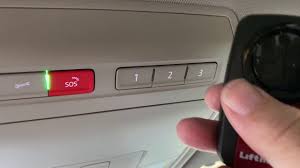
Have you ever pulled into your driveway, pressed the button in your car, and watched your garage door stay stubbornly closed? It is a frustrating experience that many new owners face when trying to integrate their vehicle with their home security system. If you are struggling to sync your devices, learning how to program 2019 VW Atlas garage door opener settings is the key to restoring that seamless convenience you expected from your premium SUV.
The Volkswagen Atlas is designed for comfort and connectivity, but the Homelink system can sometimes be tricky to configure due to varying garage door opener frequencies and rolling code technologies. This guide will walk you through the exact steps to get your garage door responding to your Atlas instantly, ensuring you never have to fumble for a remote again.
Understanding the Homelink System in Your 2019 Atlas
Before diving into the buttons, it helps to understand what is happening under the hood. The 2019 VW Atlas uses a Homelink transceiver, which is essentially a universal radio transmitter built into your rearview mirror or overhead console. Unlike older fixed-code remotes, modern systems use “rolling codes” for security. This means the code changes every time you press the button, preventing thieves from intercepting and replaying the signal.
According to Homelink’s official compatibility guidelines, this technology is standard in most garage door openers manufactured after 1993. However, because every garage door brand (LiftMaster, Chamberlain, Genie, etc.) has slight variations in their programming protocols, the pairing process requires precision.
Why Does Programming Fail?
- Interference: Other electronic devices nearby can disrupt the signal.
- Distance: Being too far from the garage motor during setup.
- Battery Issues: A weak car battery or remote battery can cause signal drops.
- Wrong Mode: Not clearing old codes before starting fresh.
Step-by-Step Guide: How to Program 2019 VW Atlas Garage Door Opener
Follow these instructions carefully. It is recommended to have a second person help you if possible, as you will need to move between the car and the garage door motor unit.
Step 1: Clear Existing Codes (Crucial First Step)
If you have tried to program the button before and failed, or if you are buying the car used, you must clear the memory first.
- Turn your ignition to the “ON” position (engine can be off).
- Locate the two outer Homelink buttons on your rearview mirror.
- Press and hold both outer buttons simultaneously.
- Keep holding them for about 20–30 seconds.
- Watch the indicator light. It will start flashing slowly, then rapidly. Once it flashes rapidly, release the buttons.
- The memory is now cleared.
Step 2: Train the Homelink Button
Now we will teach your Atlas to recognize your garage door remote.
- Hold your original garage door remote 1–3 inches away from the Homelink buttons on the mirror.
- Choose the Homelink button you want to use (e.g., the left button).
- Press and hold the chosen Homelink button and the button on your handheld remote at the same time.
- Keep holding both until the Homelink indicator light changes from a slow flash to a rapid flash. This usually takes 10–20 seconds.
- Release both buttons.
Note: If the light does not change to rapid flashing, try moving the remote slightly closer or further away. Angle matters!
Step 3: Sync with the Garage Door Motor Unit
This is the step most people miss. Because of rolling codes, the garage motor needs to “accept” the new signal from your car.
- Exit your vehicle and go to your garage door motor unit (hanging from the ceiling).
- Locate the “Learn” or “Smart” button on the motor. It is usually yellow, purple, or red.
- Press and release the “Learn” button. You typically have 30 seconds to complete the next step.
- Return to your VW Atlas quickly.
- Press and hold the programmed Homelink button for 2 seconds, release it, and repeat this press-hold-release cycle three times.
- Listen for the garage door lights to blink or the door to move. This confirms the sync is successful.
Step 4: Test the System
Drive out of the garage and close the door using your wall switch or remote. Then, drive back within range and press the Homelink button in your Atlas. The door should open smoothly.
Troubleshooting Common Issues
Even with careful following, things can go wrong. Here is a breakdown of common problems and solutions.
| Issue | Possible Cause | Solution |
|---|---|---|
| Light flashes but door doesn’t move | Rolling code not synced | Repeat Step 3 (Sync with Motor Unit) exactly. |
| Light stays solid immediately | Button already programmed | Clear memory (Step 1) and try again. |
| Remote works, Car doesn’t | Signal interference | Move car closer to the door during training. Remove tinted film near the mirror if present. |
| Door reverses after closing | Safety sensor misalignment | Check the eye-beams at the bottom of your garage tracks. |
Expert Tip: The “Cycle” Method
If Step 3 fails, some technicians recommend pressing the Homelink button in the car, waiting for the door to start moving, and then pressing the “Learn” button on the motor while the door is moving. This forces the motor to capture the active signal. Always consult your specific garage door manual before trying alternative methods.
Frequently Asked Questions (FAQ)
1. Can I program multiple garage doors to my 2019 VW Atlas?
Yes, the 2019 Atlas Homelink system typically supports up to three different devices. You can program one button for your home garage, one for a vacation home, and one for a gate or another door. Just repeat the entire process for each button, ensuring you clear only the specific button if needed, though clearing all is safer for beginners.
2. What if my garage door opener is very old (pre-1993)?
Older openers use “fixed codes” rather than rolling codes. The programming process is similar, but you may not need to perform Step 3 (syncing with the motor unit). If your opener has DIP switches (small tiny switches inside the remote), you must match the switch positions in your car’s Homelink settings to match the remote. However, most 2019 Atlas owners have newer openers.
3. Why does my Homelink work intermittently?
Intermittent issues are often caused by battery voltage. If your car battery is old, the Homelink transmitter may not send a strong enough signal. Additionally, check the battery in your handheld garage remote. If the remote battery is weak, the initial training (Step 2) may not have captured a clean signal. Replace batteries and reprogram.
4. Do I need an internet connection to program the garage door?
No. The Homelink system in the 2019 VW Atlas operates on radio frequencies (typically 315 MHz, 390 MHz, or 433 MHz). It is a direct hardware-to-hardware communication and does not rely on Wi-Fi, Bluetooth, or cellular data. Ensure your car is not in “Valet Mode” which might disable certain features, but generally, no internet is required.
5. Is it safe to program the garage door opener myself?
Yes, it is completely safe. The Homelink system is designed for consumer DIY installation. The most significant risk is accidentally programming a neighbor’s door if you are too close to their house, but the rolling code technology makes it highly unlikely that you would interfere with other systems. Always ensure you are programming your specific motor unit.
6. What if the “Learn” button on my garage motor is not working?
If the motor unit does not respond to the “Learn” button, check if the lock feature is enabled on the motor. Some LiftMaster and Chamberlain units have a lock button that disables wireless programming. Hold the lock button for a few seconds to unlock it, then try the programming process again.
Conclusion
Learning how to program 2019 VW Atlas garage door opener functions transforms your daily commute from a chore into a seamless experience. By understanding the difference between training the car (Step 2) and syncing with the motor (Step 3), you can overcome the most common hurdles that frustrate new owners.
Remember, patience is key. If it doesn’t work the first time, clear the memory and start fresh. Most failures occur because the rolling code sync was rushed or skipped. With your Homelink properly configured, you enjoy the full benefit of your Volkswagen’s connectivity features.
Did this guide help you get your garage door working? Share this article with fellow VW Atlas owners on social media who might be struggling with their Homelink setup!
Leave a Reply