Introduction
Are you struggling to connect your new garage door with your vehicle’s built-in remote? You are not alone. Many 2019 Toyota Highlander owners face confusion when trying to sync their HomeLink system for the first time. Knowing how to program 2019 Toyota Highlander garage door opener correctly saves you time, money, and the frustration of manually pressing a separate remote every time you arrive home. This guide walks you through the exact steps needed to get your garage door working seamlessly with your SUV.
Understanding the HomeLink System in Your 2019 Highlander
Before diving into the buttons, it is helpful to understand what you are working with. The 2019 Toyota Highlander comes equipped with the HomeLink wireless control system. This technology allows your vehicle to communicate with various radio-frequency devices, such as garage door openers, gate operators, and even home lighting systems.
Unlike older mechanical remotes, HomeLink uses digital coding to mimic the signal of your original garage door remote. According to Wikipedia, HomeLink is one of the most widely used integrated transceiver systems in the automotive industry, known for its compatibility with over 95% of garage door openers manufactured since 1984.
Why Programming Might Fail Initially
Many users assume that pressing the buttons is enough. However, modern garage door openers use rolling code technology for security. This means the code changes every time you press the button. If you do not follow the specific “learning” sequence required by both your car and your garage motor, the two devices will never speak the same language.
Step-by-Step Guide: How to Program 2019 Toyota Highlander Garage Door Opener
Programming your HomeLink system requires patience and precision. Follow these steps exactly to ensure a successful connection.
Step 1: Prepare Your Equipment
- Ensure your garage door is closed.
- Have your original handheld garage door remote ready.
- Sit in your 2019 Highlander with the ignition turned to the “ON” position (you do not need to start the engine, but the electronics must be active).
- Clear any previous programming if this is a replacement or reset. To clear memory, press and hold the two outer HomeLink buttons for about 20 seconds until the indicator light flashes rapidly.
Step 2: Choose Your Button
Decide which of the three HomeLink buttons you want to use for your garage door. For this guide, we will use Button 1.
Step 3: Initiate the Learning Mode
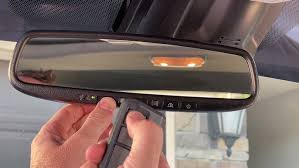
- Press and hold the chosen HomeLink button (Button 1) and your original handheld remote button simultaneously.
- Keep both buttons pressed. Do not release them yet.
- Watch the HomeLink indicator light in your rearview mirror or overhead console. It will start flashing slowly.
- Continue holding both buttons until the light changes from a slow flash to a rapid flash. This usually takes between 20 to 30 seconds.
- Once the light flashes rapidly, release both buttons.
Step 4: Train the Garage Door Motor
Now that your car has learned the signal, you need to tell your garage door motor to accept it. This step varies slightly depending on the brand of your garage door opener (e.g., Chamberlain, LiftMaster, Genie).
- Locate the “Learn” or “Smart” button on your garage door motor unit. This is usually found on the back or side of the motor hanging from your ceiling. It is often yellow, purple, or red.
- Press and release the “Learn” button. You typically have 30 seconds to complete the next step.
- Return to your 2019 Highlander.
- Press and hold the programmed HomeLink button (Button 1) for two seconds, then release it.
- Repeat this press-hold-release cycle up to three times.
- Watch your garage door. If it moves, the programming was successful.
Troubleshooting Common Issues
If the door does not move, check the following:
- Distance: Are you parked too far away? Try moving closer to the garage door (within 10 feet).
- Battery: Is the battery in your handheld remote weak? Replace it if necessary.
- Compatibility: Some older openers may require a compatibility bridge kit. Check your garage door manual.
Comparing HomeLink vs. Standard Remotes
Why bother programming your car when you already have a remote? Here is a quick comparison to highlight the benefits.
| Feature | HomeLink System | Standard Handheld Remote |
|---|---|---|
| Convenience | High (Integrated in car) | Low (Easy to lose/misplace) |
| Security | Rolling Code Encryption | Varies by model age |
| Weather Resistance | Excellent (Protected inside car) | Moderate (Exposed to elements) |
| Battery Life | Uses Car Battery | Requires frequent replacement |
| Aesthetics | Clean, clutter-free dashboard | Adds keychain bulk |
As shown above, integrating your garage door into your 2019 Toyota Highlander offers superior convenience and reliability. You no longer need to dig through your purse or pockets for a small plastic remote while juggling groceries.
Advanced Tips for Rolling Code Openers
If you have a newer garage door opener (manufactured after 1995), it likely uses rolling codes. These codes change with every use to prevent hacking.
When programming a rolling code system, the initial sync might require an extra step. After completing Step 4 above, if the door only works once and then stops, you need to re-sync the rolling code.
- Press the “Learn” button on the motor again.
- Press the HomeLink button in your car twice.
- Test the door again. It should now operate consistently.
This extra synchronization ensures that the car and the motor are updated with the same changing algorithm.
FAQ Section
1. Can I program multiple garage doors to my 2019 Toyota Highlander?
Yes, the HomeLink system has three separate buttons. You can program each button to control a different device, such as a second garage door, a gate, or even home lights. Each button is programmed independently using the same steps outlined above.
2. What if my HomeLink light does not flash rapidly?
If the light remains solid or flashes slowly without changing speed, it means the car is not receiving the signal from your handheld remote. Ensure you are holding the remote close to the HomeLink buttons (within 1-2 inches) and that the remote battery is fresh. Try replacing the battery in your handheld remote and attempt the process again.
3. Do I need to delete old programs before programming a new one?
It is recommended but not always required. If you are programming a button that has never been used, you can skip the clearing step. However, if you are reprogramming a button that previously controlled a different device, you should clear the memory first by holding the two outer buttons for 20 seconds until the light flashes rapidly.
4. Why does my garage door reverse immediately after closing?
This is usually a safety sensor issue, not a programming issue. Check the photo-eye sensors at the bottom of your garage door tracks. Ensure they are aligned and free of dirt or obstructions. If the sensors detect an obstacle, the door will reverse automatically regardless of how the remote is programmed.
5. Is it safe to program the garage door opener while driving?
No. Never attempt to program or adjust your HomeLink system while the vehicle is in motion. Always park your 2019 Toyota Highlander in a safe location with the engine running or in accessory mode before starting the programming process. Safety should always be your top priority.
6. What should I do if my garage door opener brand is not listed in the HomeLink manual?
HomeLink is compatible with the vast majority of openers. If your brand is not explicitly listed, look for the “Learn” button on your motor unit. The presence of a learn button generally indicates compatibility with universal remotes like HomeLink. If you still face issues, consult the HomeLink online compatibility database or contact Toyota support for specific adapter recommendations.
Conclusion
Learning how to program 2019 Toyota Highlander garage door opener is a straightforward process that significantly enhances your daily convenience. By following the steps above, you can integrate your garage door into your vehicle’s HomeLink system, eliminating the need for clunky handheld remotes.
Remember, patience is key during the syncing process, especially with rolling code technologies. Once set up, you will enjoy the seamless experience of arriving home and opening your garage with just a press of a button on your rearview mirror.
Did you find this guide helpful? Share it with fellow Toyota owners on social media who might be struggling with their HomeLink setup!
Leave a Reply