Introduction
There is nothing quite as frustrating as pulling into your driveway, pressing the button on your car’s visor, and watching your garage door remain stubbornly closed. It disrupts your routine and adds unnecessary stress to your day. If you are wondering how to program 2019 Toyota 4Runner garage door opener, you are not alone. Many owners find the process slightly confusing at first, but with the right guidance, it is a quick and straightforward task. This guide will walk you through every step, ensuring you get back to the convenience of hands-free entry in no time.
Understanding the HomeLink System in Your 4Runner
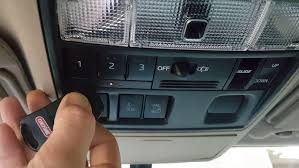
Before diving into the buttons, it helps to understand what you are working with. The 2019 Toyota 4Runner comes equipped with the HomeLink universal transceiver. This system is designed to replace up to three separate remote controls for devices like garage doors, gate operators, or even home lighting systems.
Unlike older mechanical remotes, HomeLink uses radio frequencies to communicate with your receiver. According to Wikipedia, HomeLink is one of the most widely integrated vehicle-to-home systems in the world, known for its compatibility with over 95% of garage door openers manufactured since 1993. This high compatibility rate means that if you have a standard residential garage door, your 4Runner can almost certainly control it.
Why Proper Programming Matters
Programming isn’t just about convenience; it is also about security. An improperly programmed system may fail to use rolling code technology, which changes the access code every time you press the button. Ensuring your 2019 4Runner is synced correctly guarantees that your home remains secure from signal interception.
Step-by-Step: How To Program 2019 Toyota 4Runner Garage Door Opener
The process varies slightly depending on whether your garage door opener uses a fixed code or a rolling code (security+). Most modern openers made after 1993 use rolling codes. We will cover the standard method that works for the majority of users.
Step 1: Prepare Your Workspace
Ensure your vehicle is parked outside your garage with the engine running. This ensures your battery does not drain during the process. Have your original handheld garage door remote ready. You will need it to transmit the signal to your car.
Step 2: Clear Existing Memory (If Necessary)
If you are replacing an old device or if the buttons were previously programmed, you must clear them first.
- Press and hold the two outer HomeLink buttons simultaneously.
- Keep holding them for about 20 seconds.
- Watch the indicator light. It will flash slowly, then rapidly.
- Once it flashes rapidly, release the buttons. The memory is now cleared.
Step 3: Initiate Training Mode
- Choose the HomeLink button you wish to use (Button 1, 2, or 3).
- Press and hold this chosen button.
- Simultaneously, bring your handheld garage remote within 1–3 inches of the HomeLink button.
- Press and hold the button on your handheld remote.
- Keep both buttons held down. Do not let go yet.
Step 4: Wait for the Signal Change
Continue holding both buttons. You are waiting for the HomeLink indicator light to change its behavior.
- Initially, the light may flash slowly.
- After 10–20 seconds, the light should begin to flash rapidly.
- Once the rapid flashing begins, release both buttons immediately.
Step 5: Test the Connection
Press the programmed HomeLink button in your 4Runner. Observe your garage door.
- If the door moves: You are done! Proceed to the “Rolling Code” section below only if your door moves but stops immediately or reverses.
- If nothing happens: You may need to repeat Step 3 and 4, ensuring the remote is closer to the visor.
Handling Rolling Code Systems (Security+)
If your garage door opener was manufactured after 1993, it likely uses a rolling code for enhanced security. In this case, the initial programming above is only half the battle. You must complete the “sync” process at the garage motor unit itself.
Locating the Learn Button
Go to your garage door motor unit (the box attached to your ceiling). Look for a small button, often colored yellow, purple, or red. It is usually labeled “Learn,” “Smart,” or “Program.” There may also be a small LED light next to it.
Completing the Sync
- Press the “Learn” button on the motor unit firmly. The LED light on the motor will typically turn on or blink.
- You have approximately 30 seconds to return to your vehicle.
- Inside your 2019 4Runner, press and hold the programmed HomeLink button for two seconds, then release.
- Repeat this press-and-release cycle three times.
- Watch the garage door. It should move up or down, confirming the sync is complete.
Pro Tip: If the door does not respond after the third press, wait for the LED on the motor unit to turn off, then repeat the entire “Completing the Sync” sequence. Timing is critical here.
Troubleshooting Common Issues
Even with careful following, things can go wrong. Here is a breakdown of common problems and their solutions.
| Issue | Possible Cause | Solution |
|---|---|---|
| Light flashes slowly but never rapidly | Weak battery in handheld remote | Replace the battery in your original remote. |
| Door moves but reverses immediately | Safety sensors blocked | Check the photo-eye sensors at the bottom of your garage tracks for dirt or obstruction. |
| HomeLink button does nothing | Incorrect frequency | Ensure your remote is compatible (315 MHz or 390 MHz are standard for Toyota). |
| Rapid flash never occurs | Distance too great | Move the handheld remote closer to the visor (within 1 inch). |
What If It Still Doesn’t Work?
Some older garage door openers or specific brands (like Chamberlain or LiftMaster with specific security protocols) require a different approach. If the standard method fails, consult your garage door opener’s manual for “Universal Remote Programming.” Sometimes, you must dip switches on the motor unit to match the frequency, though this is rare in post-2010 models.
Expert Tips for Long-Term Reliability
To ensure your 2019 Toyota 4Runner garage door opener continues to work flawlessly, consider these expert recommendations:
- Avoid Interference: Do not store other strong RF devices (like high-power walkie-talkies) directly next to the HomeLink module in your visor.
- Regular Testing: Test the button once a month to ensure the battery in your car and the signal strength remain optimal.
- Update Firmware: While HomeLink is hardware-based, some newer garage motors allow firmware updates via apps. Ensure your garage motor is up to date for best compatibility.
FAQ Section
Q1: Can I program more than one garage door to my 2019 4Runner?
A: Yes. The HomeLink system in the 2019 4Runner has three distinct buttons. You can program each button to a different device, such as two different garage doors and a gate operator. Simply repeat the programming steps for each button individually.
Q2: Why does my garage door close partially and then reverse?
A: This is usually not a HomeLink issue but a safety sensor issue. Check the small sensors near the floor on both sides of your garage door. If they are misaligned, dirty, or blocked by an object, the door will reverse to prevent injury. Clean the lenses and ensure the lights on the sensors are solid, not blinking.
Q3: Do I need a ladder to program the HomeLink?
A: For most modern rolling code openers, yes. You need to press the “Learn” button on the motor unit, which is mounted on the ceiling. A sturdy stepladder is recommended for safety. However, if you have an older fixed-code system, you may not need to access the motor unit at all.
Q4: Will programming HomeLink erase my existing handheld remote?
A: No. Programming your car does not delete the memory from your handheld remote. Both devices will work independently. However, if you clear the HomeLink memory in your car, it does not affect the garage motor’s memory either.
Q5: What if my 4Runner has a sunroof? Does that affect HomeLink?
A: No. The HomeLink module is integrated into the overhead console or visor area, regardless of whether you have a sunroof. The positioning is designed to avoid interference from the glass roof panel.
Q6: Is it safe to leave my car running while programming?
A: It is recommended to keep the engine running to prevent battery drain, especially if the process takes several attempts. However, ensure your car is in “Park” and the parking brake is engaged. Never leave a running vehicle unattended.
Conclusion
Learning how to program 2019 Toyota 4Runner garage door opener is a small task that yields significant daily convenience. By following the steps outlined above, you can seamlessly integrate your vehicle with your home’s entry system. Remember, patience is key when dealing with rolling code synchronization, and always prioritize safety when using ladders to access your garage motor.
Now that your garage door responds to your touch, you can enjoy the seamless transition from drive to home. Did this guide help you get set up? Share this article with fellow 4Runner owners on social media who might be struggling with their HomeLink setup!
Leave a Reply