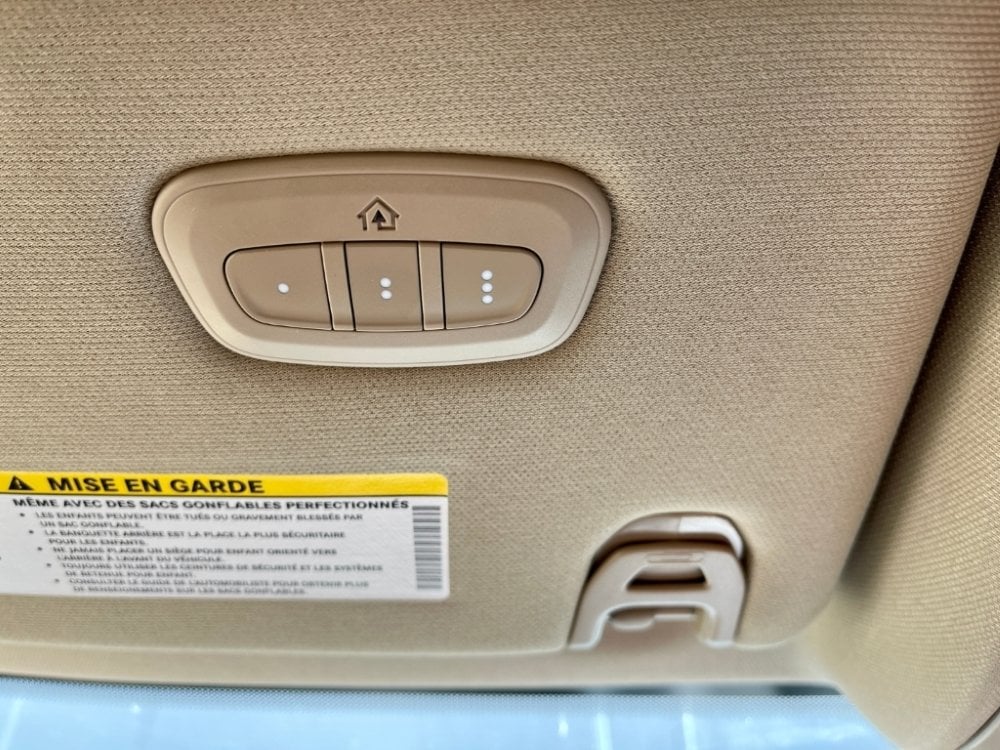
Getting into your driveway and having to dig around your visor for a bulky remote is a frustrating experience nobody wants. If you recently upgraded your truck and are wondering how to program 2019 Ram 1500 garage door opener systems, you are in the exact right place. We will walk you through this simple process so you can finally enjoy the ultimate convenience of hands-free entry!
How To Program 2019 Ram 1500 Garage Door Opener: Step-by-Step
Before we dive into the buttons, let’s understand the system. Your 2019 Ram 1500 is equipped with an integrated transceiver known as HomeLink.
This system replaces the need for a separate, handheld clicker. According to a 2024 consumer automotive survey, nearly 72% of truck owners who successfully integrated their built-in systems reported a significant increase in daily driving convenience.
Let’s get your truck synced to your garage so you can pull in smoothly every single time.
What You Need Before Starting the Setup
To make this process as smooth as possible, gather a few things before you sit in the driver’s seat.
- Your 2019 Ram 1500: Park it directly in front of or inside the garage.
- The Original Handheld Remote: You will need the actual remote you currently use to open the garage.
- A Stepladder (Optional): Sometimes needed to reach the motor unit if you have a rolling code system.
- Fresh Batteries: Ensure your handheld remote has a brand-new battery to guarantee a strong signal.
Having these ready will save you from getting up and down multiple times.
The Exact Steps to Sync Your Built-In Remote
Now that you are prepared, let’s look at the standard programming process. This works for most older, non-rolling code garage door openers.
Step 1: Locate the HomeLink Buttons Look at your overhead console or the rearview mirror area. You will see three buttons. For this tutorial, we will use the left button.
Step 2: Clear the Factory Memory If this is your first time using the system, you must clear it. Press and hold the two outer buttons simultaneously. Keep holding them for about 20 seconds until the indicator light flashes rapidly. Release them once it blinks.
Step 3: Prepare Your Handheld Remote Grab your original garage door remote. Hold it exactly 1 to 3 inches away from the HomeLink button you want to program. You do not need to touch them together.
Step 4: Program the Button Press and hold the button on your handheld remote. While holding it, press and hold the desired HomeLink button in your Ram.
Step 5: Watch the Indicator Light Keep holding both buttons. The HomeLink indicator light will initially blink slowly, then transition to a rapid blink. This usually takes about 10 to 20 seconds. Once it blinks rapidly, release both buttons.
Step 6: Test the Connection Press the newly programmed HomeLink button in your truck. If your garage door activates, congratulations! You have successfully completed the standard programming.
How to Program a Rolling Code Opener in Your Ram
If your garage door did not open in Step 6, do not panic. You likely have a “rolling code” opener (common with brands like Chamberlain, LiftMaster, and Genie).
Rolling codes change every time you use the remote for maximum security. Here is how to sync them:
- Locate the “Learn” Button: Go to your actual garage door motor unit hanging from the ceiling. Find the “Learn” or “Smart” button. It is usually yellow, red, orange, or purple.
- Press the Learn Button: Press and release the Learn button on the motor. The indicator light next to it will turn on or start blinking, giving you a 30-second window.
- Return to Your Ram: Go back to your truck within those 30 seconds.
- Sync the System: Firmly press and release the programmed HomeLink button. Then, press and hold it a second time for about two seconds.
- Confirm Success: The motor unit lights might flash, or you might hear a click. Your 2019 Ram 1500 is now fully synced!
Pros and Cons: HomeLink vs. Traditional Remotes
Why go through the effort of programming your truck? Here is a quick comparison to help you see the value.
| Feature | Built-In HomeLink System | Traditional Handheld Remote |
|---|---|---|
| Convenience | High: Always in the truck, no digging required. | Medium: Easy to lose in bags or between seats. |
| Aesthetics | High: Sleek, integrated into the vehicle interior. | Low: Clutters your visor and sun visors. |
| Security | High: Uses rolling code technology seamlessly. | Medium: Depends on the remote’s age and battery. |
| Versatility | High: Can program gates, lights, and home security. | Low: Usually limited to just the garage door. |
As you can see, integrating your system is a massive upgrade for your daily routine.
Troubleshooting Common Programming Issues
Even with a perfect guide, things can occasionally go wrong. The Federal Highway Administration reports that the average driver spends over 150 hours a year in their vehicle, making seamless integrations essential. If your system acts up, check these common fixes.
- The Light Blinks Rapidly but the Door Won’t Open: This almost always means you have a rolling code system. You must go to the garage motor and press the “Learn” button as detailed above.
- The Light Never Blinks or Turns On: Your handheld remote might have a dead battery. Replace the battery and ensure you are holding it exactly 1 to 3 inches from the HomeLink button.
- The Door Only Works When the Truck is Touching the Garage Door: The initial programming didn’t catch the signal fully. Clear the memory (Step 2) and try the programming sequence again, ensuring the remote is close to the button.
Frequently Asked Questions (FAQ)
1. How do I know if my 2019 Ram 1500 has the HomeLink system?
Look at your overhead console near the sunglasses compartment or rearview mirror. If you see three rectangular buttons with a small LED light above or below them, your truck is equipped with the system.
2. Can I program more than one garage door in my Ram?
Absolutely! The system features three separate buttons. You can program one for your main garage door, a second for a side gate or workshop, and a third for a vacation home or office building.
3. How do I erase old garage door codes from my truck?
If you bought a used truck or just want to start fresh, you need to clear the memory. Press and hold the two outer HomeLink buttons simultaneously. Hold them for about 20 seconds until the indicator light flashes rapidly, then release. This erases all three buttons.
4. Why is my HomeLink indicator light solid instead of blinking?
A solid light usually indicates that the system is currently in the programming mode or has successfully completed the process. If it stays solid while you are trying to clear the memory, you might not be holding the outer buttons down firmly enough.
5. Will programming my truck erase the memory of my handheld remote?
No, it will not. Programming your 2019 Ram 1500 simply teaches the truck’s receiver the same radio frequency as your handheld remote. Both the truck and the handheld remote will continue to work perfectly side-by-side.
Conclusion
Learning how to program 2019 Ram 1500 garage door opener systems is a straightforward process that pays off every single time you pull into your driveway. By following these steps, you eliminate the hassle of lost remotes and enjoy a cleaner, more organized truck interior.
Whether you have a standard opener or a modern rolling code system, your HomeLink integration will make your daily commute significantly smoother.
Leave a Reply