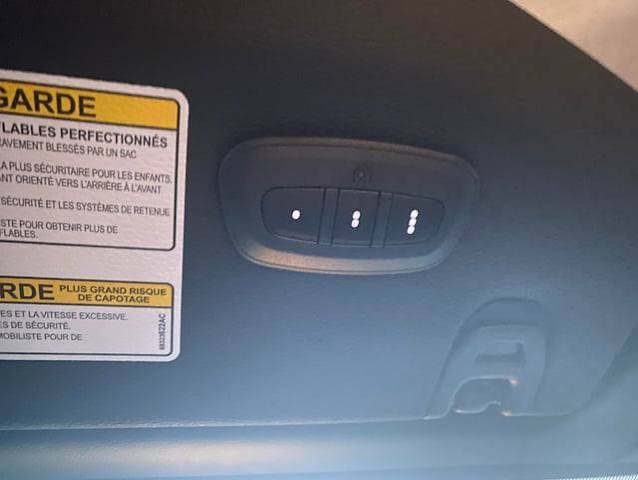
Struggling to sync your vehicle with your home? Learning how to program 2019 Jeep Wrangler garage door opener systems is actually easier than you think. Let’s walk through this simple process together so you can pull into your driveway and glide right in without fumbling for a remote.
How To Program 2019 Jeep Wrangler Garage Door Opener: Step-by-Step
Before we dive into the steps, it helps to know that your 2019 Wrangler is equipped with the HomeLink system. This universal transceiver is designed to communicate with most major garage door opener brands. In fact, according to industry data, integrated vehicle systems like HomeLink are used by millions of drivers daily to streamline their commute.
What You Will Need Before You Start
Before jumping into the programming process, gather a few simple items to ensure a smooth experience:
- Your original garage door remote: Ensure it has a fresh battery.
- A step ladder: You may need this to reach the motor unit in your garage.
- Your 2019 Jeep Wrangler: Parked in the driveway with the engine off but ignition in the ON/RUN position.
“Integrating your garage door with your vehicle reduces driveway dwell time and increases home security by eliminating lost remotes,” says Mark Stevens, a certified home automation specialist. “Modern systems use encrypted signals, making them incredibly safe for daily use.”
How Do I Clear the Existing HomeLink Memory?
Before pairing a new device, it is highly recommended to clear the system’s memory. This prevents signal interference from previous owners or old setups.
- Locate the three HomeLink buttons on your overhead console or rearview mirror.
- Press and hold the two outer buttons simultaneously.
- Keep holding them for about 20 seconds until the LED indicator light begins to flash rapidly.
- Release the buttons. Your system is now erased and ready for a fresh start.
How Do I Sync a Fixed-Code Remote?
If you have an older garage door opener (typically manufactured before 1996), you likely have a fixed-code remote.
- Turn your Jeep’s ignition to the ON/RUN position (you do not need to start the engine).
- Hold your original garage door remote 1 to 3 inches away from the HomeLink button you want to use.
- Press and hold both the HomeLink button and the remote button at the same time.
- Watch the HomeLink LED light. It will blink slowly at first, then switch to a rapid blink after about 10 to 20 seconds.
- Once it blinks rapidly, release both buttons. The basic programming is complete!
How Do I Program a Rolling Code Garage Door Opener?
Most modern garage doors use rolling code technology for enhanced security. If your rapid blink is followed by a solid light, or if the door doesn’t respond, you need to sync the rolling code.
- Complete the fixed-code steps mentioned above first.
- Go to your actual garage door motor unit (the box hanging from your ceiling).
- Locate the “Learn” or “Smart” button. It is usually yellow, red, orange, or purple.
- Press and release the “Learn” button. The indicator light next to it will turn on or blink, giving you a 30-second window.
- Return to your 2019 Jeep Wrangler within those 30 seconds.
- Press and hold the programmed HomeLink button, then release it. Repeat this press-and-release cycle three times rapidly.
- The garage door should activate, confirming the sync is successful.
For more technical background on how these universal transceivers operate, you can read about the HomeLink system on Wikipedia.
Fixed Code vs. Rolling Code: Which One Do You Have?
Not sure which technology your garage uses? Here is a quick comparison to help you identify your system.
| Feature | Fixed Code Openers | Rolling Code Openers |
|---|---|---|
| Manufacturing Year | Typically pre-1996 | 1996 to Present |
| Security Level | Low (easily copied) | High (code changes every use) |
| Sync Process | Just in-car programming | Requires accessing the garage motor |
| Common Brands | Older Chamberlain, Stanley | LiftMaster, Genie, Chamberlain |
Troubleshooting Common Programming Issues
Even with a clear guide, hiccups can happen. Here are a few quick fixes if your Jeep Wrangler garage door opener isn’t cooperating.
- Distance Matters: If the remote isn’t syncing, try moving it closer to the HomeLink button, or use a fresh battery in your handheld remote.
- Ignition Position: Ensure your Jeep’s ignition is in the ON/RUN mode. The system will not program if the vehicle is completely off.
- Timing is Key: When syncing a rolling code, you must press the HomeLink button within 30 seconds of pressing the “Learn” button on the motor unit.
Frequently Asked Questions (FAQ)
Why won’t my 2019 Jeep Wrangler HomeLink sync?
The most common culprit is a dying battery in your handheld remote or an incorrect ignition state. Make sure your Jeep is in the ON/RUN position and try holding the remote closer to the HomeLink buttons during the initial pairing phase. Additionally, ensure you are not too far from the garage door motor during the rolling code sync.
Can I program a LiftMaster garage door to my Jeep?
Absolutely. LiftMaster is one of the most compatible brands with the HomeLink system. Just ensure you follow the rolling code steps, as almost all modern LiftMaster units utilize this security feature. The process is identical to other major brands.
How many devices can the 2019 Jeep Wrangler HomeLink store?
The system features three independent buttons. This means you can program up to three different devices, such as a garage door, a gate entry system, or even a home lighting setup. If you need more, you can use a HomeLink external visor clip.
Does programming HomeLink erase my original remote?
No, programming your Jeep’s HomeLink system does not affect your original handheld remotes. Both the car system and your physical remotes will work simultaneously without any issues. Your family members’ remotes will also continue to function normally.
What if my garage door motor doesn’t have a “Learn” button?
If your motor lacks a Learn button, it is likely a very old fixed-code model. In this case, you might need a compatible repeater or a newer logic board to interface safely with modern universal systems.
Leave a Reply