Introduction
Are you frustrated because your new 2019 Honda Odyssey won’t open your garage? You are not alone. Many drivers struggle with the initial setup of the built-in HomeLink system, but the process is actually quite straightforward once you know the right steps. In this guide, we will show you exactly how to program 2019 Honda Odyssey garage door opener systems quickly and safely, saving you the cost of calling a professional technician.
Understanding the HomeLink System in Your 2019 Odyssey
Before diving into the buttons, it is helpful to understand what you are working with. The 2019 Honda Odyssey comes equipped with the HomeLink Universal Transceiver. This system allows your vehicle to communicate with radio-frequency devices, such as garage doors, gate operators, and even home lighting systems.
Unlike older remote controls that used simple fixed codes, modern systems like HomeLink often use “rolling codes” for enhanced security. This means the code changes every time you press the button, preventing hackers from intercepting the signal. According to HomeLink’s official documentation, this technology is compatible with over 95% of garage door openers manufactured since 1995.
Key Components You Need
- Your 2019 Honda Odyssey: Ensure the battery is charged.
- The Original Garage Remote: You will need this handheld remote to teach the car the signal.
- A Ladder: If your garage door motor unit is mounted high on the ceiling.
- Patience: Some older garage door brands require an extra “learning” step at the motor unit itself.
Step-by-Step: How to Program 2019 Honda Odyssey Garage Door Opener
Programming your garage door involves two main phases: training the car to recognize the remote, and (if necessary) syncing the car with the garage motor unit. Follow these steps carefully.
Phase 1: Clear Existing Memory (If Necessary)
If you have previously programmed a device to one of the HomeLink buttons, you should clear it first to avoid interference.
- Turn the ignition to the ON position (you do not need to start the engine).
- Press and hold the two outer HomeLink buttons (usually Button 1 and Button 3) simultaneously.
- Hold them for about 20 seconds until the indicator light begins to flash rapidly.
- Release the buttons. The memory is now cleared.
Phase 2: Train the HomeLink Button
This is the core process where your car learns the signal from your handheld remote.
- Position Yourself: Sit in your driver’s seat with the garage door closed. Have your original handheld garage remote ready.
- Select a Button: Choose which HomeLink button in your Odyssey you want to use (e.g., Button 1).
- Initiate Learning Mode: Press and hold the chosen HomeLink button. Do not release it yet.
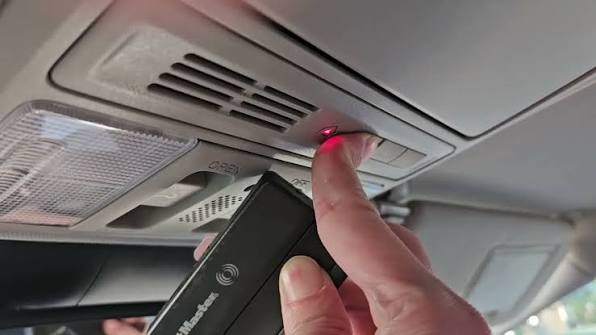
- Bring the Remote Close: While still holding the HomeLink button, bring your handheld remote 1–3 inches away from the HomeLink buttons on the rearview mirror or overhead console.
- Send the Signal: Press and hold the button on your handheld remote that operates the garage door.
- Wait for the Flash: Keep both buttons held down. Watch the HomeLink indicator light. It will slowly change from a solid light to a rapidly flashing light. This indicates that the frequency has been learned.
- Release Buttons: Once the light flashes rapidly, release both buttons.
Phase 3: Test the Connection
Now, test if the programming was successful.
- Press the programmed HomeLink button in your Odyssey firmly three times.
- Observe the garage door. If it moves, you are done!
- If the door does not move, proceed to Phase 4, as you likely have a rolling code system.
Troubleshooting Rolling Code Systems
Most garage door openers manufactured after 1995 use rolling codes for security. If Phase 2 did not work immediately, you must complete the “sync” process at the garage motor unit.
Identifying a Rolling Code Opener
Check your garage door motor unit (the box hanging from your ceiling). Look for a label that says “Security+” or “Rolling Code.” Common brands include LiftMaster, Chamberlain, Genie, and Craftsman.
The Sync Process
- Locate the Learn Button: Find the “Learn” or “Smart” button on your garage door motor unit. It is usually located near the antenna wire and may be yellow, purple, or red.
- Press the Learn Button: Press and release the Learn button on the motor unit. You typically have 30 seconds to complete the next step. An LED light on the motor will usually blink or turn on.
- Return to Your Car: Within those 30 seconds, go back to your 2019 Odyssey.
- Finalize Programming: Press and hold the programmed HomeLink button for two seconds, then release it. Press it again for two seconds, and release. Repeat this cycle up to three times.
- Test Again: Press the HomeLink button. The garage door should now activate.
Pro Tip: If you have multiple garage doors, repeat the entire process for each door, using a different HomeLink button for each.
Common Issues and Solutions
Even with careful following of instructions, things can go wrong. Here is a breakdown of common issues and how to fix them.
| Issue | Possible Cause | Solution |
|---|---|---|
| Light flashes slowly, never fast | Weak remote battery | Replace the battery in your handheld garage remote. |
| Door moves partially then stops | Safety sensor obstruction | Check the photo-eye sensors at the bottom of the garage tracks for dirt or misalignment. |
| HomeLink doesn’t respond | Ignition off | Ensure the car is in “ON” mode or the engine is running. Some models disable HomeLink when off to save battery. |
| Interference from LED bulbs | Frequency noise | Newer LED garage lights can interfere with radio signals. Try turning off the garage light during programming. |
Why Use HomeLink Instead of a Clip-On Remote?
You might wonder why you should bother programming the built-in system when you can just clip a universal remote to your visor. There are several compelling reasons to use the integrated HomeLink system in your 2019 Honda Odyssey.
- Aesthetics and Convenience: No dangling remotes or cluttered visors. The buttons are seamlessly integrated into the mirror or console.
- Security: HomeLink uses encrypted signals. A clip-on universal remote can sometimes be less secure or easier to lose.
- Reliability: The built-in antennas in the Odyssey are designed for optimal range and signal strength within the vehicle’s structure.
- Resale Value: A fully programmed HomeLink system is a selling point for future buyers who expect modern convenience features.
FAQ Section
1. Can I program my 2019 Honda Odyssey to open two different garage doors?
Yes. The 2019 Odyssey HomeLink system typically has three programmable buttons. You can assign each button to a different device, such as two separate garage doors and a gate operator. Simply repeat the programming steps for each device using a different button.
2. What if I don’t have the original garage door remote?
If you have lost your original remote, you cannot program HomeLink directly. You will need to purchase a compatible universal remote from a hardware store or contact your garage door manufacturer to get a replacement. Once you have a working remote, you can use it to teach the HomeLink system.
3. Does programming HomeLink drain my car battery?
No. The HomeLink system only draws power when actively transmitting a signal or during the programming process. It does not have a significant impact on your 2019 Honda Odyssey’s battery life. However, always ensure your car battery is healthy before attempting lengthy programming sessions.
4. Why does my garage door close immediately after opening via HomeLink?
This is usually a safety feature issue. Check the safety sensors (photo-eyes) at the base of your garage door tracks. If they are misaligned, blocked by debris, or dirty, the door will reverse direction to prevent injury. Clean the lenses and ensure they are pointing directly at each other.
5. Is the HomeLink system compatible with all garage door openers?
HomeLink is compatible with approximately 95% of garage door openers made since 1995. However, some very old models or proprietary systems (like certain European brands) may require a compatibility bridge or adapter. You can check the HomeLink compatibility database for specific brand support.
6. Can I reset HomeLink if I sell my car?
Absolutely. It is highly recommended to clear the HomeLink memory before selling your 2019 Honda Odyssey for security reasons. Follow the “Clear Existing Memory” steps outlined in Phase 1 of this guide to wipe all programmed devices.
Leave a Reply