Struggling to connect your garage door to your 2019 GMC Sierra? You’re not alone. Many truck owners find the HomeLink programming process confusing at first, but once you understand the steps, it’s surprisingly straightforward. This comprehensive guide will walk you through exactly how to program 2019 GMC Sierra garage door opener systems, saving you time and frustration.
What Is HomeLink and Why Does Your 2019 GMC Sierra Have It?
HomeLink is a universal wireless control system built into many modern vehicles, including the 2019 GMC Sierra. This technology allows you to operate garage doors, gate operators, home lighting, and security systems directly from your vehicle. According to Wikipedia, HomeLink has been integrated into over 60 million vehicles worldwide since its introduction in 1992.
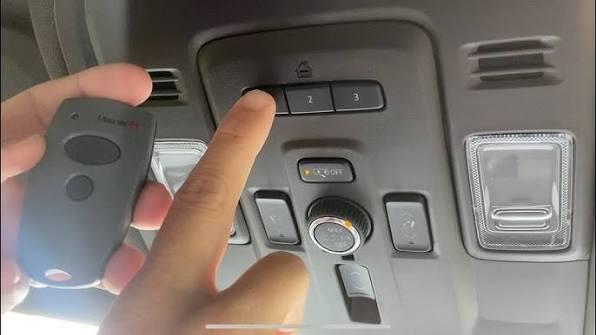
The 2019 GMC Sierra features HomeLink buttons typically located on the rearview mirror or overhead console. These buttons can store up to three different devices, making it convenient for households with multiple garage doors or gates.
Benefits of Using HomeLink in Your GMC Sierra
- Convenience: No need to carry separate remote controls
- Security: Rolling code technology prevents unauthorized access
- Versatility: Works with 95% of garage door openers manufactured after 1982
- Professional appearance: Integrated design maintains your vehicle’s aesthetic
Before You Begin: Essential Preparation Steps
Successful programming requires proper preparation. Follow these crucial steps before starting the programming process.
Gather Required Information
First, locate your garage door opener’s manual. You’ll need to identify whether your opener uses:
- Fixed code systems (older models)
- Rolling code systems (newer models with enhanced security)
Most garage door openers manufactured after 1993 use rolling code technology. Check your opener’s motor unit for a label indicating the brand and model number.
Ensure Proper Working Conditions
- Park your GMC Sierra outside the garage with clear line-of-sight to the opener
- Make sure your vehicle’s battery is fully charged
- Have a ladder ready if you need to access the garage door opener motor unit
- Keep your existing garage door remote handy as a backup
Safety First
Always ensure the garage door area is clear of people, pets, and objects before testing. Never attempt programming while the garage door is in motion.
Step-by-Step Guide: How to Program 2019 GMC Sierra Garage Door Opener
Follow these detailed instructions to successfully program your HomeLink system. The entire process typically takes 10-15 minutes.
Step 1: Clear Existing HomeLink Memory (If Necessary)
If your HomeLink buttons have been previously programmed, clear them first:
- Press and hold the two outer HomeLink buttons simultaneously
- Continue holding for approximately 20 seconds
- Watch for the indicator light to flash rapidly
- Release both buttons when the flashing begins
This ensures a clean slate for your new programming attempt.
Step 2: Position Your Vehicle Correctly
Proper positioning is critical for successful signal transmission:
- Park your 2019 GMC Sierra 6-10 feet away from the garage door opener motor
- Ensure no obstacles block the signal path
- Turn off your vehicle’s engine but keep the ignition in the “ON” position
- Close all windows and doors to minimize interference
Step 3: Initiate Programming Mode
- Choose which HomeLink button you want to program (1, 2, or 3)
- Press and hold your chosen HomeLink button
- While holding the HomeLink button, bring your original garage door remote within 1-3 inches of the HomeLink buttons
- Press and hold the button on your original remote that operates the garage door
- Continue holding both buttons until the HomeLink indicator light changes from slow to rapid flashing
This process may take 20-30 seconds. Be patient and maintain steady pressure on both buttons.
Step 4: Program the Garage Door Opener Unit
Now you need to teach your garage door opener to recognize the HomeLink signal:
- Locate the “Learn” or “Smart” button on your garage door opener motor unit
- This button is usually colored yellow, purple, orange, or red
- Press and release the Learn button (you have 30 seconds to complete the next step)
- Return to your vehicle and press the programmed HomeLink button three times
- Wait for the garage door to respond
Step 5: Test and Confirm Programming
Test your newly programmed HomeLink button:
- Press the HomeLink button once
- The garage door should activate
- If successful, the door will open or close accordingly
- Test the button multiple times to ensure consistent operation
Troubleshooting Common Programming Issues
Even with careful following of instructions, problems can occur. Here are solutions to common issues:
Problem: HomeLink Light Doesn’t Flash Rapidly
Solutions:
- Ensure you’re holding both buttons firmly
- Check that your original remote has fresh batteries
- Move closer to the HomeLink buttons (within 1 inch)
- Try a different HomeLink button
Problem: Garage Door Doesn’t Respond After Programming
Solutions:
- Verify you pressed the Learn button on the opener unit
- Ensure you completed the process within 30 seconds
- Check that your garage door opener isn’t in “lock” mode
- Repeat the entire programming sequence
Problem: Intermittent Operation
Solutions:
- Reposition your vehicle closer to the garage door opener
- Remove any metal objects that might interfere with the signal
- Check for electronic interference from nearby devices
- Consider reprogramming with a stronger signal
Fixed Code vs. Rolling Code: Understanding the Difference
| Feature | Fixed Code | Rolling Code |
|---|---|---|
| Security Level | Basic | Enhanced |
| Code Changes | Never changes | Changes with each use |
| Programming Complexity | Simpler | More complex |
| Prevalence | Pre-1993 models | Post-1993 models |
| Interference Risk | Higher | Lower |
Most 2019-compatible garage door openers use rolling code technology, which provides better security against code grabbing and unauthorized access.
Advanced Tips for Optimal Performance
Multiple Device Programming
Your 2019 GMC Sierra can store up to three different devices. To program additional devices:
- Choose an unused HomeLink button
- Follow the same programming steps
- Label each button for easy identification
Maintaining Strong Signal Strength
- Keep your windshield clean around the HomeLink area
- Avoid placing metallic objects near the rearview mirror
- Regularly test your HomeLink functionality
- Replace your garage door opener batteries annually
Compatibility Considerations
While HomeLink works with most garage door openers, some older or specialized systems may require additional components:
- Compatibility Bridge: Required for certain European brands
- External Receiver: Needed for very old systems
- Professional Installation: Recommended for complex multi-door setups
FAQ Section
Q: How long does it take to program a 2019 GMC Sierra garage door opener?
A: The programming process typically takes 10-15 minutes from start to finish. However, allow extra time for troubleshooting if you encounter issues. Having your garage door opener manual and original remote ready can speed up the process significantly.
Q: Can I program multiple garage doors to my 2019 GMC Sierra?
A: Yes, the 2019 GMC Sierra’s HomeLink system can store up to three different devices. Each button can be programmed to operate a separate garage door, gate, or other compatible device. Simply follow the programming steps for each additional device using a different HomeLink button.
Q: What should I do if my HomeLink stops working after initial programming?
A: First, check your garage door opener’s power source and ensure it’s functioning properly with the original remote. If the opener works normally, try reprogramming the HomeLink system. Sometimes, power outages or opener resets can erase the learned codes. If problems persist, consult your GMC dealer or a professional installer.
Q: Is it safe to program HomeLink while sitting in my vehicle?
A: Yes, programming HomeLink while seated in your vehicle is completely safe. In fact, it’s recommended because you need to be inside the vehicle to access the HomeLink buttons. Just ensure your vehicle is parked safely outside the garage with the engine off but ignition on.
Q: Will programming HomeLink void my vehicle warranty?
A: No, programming HomeLink will not void your vehicle warranty. HomeLink is a factory-installed feature designed for user programming. However, improper installation of aftermarket garage door openers could potentially affect warranty coverage. Always follow manufacturer guidelines and consider professional installation for complex systems.
Q: Can I use HomeLink with smart garage door openers?
A: Most smart garage door openers are compatible with HomeLink, but you may need to enable compatibility mode in your opener’s settings. Some newer smart openers use Wi-Fi or Bluetooth technology alongside traditional radio frequencies. Check your smart opener’s manual for specific HomeLink compatibility instructions.
Conclusion
Learning how to program 2019 GMC Sierra garage door opener systems doesn’t have to be complicated. With proper preparation and careful attention to detail, you can have your HomeLink system operational in under 15 minutes. The convenience of controlling your garage door directly from your truck’s interior is well worth the initial setup effort.
Remember to keep your garage door opener manual accessible, ensure proper vehicle positioning, and don’t hesitate to repeat the process if needed. Most programming issues stem from rushing through the steps or inadequate signal strength.
Found this guide helpful? Share it with fellow GMC Sierra owners on social media! Your friends and family will appreciate having a reliable resource for their HomeLink programming needs.
For additional support, consult your 2019 GMC Sierra owner’s manual or contact your local GMC dealership. They can provide model-specific guidance and professional assistance if you encounter persistent issues.
Leave a Reply