Are you tired of juggling multiple remotes and visor clips every time you pull into your driveway? You are certainly not alone, and figuring out how to program 2019 Dodge Ram garage door opener systems is actually much simpler than it looks. In this guide, we will walk you through the exact steps to sync your vehicle’s built-in system with your garage in just a few minutes.
How To Program 2019 Dodge Ram Garage Door Opener: What You Need
Before we dive into the actual steps, let us gather everything you need for a smooth setup. The 2019 Dodge Ram (including the 1500, 2500, and 3500 models) comes equipped with the HomeLink transceiver system. This system is typically located on the overhead console, near your rearview mirror.
To get started, you will need:
- Your 2019 Dodge Ram with the ignition turned to the “ON/RUN” position (the engine does not need to be running).
- The original, hand-held garage door remote you want to sync.
- A fresh battery in your hand-held remote (a weak battery is the #1 cause of programming failure).
- A sturdy step ladder if you need to reach the motor unit in your garage later.
According to industry data, over 40 million vehicles on the road today feature integrated garage door openers. The HomeLink system is a universally trusted standard that significantly reduces the daily hassle of lost or broken remotes.
Step-by-Step Guide: Standard Programming
If your garage door opener was manufactured after 1996, it likely uses “rolling code” technology. However, let us start with the universal first step to clear the system and begin the pairing process.
Step 1: Clear the HomeLink Memory
If your 2019 Ram is new to you, or if you are replacing an old code, you must clear the memory first.
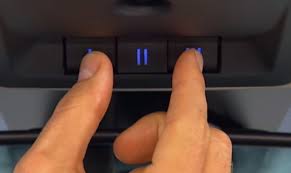
- Locate the two outer buttons on the HomeLink console.
- Press and hold both outer buttons simultaneously.
- Keep holding them for about 10 to 20 seconds.
- Watch the LED indicator light. Once it begins to blink rapidly, release the buttons. The memory for all three buttons is now erased.
Step 2: Initiate the Learning Mode
Think of this step like introducing two friends so they can shake hands.
- Decide which of the three HomeLink buttons you want to use (Left, Middle, or Right).
- Hold your original garage door remote 1 to 3 inches away from the HomeLink button you chose.
- Press and hold the button on your original remote.
- Simultaneously, press and hold the corresponding button on your HomeLink console.
- Watch the LED light on the HomeLink system. It will start by blinking slowly, and then it should switch to a rapid blink.
- Once it blinks rapidly, release both buttons. This indicates a successful standard frequency capture.
Step 3: Test the Connection
Turn your ignition completely off, and then turn it back to the “ON/RUN” position. Press and release the newly programmed HomeLink button. If your garage door activates, congratulations! You are done.
If the LED light stays solid and the door does not move, you likely have a rolling code opener. Do not worry; proceed to the next section.
How to Sync a “Rolling Code” Garage Door Opener
Most modern garage doors use rolling code technology for enhanced security. This means the code changes every single time you use the remote. If your standard programming failed, here is how to program 2019 Dodge Ram garage door opener systems with rolling codes.
Step 1: Locate the “Learn” Button on Your Garage Motor
You will need to go out to your actual garage door motor unit (the box hanging from the ceiling).
- Look for a colored “Learn” or “Smart” button on the back or side of the motor.
- This button is usually purple, orange, red, or yellow, depending on the brand (like Chamberlain, LiftMaster, or Genie).
Step 2: Press the Learn Button
- Press and release the colored “Learn” button on the motor unit.
- The indicator light next to the button will illuminate or start blinking. You usually have exactly 30 seconds to complete the next step before the motor times out.
Step 3: Finalize the Sync in Your Ram
- Return to your 2019 Dodge Ram immediately.
- Find the HomeLink button you previously programmed in Step 2.
- Press and hold this HomeLink button.
- Hold it for about 2 to 5 seconds, then release it.
- If you need to, press and hold it a second time until the garage door motor responds or you hear a distinct “click” from the ceiling unit.
Your 2019 Dodge Ram is now fully synced!
Pros and Cons of Using an Integrated System
Why go through the trouble of programming your truck’s built-in system instead of just using a visor clip? Let us look at the practical benefits.
| Feature | Integrated HomeLink System | Traditional Visor Clip Remote |
|---|---|---|
| Convenience | High. Always in the exact same place on the ceiling console. | Medium. Prone to falling off the visor or getting lost in the cabin. |
| Aesthetics | Excellent. Keeps your truck interior clean and clutter-free. | Poor. Dangling remotes can block your view or look messy. |
| Battery Life | Superior. Draws power directly from the vehicle; no battery swaps. | Low. Requires frequent CR2032 battery replacements. |
| Theft Security | High. If the truck is locked, the system is inaccessible. | Low. If a thief breaks a window, the remote is right there. |
Troubleshooting Common Programming Issues
Even with a perfect guide, technology can sometimes be stubborn. Here are the most common issues users face and how to fix them.
- The LED blinks rapidly but the door won’t move: This almost always means you skipped the rolling code step. Go back to your garage motor and press the “Learn” button, then return to the truck to press the HomeLink button.
- The LED never blinks during Step 2: Your original remote likely has a dead battery. Replace it and try again. Also, ensure you are holding the remote close enough (1-3 inches) to the overhead console.
- The door works, but only from 5 feet away: This indicates radio frequency interference. Ensure your LED garage door bulbs are shielded. Non-shielded LED bulbs emit radio noise that blocks the HomeLink signal.
Frequently Asked Questions (FAQ)
1. How many garage doors can I program in my 2019 Dodge Ram?
The HomeLink system in the 2019 Dodge Ram features three separate buttons. This means you can program up to three different devices, such as a main garage door, a side gate, or a neighborhood community entry gate.
2. Do I need the original remote to program the 2019 Dodge Ram?
For the initial setup, yes. You need the original remote to teach the HomeLink system the correct radio frequency. Once it is programmed, you do not need the original remote in the vehicle anymore. However, keep it in your house as a backup.
3. Why is my HomeLink light blinking rapidly before I even start?
If the light is blinking rapidly before you press anything, it means the system is already in programming mode or there is a residual memory glitch. Simply turn the ignition off, wait 10 seconds, and turn it back on to reset the console.
4. Can I program a garage door without a “Learn” button on the motor?
Yes, but it is rare. If your motor is very old (pre-1996) and lacks a Learn button, the standard Step 2 mentioned earlier will work perfectly on the first try without needing to go to the ceiling motor.
5. Will programming a new door erase my old settings?
No. Because there are three independent buttons, programming a new door into Button 1 will not affect the settings saved in Button 2 or Button 3
Leave a Reply