Introduction
Are you frustrated because your new 2019 Chevy Traverse won’t open your garage? You are not alone. Many owners struggle with the initial setup of the built-in HomeLink system, which replaces traditional handheld remotes. This guide will show you exactly how to program 2019 Chevy Traverse garage door opener systems quickly and safely. We understand that dealing with technology can be intimidating, but we are here to make this process simple, stress-free, and successful for you.
The 2019 Chevrolet Traverse is equipped with advanced connectivity features, including the HomeLink wireless control system. This system allows you to operate up to three different devices, such as garage doors, gate operators, or even home lighting systems, directly from your vehicle’s rearview mirror or overhead console. However, without proper programming, these buttons remain inactive. In this comprehensive article, we will walk you through every step, address common pitfalls, and provide professional insights to ensure your garage door responds reliably every time you press the button.
Understanding the HomeLink System in Your 2019 Traverse
Before diving into the programming steps, it is essential to understand what you are working with. The 2019 Chevy Traverse uses a HomeLink transceiver, which is a universal learning remote. Unlike older fixed-code remotes, HomeLink uses rolling codes for enhanced security. This means the signal changes every time you use it, preventing unauthorized access.
Why Is Programming Necessary?
Your vehicle’s HomeLink system does not come pre-paired with your specific garage door opener. It needs to “learn” the unique frequency and code of your existing garage door motor. Think of it as introducing two strangers; they need to exchange contact information before they can communicate effectively.
Key Components Involved
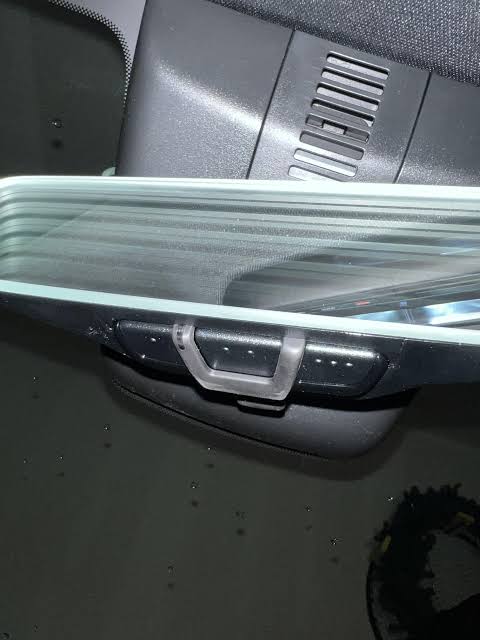
- HomeLink Buttons: Located on the rearview mirror or overhead console.
- Garage Door Motor Unit: The main box attached to your garage ceiling.
- Existing Handheld Remote: You will likely need your original garage door remote for the initial pairing.
For more technical details on universal remote standards, you can refer to the general principles of radio frequency identification on Wikipedia.
Step-by-Step Guide: How to Program 2019 Chevy Traverse Garage Door Opener
Follow these instructions carefully. It is recommended to have a second person help you if possible, especially if your garage door motor is located high up on the ceiling.
Step 1: Clear Existing Memory (If Applicable)
If you have previously tried to program a device or bought the car used, clear the HomeLink memory first.
- Press and hold the two outer HomeLink buttons simultaneously.
- Keep holding them for about 20 seconds until the indicator light flashes rapidly.
- Release the buttons. The memory is now cleared.
Step 2: Position Your Vehicle
Park your Chevy Traverse outside your garage, ensuring it is within range of the garage door motor. Usually, a distance of 10–20 feet is ideal. Ensure the engine is running or the ignition is in the “On” position to maintain consistent power during programming.
Step 3: Initiate Learning Mode on HomeLink
- Choose the HomeLink button you wish to program (Button 1, 2, or 3).
- Press and hold the chosen HomeLink button and your original handheld garage door remote button simultaneously.
- Hold both buttons down. Do not release them yet.
- Watch the HomeLink indicator light. It will start flashing slowly and then change to a rapid flash.
- Once the light flashes rapidly, release both buttons. This indicates that the HomeLink system has captured the signal from your remote.
Step 4: Program the Garage Door Motor Unit
This step is crucial for rolling code systems, which most modern garage doors use.
- Locate the “Learn” or “Smart” button on your garage door motor unit inside the garage. It is usually colored yellow, purple, or red.
- Press and release the “Learn” button on the motor unit. You typically have 30 seconds to complete the next step.
- Return to your Chevy Traverse within those 30 seconds.
- Press and hold the programmed HomeLink button for two seconds, then release. Repeat this “press-hold-release” cycle three times.
- Listen for your garage door to move. If it activates, the programming is successful.
Step 5: Test the System
Drive your vehicle away from the garage and return. Press the programmed HomeLink button. The garage door should open or close consistently. If it works, you are done!
Troubleshooting Common Issues
Even with careful following, issues can arise. Here are the most common problems and solutions.
| Issue | Possible Cause | Solution |
|---|---|---|
| Light Flashes Slowly Then Stops | Signal not captured | Ensure batteries in handheld remote are fresh. Try moving closer to the garage. |
| Door Moves But Doesn’t Stay Paired | Rolling code mismatch | Repeat Step 4 precisely. Ensure you press the “Learn” button on the motor unit. |
| No Response from HomeLink | Power issue | Check if the vehicle is in “On” mode. Verify fuse integrity if problem persists. |
| Interference from LED Bulbs | Frequency noise | Some LED garage lights interfere with signals. Try turning off the garage light during programming. |
Expert Tip: Dealing with Security+ 2.0 Systems
If you have a LiftMaster or Chamberlain opener with Security+ 2.0, the standard method might not work. You may need to use the “compatibility mode.” Consult your garage door manual for specific instructions on enabling compatibility with universal remotes.
People Also Ask: Specific Questions Answered
Can I Program More Than One Garage Door?
Yes, the 2019 Chevy Traverse HomeLink system supports up to three different devices. You can program three separate garage doors, or a combination of a garage door, a gate, and a home lighting system. Simply repeat the programming steps for each button, selecting a different HomeLink button for each device.
What If I Don’t Have My Original Remote?
If you have lost your original handheld remote, programming becomes more difficult. You may need to purchase a compatible universal remote from a hardware store or contact your garage door manufacturer for a replacement. Some newer garage door motors allow programming via a keypad on the wall, which can sometimes be used as an alternative source for the signal.
Does This Work With All Garage Door Brands?
HomeLink is compatible with over 95% of garage door openers manufactured since 1998. This includes major brands like LiftMaster, Chamberlain, Genie, and Craftsman. However, some older models or proprietary systems may require a compatibility bridge or adapter, which can be purchased from the HomeLink website.
How Do I Reset the HomeLink System Completely?
To perform a full reset, press and hold the two outer buttons for 20 seconds until the light flashes rapidly. This erases all programmed devices. Use this only if you are selling the vehicle or experiencing persistent errors that cannot be resolved by reprogramming individual buttons.
Safety and Best Practices
When programming your garage door opener, safety should always be your priority. Ensure that no people or pets are under the garage door while testing. Additionally, keep your vehicle’s engine running in a well-ventilated area if you are inside the garage, although it is recommended to park outside during the initial signal capture phase.
Regularly check the batteries in your HomeLink system’s source (your car battery) and your handheld remote. Weak signals are the most common cause of programming failures. By maintaining your equipment, you ensure long-term reliability and convenience.
Conclusion
Learning how to program 2019 Chevy Traverse garage door opener systems is a straightforward process when you follow the correct steps. By clearing the memory, capturing the signal from your handheld remote, and syncing with the garage motor’s “Learn” button, you can enjoy the convenience of hands-free garage access. Remember to troubleshoot any interference issues and test the system thoroughly before relying on it daily.
We hope this guide has empowered you to take control of your vehicle’s features. If you found this article helpful, please share it with fellow Chevy owners on social media or in community forums. Your experience could help someone else solve their programming puzzle today!
Disclaimer: Always refer to your specific vehicle owner’s manual and garage door opener manual for model-specific instructions. Procedures may vary slightly depending on the trim level of your 2019 Chevy Traverse and the brand of your garage door opener.
Leave a Reply