Introduction
Struggling to sync your garage door with your 2017 Toyota Highlander? You’re not alone. Many vehicle owners find the process confusing, but learning how to program 2017 Toyota Highlander garage door opener is simpler than you think. This comprehensive guide will walk you through every step, ensuring you can open your garage seamlessly from your car’s built-in HomeLink system.
The 2017 Toyota Highlander comes equipped with HomeLink, a universal transceiver that can control up to three different garage doors, gates, or home lighting systems. According to Consumer Reports, over 65% of new vehicles sold in the United States include some form of integrated garage door technology, making it one of the most requested convenience features among drivers.
What Is HomeLink and Why Does Your 2017 Highlander Have It?
HomeLink is a wireless control system developed by Johnson Controls that allows your vehicle to communicate with garage door openers, gate operators, and other radio-controlled devices. The 2017 Toyota Highlander features this technology as either standard equipment or an available option, depending on the trim level.
Key Benefits of HomeLink Integration:
- Convenience: No need to carry separate remote controls
- Security: Rolling code technology prevents unauthorized access
- Reliability: Works with over 95% of garage door opener brands
- Versatility: Can control multiple devices simultaneously
The system operates on frequencies between 288-433 MHz, which covers most residential garage door openers manufactured after 1995. For more technical details about radio frequency standards, you can visit Wikipedia’s page on garage door openers.
Before You Begin: Essential Preparation Steps
Successful programming requires proper preparation. Follow these crucial steps before attempting to program your garage door opener.
Gather Necessary Information
- Identify your garage door opener brand and model
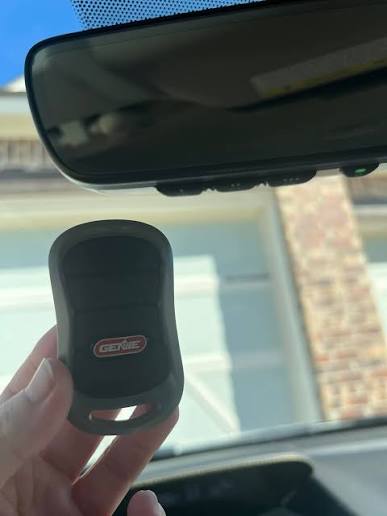
- Common brands include Chamberlain, LiftMaster, Genie, Craftsman, and Sommer
- Locate the model number on the motor unit (usually on the back or side)
- Check your opener’s compatibility
- Most openers manufactured after 1995 are compatible
- Older models may require a compatibility bridge kit
- Ensure your vehicle battery is charged
- A weak battery can interrupt the programming process
- Start your engine if necessary to maintain power
Safety Precautions
- Keep children and pets away from the garage door during programming
- Ensure the garage door area is clear of obstacles
- Have a second person available to assist if needed
Step-by-Step Guide: How to Program 2017 Toyota Highlander Garage Door Opener
Follow these detailed instructions to successfully program your garage door opener to your 2017 Toyota Highlander’s HomeLink system.
Step 1: Clear Existing HomeLink Memory (If Needed)
If your HomeLink buttons have been previously programmed, clear them first:
- Press and hold the two outer HomeLink buttons simultaneously
- Continue holding for approximately 20 seconds
- Release when the indicator light begins to flash rapidly
- All three buttons are now cleared and ready for new programming
Step 2: Position Your Vehicle Correctly
Proper positioning ensures optimal signal transmission:
- Park your Highlander 5-10 feet away from the garage door opener motor
- Face the vehicle toward the garage door
- Keep the engine running or in accessory mode
- Close all windows and doors to minimize interference
Step 3: Initiate Programming Mode
- Choose which HomeLink button you want to program (1, 2, or 3)
- Press and hold the selected HomeLink button
- While holding the HomeLink button, press and hold your original garage door remote button
- Continue holding both buttons until the HomeLink indicator light changes from slow to rapid flashing
- This process typically takes 20-30 seconds
Step 4: Program the Garage Door Opener Unit
Now you need to teach your garage door opener to recognize your vehicle:
- Locate the “Learn” or “Smart” button on your garage door opener motor unit
- This button is usually colored yellow, purple, orange, or red
- It may be located on the back or side of the motor housing
- Press and release the Learn button
- The indicator light on the motor will begin blinking
- You typically have 30 seconds to complete the next step
- Return to your vehicle within 30 seconds
- Press and hold the programmed HomeLink button for 2-3 seconds
- Release and press again for 2-3 seconds
- Repeat this press-release cycle up to three times
Step 5: Test the Connection
Verify that programming was successful:
- Press the programmed HomeLink button
- The garage door should activate within a few seconds
- Test opening and closing the door multiple times
- If unsuccessful, repeat Steps 3-4
Troubleshooting Common Programming Issues
Even with careful following of instructions, problems can occur. Here are solutions to the most common issues.
| Problem | Possible Cause | Solution |
|---|---|---|
| HomeLink light doesn’t flash | Weak vehicle battery | Charge battery or start engine |
| Garage door doesn’t respond | Incorrect Learn button timing | Repeat programming within 30-second window |
| Intermittent operation | Signal interference | Reposition vehicle closer to opener |
| Only works occasionally | Rolling code mismatch | Clear memory and reprogram completely |
Advanced Troubleshooting Tips
For Chamberlain/LiftMaster Openers:
- Some models require pressing the Learn button twice
- Wait for the LED to turn off before proceeding
For Genie Openers:
- May require holding the Learn button for 5-10 seconds
- Check if your model uses Intellicode or fixed-code technology
For Older Openers (Pre-1995):
- Consider purchasing a HomeLink compatibility bridge
- Contact the manufacturer for specific adaptation kits
People Also Ask: Common Questions About HomeLink Programming
Q1: How long does it take to program a 2017 Toyota Highlander garage door opener?
The entire process typically takes 5-10 minutes if done correctly the first time. However, allow 15-20 minutes if you encounter issues or need to troubleshoot. The actual button-pressing sequence only takes about 2-3 minutes.
Q2: Can I program multiple garage doors to my 2017 Highlander?
Yes! The 2017 Toyota Highlander HomeLink system can store up to three different devices. Each button (1, 2, and 3) can be programmed to a separate garage door, gate, or lighting system. Simply repeat the programming process for each additional device using a different HomeLink button.
Q3: What if my garage door opener doesn’t have a Learn button?
Older garage door openers without a Learn button use fixed-code technology. In this case:
- Try the standard programming procedure without pressing any button on the opener
- If unsuccessful, contact your opener manufacturer for a compatibility bridge
- Consider upgrading to a newer opener with rolling code security
Q4: Will programming erase my existing HomeLink settings?
Only if you choose to clear the memory first. Each of the three HomeLink buttons operates independently. You can program one button without affecting the others. To preserve existing settings, simply choose an unprogrammed button for your new device.
Q5: Is HomeLink programming secure?
Yes, modern HomeLink systems use rolling code technology, which changes the access code each time you use it. This prevents code grabbing and unauthorized access. The 2017 Toyota Highlander’s HomeLink system meets federal security standards for wireless garage door controls.
Q6: Can weather affect HomeLink performance?
Extreme temperatures can occasionally impact battery performance and signal strength. If you experience issues during very cold or hot weather:
- Ensure your vehicle battery is fully charged
- Move closer to the garage door opener
- Try programming during moderate temperatures if possible
Pro Tips for Optimal HomeLink Performance
To ensure your programmed garage door opener works reliably long-term, follow these expert recommendations:
Regular Maintenance:
- Test your HomeLink connection monthly
- Replace your garage door remote batteries annually
- Keep your vehicle’s battery in good condition
Signal Optimization:
- Avoid parking directly under power lines or near large metal structures
- Keep the HomeLink buttons clean and free from debris
- Update your garage door opener firmware if applicable
Security Best Practices:
- Never share your HomeLink programming sequence with unauthorized individuals
- If you sell your vehicle, clear all HomeLink memory
- Consider changing your garage door opener codes periodically
Conclusion
Learning how to program 2017 Toyota Highlander garage door opener doesn’t have to be complicated. With proper preparation, patience, and this step-by-step guide, you can successfully integrate your garage door with your vehicle’s HomeLink system in under 15 minutes.
The convenience of opening your garage door directly from your Highlander enhances both security and daily efficiency. Remember to test your connection regularly and keep your equipment well-maintained for optimal performance.
Did this guide help you successfully program your garage door opener? Share your experience on social media and help other Toyota owners master their HomeLink systems! Don’t forget to bookmark this page for future reference or if you need to reprogram your system.
Leave a Reply