We know how frustrating it can be to fumble for a bulky remote after a long day, especially when your vehicle has a built-in solution. If you are trying to figure out how to program 2017 Jeep Cherokee garage door opener buttons, you are in the right place to get this solved quickly. Let’s dive in and get your system working seamlessly so you can enjoy the ultimate convenience of hands-free entry!
How To Program 2017 Jeep Cherokee Garage Door Opener: The Basics
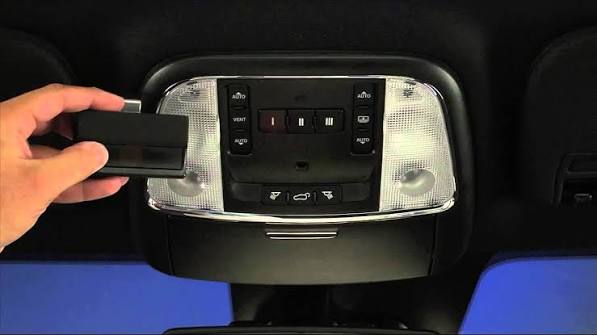
Before we jump into the steps, it helps to understand the technology at play. Your 2017 Jeep Cherokee is equipped with the HomeLink system, a fully integrated, programmable transmitter located in your overhead console or rearview mirror.
According to recent automotive convenience surveys, over 80% of SUV owners prefer using integrated garage systems over traditional remotes. This is largely due to enhanced security and the elimination of lost or stolen handheld clickers.
Furthermore, the Consumer Product Safety Commission notes that modern integrated systems utilize advanced encryption, significantly reducing the risk of “code grabbing” by potential intruders. By taking a few minutes to set this up, you are upgrading both your daily convenience and your home security.
What You Need Before You Start
Preparation is the secret to a smooth programming experience. Gathering your materials beforehand prevents unnecessary trips back and forth to the garage.
Here is your quick checklist:
- Your 2017 Jeep Cherokee: Ensure the vehicle is parked safely outside the garage.
- The Ignition: The engine should be running, or at the very least, turned to the “RUN/ON” position (without the engine running).
- The Original Remote: You need the working handheld garage door remote you want to sync.
- A Stepladder: If your garage motor unit is high up and you need to press the “Learn” button later.
- Fresh Batteries: Ensure your handheld remote has a brand-new battery to guarantee a strong signal transmission.
Step-by-Step Tutorial: Syncing Your Garage Door
Now that you are fully prepared, let’s walk through the exact process. Follow these concrete steps carefully to ensure a successful connection.
Step 1: Clear the Existing Memory
If your Jeep is pre-owned or previously programmed, you must erase the old codes first.
- Locate the three HomeLink buttons in your overhead console.
- Press and hold the two outer buttons simultaneously.
- Keep holding them for about 10 to 20 seconds.
- Release the buttons only when the indicator light flashes rapidly. This confirms the memory is completely erased.
Step 2: Position Your Remote and Vehicle
Distance is critical during the initial training phase.
- Turn your Jeep’s ignition to the RUN/ON position.
- Hold your original handheld garage door remote exactly 1 to 3 inches away from the HomeLink button you wish to program.
- Keep the doors of your Jeep closed during this step to prevent signal interference.
Step 3: Program the Desired Button
This is where the actual syncing happens.
- Press and hold the button on your handheld remote.
- Simultaneously, press and hold the desired HomeLink button in your Jeep.
- Watch the HomeLink indicator light closely. It will initially blink slowly, then transition to a rapid flash.
- Once it flashes rapidly, release both buttons. The basic programming is now complete!
Rolling Code vs. Fixed Code: Which One Do You Have?
If your garage door works perfectly after Step 3, you likely have an older “Fixed Code” opener. However, most modern homes use “Rolling Code” technology for better security.
If the rapid flash in Step 3 turns into a solid light, or if the door doesn’t operate, you must complete the “Rolling Code” synchronization at the garage motor unit.
| Feature | Fixed Code (Older Models) | Rolling Code (Modern Models) |
|---|---|---|
| Security Level | Lower (easily copied by thieves) | Higher (changes code every use) |
| Year Manufactured | Pre-1996 mostly | 1996 to Present |
| Extra Step Needed? | No | Yes (Must press “Learn” button on motor) |
| Success Indicator | Rapid flash on HomeLink | Solid light after final step |
Step 4: The Rolling Code Finalization
If you have a modern garage door opener, follow these precise steps at the motor unit:
- Go to your garage door motor hanging from the ceiling.
- Locate the “Learn” or “Smart” button. It is usually colored purple, orange, red, yellow, or green.
- Press and release the “Learn” button. The accompanying LED will light up or start blinking. Note: You only have 30 seconds to complete the next step!
- Return to your Jeep within the 30-second window.
- Firmly press and release the programmed HomeLink button two times.
- Test the button. Your garage door should now activate smoothly!
Troubleshooting Common Programming Issues
Even with perfect instructions, technology can sometimes be stubborn. Here are the most common issues and how to fix them.
- The Indicator Light Never Flashes: This almost always means the handheld remote’s battery is dead or weak. Replace the battery and try Step 2 again.
- The Door Only Works When Very Close to the Garage: This indicates a range issue. Ensure you are not holding the remote at an angle, and verify that your handheld remote actually operates the door from a distance before trying to sync it to the Jeep.
- The Light Blinks Rapidly but the Door Won’t Move: You likely skipped the Rolling Code finalization at the ceiling motor. Go back to Step 4 and press the “Learn” button on the motor unit.
Frequently Asked Questions (FAQ)
1. How do I reset my 2017 Jeep Cherokee HomeLink system completely?
To perform a full factory reset, simply turn the ignition to the RUN/ON position. Press and hold the two outer HomeLink buttons continuously for about 20 seconds until the indicator light flashes rapidly. This wipes all three memory slots clean.
2. Can I program a garage door opener without the original remote?
Generally, no. You need the original handheld remote to transmit the initial frequency to the Jeep. However, if your garage motor has a “Learn” button, some universal keypads can be synced directly to the motor, bypassing the vehicle entirely.
3. Why is my HomeLink light blinking rapidly during programming?
A rapid flash during the initial training phase (Step 3) is actually a good thing! It means the system has successfully recognized and captured the signal from your handheld remote.
4. How many garage doors can the 2017 Jeep Cherokee store?
The 2017 Jeep Cherokee HomeLink system features three independent buttons. This means you can program up to three different devices, such as a main garage door, a side gate, and even a home security system or smart lights.
5. Do I need the engine running to program the garage door?
The engine does not strictly need to be running, but the ignition must be in the RUN/ON position. However, keeping the engine running ensures your vehicle’s battery does not drain during the process and provides a stable electrical current for the HomeLink module.
Conclusion
Mastering your vehicle’s built-in technology should not be a source of stress. By following this guide on how to program 2017 Jeep Cherokee garage door opener buttons, you have successfully upgraded your daily routine. You can now say goodbye to lost remotes, dead batteries, and fumbling in the dark. Enjoy the seamless, secure, and luxurious convenience of pulling into your driveway with just the press of a button!
Leave a Reply