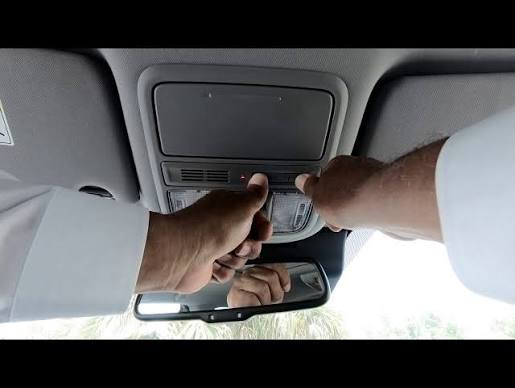
Have you ever pulled into your driveway, pressed the button on your car’s ceiling, and watched in frustration as your garage door remained stubbornly closed? It is a common annoyance for many drivers, but the good news is that fixing it is usually straightforward. If you are wondering how to program 2016 Honda Pilot garage door opener systems, you have come to the right place to get your HomeLink system synced up quickly and safely.
The 2016 Honda Pilot comes equipped with the HomeLink universal transceiver, a feature designed to replace up to three separate remote controls for your garage door, gate, or even home lighting. However, unlike older mechanical remotes, this digital system requires a specific synchronization process to communicate with your garage door opener motor. Whether you have just bought the vehicle, replaced your garage motor, or simply lost the sync, this guide will walk you through every step.
Understanding the HomeLink System in Your 2016 Pilot
Before we dive into the buttons and lights, it helps to understand what is happening under the hood. The HomeLink system in your 2016 Honda Pilot is not a magical device; it is a radio frequency transmitter that mimics the signal of your original handheld remote.
According to Wikipedia, HomeLink is a brand name for a vehicle integrated universal transmitter developed by Johnson Controls. It is designed to work with most major garage door opener brands, including LiftMaster, Chamberlain, Genie, and Craftsman.
Why Does Programming Fail?
Many users struggle because they skip the “clearing” phase or do not hold the buttons long enough. The 2016 Pilot uses a rolling code security feature for many modern garage doors. This means the code changes every time you press the button to prevent hacking. If your car and garage are not perfectly synchronized on the same “code cycle,” the door will not open.
Step-by-Step: How to Program 2016 Honda Pilot Garage Door Opener
Follow these instructions carefully. You will need your original handheld garage door remote and access to your garage door motor unit (usually mounted on the ceiling of your garage).
Step 1: Clear Existing Memory
If you are reprogramming a button that was previously used, or if the system is acting erratically, you must clear the memory first.
- Turn your ignition to the ON position (you do not need to start the engine, just ensure the dashboard lights are on).
- Locate the two outer HomeLink buttons on your overhead console.
- Press and hold both outer buttons simultaneously.
- Keep holding them for about 20 seconds.
- Watch the indicator light. It will start to flash slowly, then rapidly. Once it flashes rapidly, release the buttons.
- The memory is now cleared.
Step 2: Choose Your Button
Decide which of the three HomeLink buttons you want to use for your garage door. For this guide, we will assume you are using the first button.
Step 3: Initiate Training Mode
- With the ignition still ON, press and hold the desired HomeLink button.
- Do not release it yet. The indicator light will begin to flash slowly. This indicates the system is ready to learn a new signal.
Step 4: Sync with Your Handheld Remote
This is the critical step where most people make mistakes. Precision is key here.
- Take your original handheld garage door remote.
- Hold it 1 to 3 inches away from the HomeLink buttons on your Honda Pilot’s ceiling.
- While continuing to hold the HomeLink button down, press and hold the button on your handheld remote.
- Keep both buttons pressed.
- Watch the HomeLink indicator light. It will change from a slow flash to a rapid flash.
- Once the light flashes rapidly, release both buttons.
Note: If the light does not flash rapidly after 30 seconds, try moving the handheld remote slightly closer or further away. Some remotes have stronger signals than others.
Step 5: Test the Connection
Press the programmed HomeLink button in your car. The garage door should activate. If it does, you are done! If it does not, proceed to the “Rolling Code” section below, as your system likely requires an extra security step.
Handling Rolling Code Systems (LiftMaster, Chamberlain, Genie)
Most garage door openers manufactured after 1995 use rolling code technology. If your door did not respond in Step 5, or if it only works once and then stops, you need to complete the rolling code synchronization at the motor unit.
Locating the “Learn” Button
Go to your garage door motor unit hanging from the ceiling. Look for a small button, often colored yellow, purple, orange, or red. It may be labeled “Learn,” “Smart,” or “Program.” There is usually an LED light next to it.
The Final Sync Process
- Press the “Learn” button on the motor unit firmly. The LED light on the motor will turn on or blink. You typically have 30 seconds to complete the next step.
- Return to your Honda Pilot immediately.
- Press and hold the programmed HomeLink button for two seconds, then release it.
- Repeat this press-and-release cycle three times.
- Press (2 seconds) – Release
- Press (2 seconds) – Release
- Press (2 seconds) – Release
- Watch the garage door. It should move up or down, indicating the codes are now synced.
Troubleshooting Common Issues
Even with careful following of instructions, things can go wrong. Here is a breakdown of common problems and solutions.
| Issue | Possible Cause | Solution |
|---|---|---|
| Light flashes rapidly immediately | Battery in handheld remote is weak. | Replace the battery in your handheld remote and try again. |
| Door moves but stops halfway | Safety sensors are blocked or misaligned. | Check the infrared sensors near the floor of your garage tracks. Clean lenses and ensure they face each other. |
| HomeLink light stays solid | Programming mode was not exited properly. | Clear the memory (Step 1) and restart the process from the beginning. |
| Works intermittently | Signal interference. | Try programming with the car parked closer to the garage door. Avoid having other electronics nearby. |
Expert Tip: Distance Matters
When programming, the distance between the handheld remote and the HomeLink module is crucial. If you hold the remote too far away (more than 3 inches), the signal may be too weak to be captured. If you hold it too close (touching), it might cause signal distortion. The “sweet spot” is usually about the width of your thumb away from the buttons.
Frequently Asked Questions (FAQ)
1. Can I program more than one garage door to my 2016 Honda Pilot?
Yes, the HomeLink system in the 2016 Pilot has three separate channels. You can program up to three different devices, such as two garage doors and a gate, or a garage door and home lighting system. Each button is programmed independently using the steps above.
2. What if I don’t have my original handheld remote?
Programming without the original remote is difficult but possible for some older fixed-code systems. However, for rolling code systems (most modern doors), you generally cannot program the car without the original remote. In this case, you may need to contact a professional garage door technician to clone the signal or reset the motor unit entirely.
3. Why does my garage door reverse immediately after closing?
This is rarely a HomeLink issue. It is almost always a problem with the garage door’s safety sensors or force settings. Check the sensors at the base of the door tracks to ensure they are aligned and clean. If the sensors are fine, you may need to adjust the “down force” setting on the motor unit itself.
4. Does the car need to be running to program the HomeLink?
No, the engine does not need to be running. However, the ignition must be in the ON or ACC position so that the electrical system is active. If the car is completely off, the HomeLink module will not receive power to enter programming mode.
5. How do I know if my garage door uses rolling codes?
Check the manufacturing date on your garage door motor. If it was made after 1995, it likely uses rolling codes. Additionally, if your original remote has a small LED light that blinks when you press it, it is almost certainly a rolling code remote. Fixed-code remotes typically do not have blinking lights.
6. Can I erase just one button without clearing all three?
Unfortunately, no. The Honda HomeLink system does not allow for individual button deletion. To remove one device, you must clear the entire memory of all three buttons using the “Clear Existing Memory” step (holding the two outer buttons) and then reprogram the devices you wish to keep.
Conclusion
Learning how to program 2016 Honda Pilot garage door opener systems does not have to be a headache. By understanding the difference between standard and rolling code systems, and by following the precise timing required for button presses, you can restore convenience to your daily commute. Remember, patience is key—especially when dealing with the rolling code synchronization at the motor unit.
Now that your garage door is syncing perfectly with your Honda Pilot, you can enjoy the seamless entry you paid for. Did this guide help you get back on track? Share this article with fellow Honda owners on Facebook or Twitter who might be struggling with their HomeLink setup. Safe driving!
Leave a Reply