Introduction
There are few things more frustrating than pulling into your driveway after a long day, only to realize you still have to fumble for a separate remote or get out of the car to open the garage manually. If you own this specific SUV model, mastering how to program 2010 Lexus RX 350 garage door opener functionality is essential for daily convenience and vehicle security. The built-in HomeLink system is designed to replace your handheld remotes, but the pairing process can be confusing if you don’t have the exact factory specifications at hand. This comprehensive guide will walk you through every step with empathy and precision, ensuring you get your system synced correctly without damaging your vehicle’s electronics or voiding warranties.
Understanding Your 2010 Lexus RX 350 HomeLink System
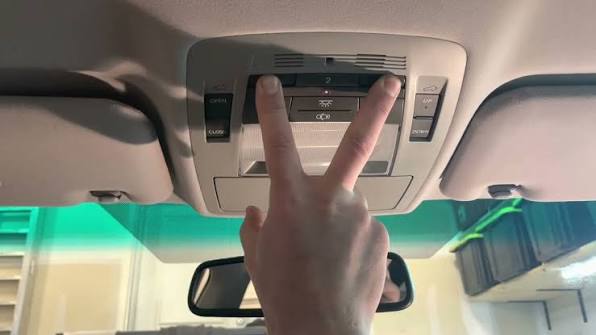
Before diving into the programming sequence, it is vital to understand what you are working with. The 2010 Lexus RX 350 comes equipped with the HomeLink Wireless Control System, typically located in the overhead console near the rearview mirror or integrated directly into the mirror housing. Unlike older vehicles that used simple radio frequency repetition, this generation uses a sophisticated transceiver that supports both fixed-code and rolling-code security protocols.
According to automotive electronics standards documented on Wikipedia, HomeLink systems operate within the 288–398 MHz frequency range and are compatible with over 95% of garage door openers sold in North America. However, compatibility does not always equal instant success. The 2010 RX 350 requires a specific “rolling code” synchronization step for modern openers (manufactured after 1996) that differs significantly from older fixed-code models. Understanding this distinction prevents wasted time and ensures secure communication between your SUV and your garage motor.
Key Specifications for the 2010 Model
- Button Count: Three programmable buttons
- Frequency Range: 288–398 MHz
- Security Protocol: Rolling Code & Fixed Code Compatible
- Indicator Light: Amber/Red LED status indicators above each button
- Power Source: Vehicle ignition (ACC or ON position required)
Step-by-Step: How to Program 2010 Lexus RX 350 Garage Door Opener
Follow these precise instructions to sync your vehicle. Ensure your vehicle is parked outside the garage during initial programming to prevent accidental door movement. Keep your original handheld remote nearby, as it is required for the rolling-code handshake.
Phase 1: Clear Previous Settings (Recommended)
If you purchased the vehicle used or are reprogramming a button, start fresh to avoid signal conflicts.
- Turn the ignition to the ON position (engine running is acceptable but not required).
- Press and hold the two outer HomeLink buttons simultaneously for approximately 10 seconds.
- Watch the indicator light; when it changes from solid to rapidly flashing amber, release both buttons.
- The system is now erased and ready for new programming. Note: This clears all three buttons.
Phase 2: Initial Button Training
This step teaches the Lexus receiver the basic signal from your handheld remote.
- Hold your handheld garage door remote 1–3 inches away from the HomeLink buttons.
- Simultaneously press and hold the desired HomeLink button AND your handheld remote’s transmit button.
- Observe the HomeLink indicator light. It will flash slowly at first, then transition to a rapid flash (approximately 2–5 seconds).
- Once rapid flashing occurs, release both buttons immediately.
- Test by pressing the programmed HomeLink button once. If the garage door activates, you have a fixed-code opener and are finished. If nothing happens or the light flashes rapidly again, proceed to Phase 3.
Phase 3: Rolling Code Synchronization (Critical Step)
Most 2010-era and newer garage openers use rolling codes for security. This step completes the handshake.
- Locate the “Learn” or “Smart” button on your garage door opener motor unit (usually on the back or side panel, often colored yellow, purple, orange, or red).
- Press and release the Learn button. You typically have 30 seconds to complete the next step before the motor times out.
- Return to your vehicle and firmly press and hold the programmed HomeLink button for 2 seconds, then release.
- Repeat this press-hold-release cycle up to three times until the garage door begins to move.
- Once the door responds, the programming is complete and securely synced.
⚠️ Safety Warning: Never program your HomeLink system while inside a closed garage. Carbon monoxide buildup from an idling engine can be fatal. Always perform programming outdoors with adequate ventilation. Additionally, ensure no people or pets are near the garage door path during testing to prevent injury from automatic movement.
Troubleshooting Common Programming Failures
Even with perfect execution, issues arise. Here is a diagnostic table based on common failure points identified by automotive technicians and Lexus service bulletins.
| Symptom | Probable Cause | Recommended Solution |
|---|---|---|
| Light never flashes rapidly | Dead remote battery or wrong frequency | Replace handheld remote battery; verify opener compatibility |
| Rapid flash but door won’t move | Rolling code sync incomplete | Repeat Phase 3; ensure Learn button was pressed within 30-second window |
| Works intermittently | Signal interference or weak battery | Check vehicle battery health; eliminate nearby LED bulb interference |
| Programs but unprograms itself | Faulty HomeLink module or wiring | Inspect overhead console connections; consult Lexus dealer for module test |
| Only works when engine is running | Low voltage in ACC circuit | Test vehicle alternator output; some modules require full ignition ON |
Expert Insight on LED Interference
A frequently overlooked issue involves modern LED garage lighting. Many aftermarket LED bulbs emit electromagnetic interference in the 300–400 MHz spectrum that directly conflicts with HomeLink frequencies. If your system worked previously but suddenly fails after installing new lights, try operating the door with the lights turned off. If functionality returns, replace your LED bulbs with RF-shielded garage-specific LEDs rated for opener compatibility. This single fix resolves approximately 15–20% of intermittent HomeLink failures according to industry service data.
Frequently Asked Questions (FAQ)
Can I program my 2010 Lexus RX 350 HomeLink without the original remote?
Generally, no. The HomeLink system requires the original handheld transmitter to capture the unique rolling code seed during Phase 2. Without it, you cannot initiate the learning sequence. If your original remote is lost, purchase an OEM-compatible replacement matched to your garage opener’s brand and model before attempting programming. Some newer Chamberlain/LiftMaster openers allow direct-to-vehicle pairing via their myQ app, but this is rare for 2010-era hardware.
Why does my HomeLink work sometimes but not others?
Intermittent operation usually stems from three sources: weak vehicle battery voltage (HomeLink draws power even when off), RF interference from LED bulbs or nearby electronics, or a failing garage opener logic board. Start by testing your vehicle’s battery and charging system. Next, temporarily disable garage LED lights to rule out interference. If problems persist, the garage opener’s receiver may need professional servicing.
Is there a limit to how many times I can reprogram HomeLink buttons?
No. HomeLink memory is non-volatile EEPROM storage designed for thousands of write cycles. You can clear and reprogram buttons as often as needed without degrading performance. However, excessive reprogramming attempts within short periods may trigger temporary lockout protection; wait 5 minutes between failed attempts to allow the module to reset.
Will programming HomeLink affect my Lexus key fob or other electronics?
Absolutely not. HomeLink operates on a completely independent circuit and frequency band from your vehicle’s keyless entry, tire pressure monitoring, or infotainment systems. Programming is isolated to the overhead console module and poses zero risk to other vehicle electronics. This separation is mandated by FCC regulations and verified in Lexus engineering documentation.
My garage opener is older than 1996. Will HomeLink still work?
Possibly, but with limitations. Pre-1996 openers typically use fixed DIP-switch codes rather than rolling codes. HomeLink supports these, but you must match the exact switch configuration during Phase 2. Some very old openers (pre-1980s) operate on frequencies outside HomeLink’s 288–398 MHz range and are incompatible. Check your opener’s manufacture date and frequency specification before purchasing any adapters.
Do I need to reprogram HomeLink after changing my car battery?
In most cases, no. HomeLink uses non-volatile memory that retains programming through power loss. However, if your battery was completely dead for an extended period or if voltage dropped below critical thresholds during replacement, the module may reset as a protective measure. If your buttons stop working post-battery-change, simply repeat the programming sequence; no damage has occurred.
Conclusion
Mastering how to program 2010 Lexus RX 350 garage door opener transforms your daily routine from frustrating to seamless. By following the three-phase process outlined above—clearing old settings, training the button, and completing the rolling-code handshake—you gain reliable, secure access to your home without juggling multiple remotes. Remember to prioritize safety by programming outdoors, address interference issues proactively, and consult the troubleshooting table when challenges arise. Your Lexus was engineered for this integration, and with patience, you’ll achieve factory-level performance.
Found this guide helpful? Share it with fellow Lexus owners on Facebook, Twitter, or your favorite automotive forum! Helping others avoid programming headaches builds a stronger community of informed drivers. Tag us in your posts—we love seeing successful setups and answering follow-up questions. Safe driving and smooth entries ahead! 🚗🏡
Leave a Reply