Introduction
There is nothing quite as frustrating as sitting in your driveway, rain pouring down, fumbling for a bulky remote that has mysteriously vanished from your visor clip. If you are tired of the clutter and want seamless access to your home, learning how to link a garage door opener to your car is the ultimate convenience upgrade. This guide will walk you through the exact steps to sync your vehicle’s built-in system or program a new universal remote safely and correctly. Whether you drive a newer model with integrated tech or an older vehicle needing a retrofit, we have the solution to get you parking inside stress-free.
Understanding Your Vehicle’s Garage Door System
Before pressing any buttons, it is vital to identify which technology your vehicle uses. Not all cars communicate with garage doors in the same way, and misidentifying your system is the most common reason programming fails.
HomeLink vs. Universal Aftermarket Remotes
Most modern vehicles (post-2000) come equipped with HomeLink, a proprietary wireless control system integrated into the rearview mirror, overhead console, or center stack. However, if your car lacks this feature, you may be using a standalone universal remote clipped to your visor.
| Feature | Integrated HomeLink | Universal Visor Remote |
|---|---|---|
| Power Source | Vehicle Battery | Coin Cell / 9V Battery |
| Range | Typically 50–100 ft | Varies by battery strength |
| Compatibility | Rolling Code & Fixed Code | Mostly Fixed Code (Older) |
| Setup Complexity | Moderate (Multi-step) | Simple (Dip Switch/Clone) |
| Aesthetics | Seamless/OEM Look | Bulky/Aftermarket Add-on |
Expert Insight: According to automotive technicians, over 85% of programming failures occur because users attempt to use “Fixed Code” instructions on a “Rolling Code” opener. Always check the manufacturing date of your garage motor; units made after 1996 typically use rolling code security technology.
For a deeper technical understanding of how these radio frequencies operate, you can refer to the Garage Door Opener entry on Wikipedia, which details the evolution from dip switches to modern encrypted signals.
How To Link A Garage Door Opener To Your Car Using HomeLink
This is the most common scenario for US drivers. Follow these precise steps to sync your factory-integrated system. Note that while brands vary (Chamberlain, LiftMaster, Genie, Craftsman), the core logic remains consistent.
Step 1: Clear Previous Codes (Crucial First Step)
If you bought the car used or are reprogramming, you must erase old data first.
- Locate the two outer HomeLink buttons in your vehicle.
- Press and hold both simultaneously for 10–20 seconds.
- Watch the indicator light: it will flash slowly, then rapidly. Release when it flashes rapidly.
- Note: Do not skip this step even if you think the memory is empty. Residual data causes signal conflicts.
Step 2: Put Your Garage Motor in “Learn” Mode
You need physical access to the garage ceiling unit for this phase.
- Locate the “Learn” or “Smart” button on the back or side of the garage door opener motor head. It is usually yellow, purple, orange, or red.
- Press and release the Learn button. An LED will illuminate or begin blinking, indicating the unit is in pairing mode.
- Time Sensitive: You typically have exactly 30 seconds to complete the next step before the motor exits learn mode. Have your car parked close enough to reach, or use a helper.
Step 3: Sync the Vehicle to the Opener
Return to your driver’s seat immediately.
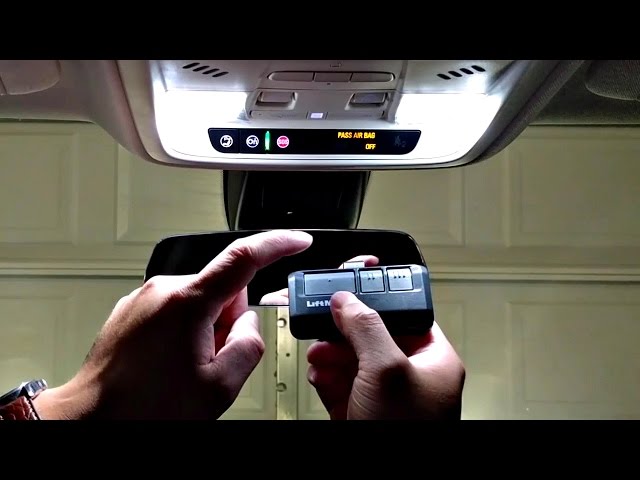
- Hold your original handheld remote 1–3 inches away from the HomeLink buttons (if programming via remote). For direct-to-opener pairing without a remote, skip to holding the HomeLink button.
- Press and hold the desired HomeLink button in your car.
- Simultaneously press and hold the button on your handheld remote (if using one).
- Observe the HomeLink indicator light:
- Slow Flash: Still searching/syncing.
- Rapid Flash/Solid: Success! The codes have been transferred.
- Test by pressing the programmed HomeLink button once. The door should activate.
Troubleshooting Rolling Code Openers
If the light flashed rapidly but the door didn’t move, you likely have a rolling code opener requiring a secondary handshake.
- Return to the garage motor within 30 seconds of the rapid flash.
- Press and release the Learn button again.
- Go back to the car and press the programmed HomeLink button three times firmly, holding each press for 2 seconds.
- This completes the security handshake. Test operation.
Programming a Universal Aftermarket Remote
If your vehicle lacks HomeLink, you are likely using a universal replacement remote. The process differs significantly based on age.
For Modern Universal Remotes (Post-1996)
These mimic the HomeLink “Learn Button” method.
- Press the Learn button on your garage motor.
- Within 30 seconds, press and hold the button on your new universal remote.
- Release when the motor light blinks or clicks.
- Test functionality.
For Vintage/Legacy Remotes (Pre-1996 Dip Switch)
Older systems use physical toggle switches inside both the remote and the motor.
- Open the battery compartment of your new remote to reveal the dip switches.
- Use a small screwdriver to match the switch pattern exactly to the pattern inside your garage motor housing.
- There is no “learn” button; alignment is purely mechanical.
- Insert the battery and test. If it fails, double-check that every switch is fully seated in the up or down position.
Safety Protocols and Maintenance Best Practices
Linking your opener isn’t just about convenience; it involves safety mechanisms that protect your family and property. Never bypass these checks during setup.
- Test the Auto-Reverse Sensor: Place a 2×4 piece of wood flat on the floor under the door. Close the door using your newly linked car button. The door must reverse immediately upon contact. If it doesn’t, adjust the force settings on the motor head per the manufacturer’s manual.
- Check Photo-Eye Alignment: Ensure the infrared sensors at the bottom of the tracks are clean and aligned. Waving an object under them while closing should stop the door instantly.
- Battery Maintenance: Replace your handheld remote batteries annually. Weak batteries cause intermittent syncing issues that users often mistake for car receiver failure.
- Secure Your Vehicle: If selling or trading in your car, always perform the “Clear Previous Codes” step outlined above to prevent unauthorized access to your home.
Frequently Asked Questions (FAQ)
Why won’t my HomeLink program even though the light flashes?
The most common culprit is a frequency mismatch or an expired rolling code window. Ensure you are completing the secondary “handshake” at the motor head within 30 seconds of the initial sync. Also, verify your garage opener isn’t too old; some pre-1995 units require a specific compatibility bridge adapter to work with modern HomeLink systems.
Can I link multiple cars to the same garage door opener?
Yes. Most modern garage door openers can store between 5 to 20 different remote/transmitter codes. Simply repeat the programming process for each vehicle. There is no need to delete previous cars unless you’ve reached the maximum memory capacity.
Does linking my car drain my vehicle’s battery?
No. Integrated HomeLink systems draw negligible power from your car’s electrical system, similar to a clock or memory preset. It will not drain your battery even if the car sits for weeks. However, aftermarket visor remotes rely on their own internal batteries and do not connect to vehicle power at all.
What if I lost my original handheld remote?
You do not need the original remote to program HomeLink on many newer vehicles (2015+). Many systems support “Direct-to-Opener” programming where you only interact with the Learn button on the motor and the car buttons. Check your vehicle owner’s manual for direct programming eligibility.
Is it safe to link a rental or company car?
Technically yes, but practically risky. Always remember to clear the HomeLink memory before returning the vehicle. If you forget, the next renter or employee could potentially access your garage. For temporary situations, consider using a smart garage app on your phone instead of hard-linking the vehicle.
How far away can I be to successfully link the opener?
During the programming phase, keep the vehicle within 10–20 feet of the garage door. Signal strength diminishes quickly through walls and metal. Once programmed, operational range typically extends to 50–100 feet depending on antenna condition and interference.
Conclusion
Mastering how to link a garage door opener to your car transforms your daily arrival experience from a chore into a seamless transition. By identifying your system type, following the precise rolling-code handshake, and verifying safety sensors, you ensure reliable, secure access for years to come. Remember, patience during the 30-second learn window is key—rushing this step causes most failures.
Now that your garage opens effortlessly, why keep this convenience to yourself? Share this guide on Facebook, X (Twitter), or Pinterest to help friends and family ditch the cluttered visor clips and upgrade their home entry today. Safe parking!
Leave a Reply