Introduction
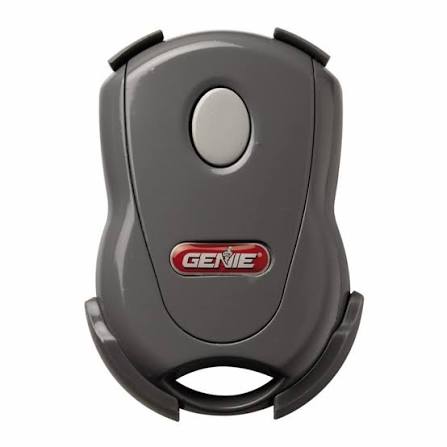
Losing your garage door remote or having it stop working can feel like a minor crisis, especially when you are rushing to leave for work or returning home late at night. It disrupts your daily routine and raises immediate security concerns about who might have access to your home. If you are wondering how to get a replacement remote for garage door opener, you are in the right place. This guide will walk you through the simplest, most cost-effective ways to restore your convenience and peace of mind without breaking the bank.
Identify Your Garage Door Opener Model
Before you spend a dime, you need to know exactly what system you are dealing with. Not all remotes are compatible with all openers, and buying the wrong one is the most common mistake homeowners make.
Locate the Manufacturer and Model Number
The first step is to find the specific model number of your garage door opener unit. This is usually located on the back or side of the motor unit hanging from your ceiling. You may need a ladder and a flashlight to see it clearly. Look for a sticker that includes:
- The brand name (e.g., Chamberlain, LiftMaster, Genie, Craftsman).
- The model number (a combination of letters and numbers).
- The serial number.
If the sticker is faded or missing, check your original installation manual or any paperwork left by the previous homeowner. If you cannot find the model number, take a clear photo of the motor unit and the existing remote (if you still have it) to show a specialist at a hardware store.
Determine the Frequency and Technology
Older openers use different frequencies than newer ones. Most modern openers operate on 315 MHz or 390 MHz. However, the technology type is even more critical:
- Dip Switches: Older models (pre-1993) use tiny switches inside the remote and motor that must match physically.
- Learn Button: Newer models (post-1993) use a “Learn” button on the motor unit to sync digitally. These are more secure and easier to program.
Understanding this distinction is vital because a universal remote designed for “Learn Button” systems will not work with an old dip-switch model, and vice versa.
Choose Between OEM and Universal Remotes
Once you have your model information, you face a choice: buy an Original Equipment Manufacturer (OEM) remote or a universal third-party remote. Each has distinct advantages and drawbacks.
| Feature | OEM Remote (Brand Specific) | Universal Remote |
|---|---|---|
| Compatibility | Guaranteed to work with your specific model. | Works with most major brands, but check compatibility list. |
| Price | Higher ($30–$60+). | Lower ($15–$30). |
| Ease of Programming | Very easy; often follows standard steps. | May require more complex setup steps. |
| Build Quality | High; matches original durability. | Varies by brand; generally good for basic use. |
| Availability | May need to order online if discontinued. | Widely available at local hardware stores. |
When to Choose OEM
If your garage door opener is relatively new (less than 10 years old) or part of a smart home ecosystem, sticking with the OEM remote is often the best choice. Brands like LiftMaster and Genie offer remotes with additional features, such as battery indicators or integrated lighting controls, that universal remotes lack.
When to Choose Universal
Universal remotes are ideal for older systems, budget-conscious homeowners, or if you need multiple remotes for family members. Brands like Chamberlain and Clicker produce high-quality universal remotes that are compatible with over 90% of garage door openers manufactured after 1993.
Where to Buy a Replacement Remote
Knowing what to buy is half the battle; knowing where to buy it efficiently is the other. Here are the most reliable sources for US consumers.
Local Hardware Stores
Stores like Home Depot, Lowe’s, and Ace Hardware carry a wide selection of universal remotes. The advantage here is immediacy—you can walk out with a solution in hand within an hour. Staff members can also help verify compatibility if you bring photos of your unit.
Online Retailers
Amazon, eBay, and specialized garage door parts websites offer the widest variety. This is particularly useful if you have an obscure or discontinued model. When buying online, always double-check the compatibility list in the product description. Look for sellers with high ratings and return policies in case the remote does not pair correctly.
Manufacturer Websites
Visiting the official website of your opener’s manufacturer is the safest bet for OEM parts. They often have a “Find Parts” tool where you enter your model number, and it lists only compatible accessories. While prices may be higher, you eliminate the guesswork entirely.
Step-by-Step Guide to Programming Your New Remote
Buying the remote is easy; programming it can be tricky if you don’t follow the right steps. Most modern openers use a similar process involving the “Learn” button.
Note: Always ensure your garage door area is clear of people and obstacles before testing.
- Locate the Learn Button: Climb your ladder and find the motor unit. The “Learn” button is usually colored yellow, purple, orange, or red. It may be labeled “Smart,” “Program,” or simply have an icon next to it.
- Clear Old Codes (Optional but Recommended): Press and hold the “Learn” button for about 6–10 seconds until the indicator light turns off. This erases all previously programmed remotes and keypads. Warning: You will need to reprogram all your existing devices if you do this.
- Initiate Programming Mode: Press the “Learn” button once briefly. The indicator light will turn on or start blinking, signaling that the unit is ready to receive a new code. You typically have 30 seconds to complete the next step.
- Program the Remote: Within those 30 seconds, press and hold the button on your new remote that you want to use. Hold it until the motor unit’s lights blink or you hear a click. This confirms the code has been accepted.
- Test the Remote: Stand away from the motor unit and press the button again. The garage door should activate. If it doesn’t, repeat the process, ensuring you are within range and the batteries are fresh.
For older dip-switch models, you must manually match the switch positions inside the remote to the positions inside the motor unit. Use a small screwdriver to adjust the tiny switches until they align perfectly.
Troubleshooting Common Issues
Even with the right remote, things can go wrong. Here are quick fixes for common problems.
- Remote Not Working: First, replace the batteries. Even new batteries can be defective. Ensure they are inserted with the correct polarity (+/-).
- Interference: LED light bulbs in your garage opener can sometimes interfere with remote signals. Try turning off the garage light and testing the remote. If it works, consider switching to incandescent bulbs or shielded LEDs.
- Range Issues: If the remote only works when you are very close, the antenna wire on the motor unit might be damaged or obstructed. Ensure the hanging wire antenna is straight and not wrapped around metal components.
FAQ Section
Can I use any universal remote for my garage door?
No, not any remote will work. You must ensure the universal remote is compatible with your opener’s frequency (315 MHz or 390 MHz) and technology type (dip switch or learn button). Always check the compatibility list on the packaging.
How much does a replacement garage door remote cost?
Prices vary widely. Universal remotes typically cost between $15 and $30, while OEM remotes can range from $30 to $60 or more, depending on features and brand.
Do I need a professional to program a new remote?
In most cases, no. Programming a modern garage door remote is a DIY-friendly task that takes less than 10 minutes. However, if you have an older, complex system or feel uncomfortable using a ladder, hiring a professional technician is a safe option.
What if my garage door opener is very old?
If your opener is more than 20 years old, finding a compatible remote might be difficult. In such cases, it may be more cost-effective and secure to replace the entire garage door opener unit with a modern, Wi-Fi-enabled model.
Can I use my smartphone as a replacement remote?
Yes, many modern openers support Wi-Fi connectivity. By installing a smart hub (like MyQ for Chamberlain/LiftMaster), you can control your garage door via a smartphone app. This serves as an excellent backup or primary method if you lose your physical remote.
Conclusion
Losing your garage door remote is inconvenient, but it is far from a disaster. By identifying your model, choosing between OEM and universal options, and following simple programming steps, you can regain access to your garage quickly and affordably. Remember, safety and compatibility are key—always double-check your model number before purchasing.
If you found this guide helpful, please share it with friends or family who might be struggling with their own garage door issues. Spreading knowledge helps everyone stay secure and stress-free!
Leave a Reply