Introduction
There are few things more frustrating than standing in your garage with a broken part in hand, ready to order a replacement, only to realize you have absolutely no idea which specific unit you own. If you are currently staring at the ceiling trying to decipher faded labels or confusing serial codes, please know that you are not alone in this struggle. Understanding how to find model number on Genie garage door opener units is the critical first step toward safe repairs, correct part ordering, and maintaining the security of your home. This guide will walk you through every possible location and method to identify your opener accurately, saving you time, money, and unnecessary headaches.
Why Identifying Your Genie Model Number Matters
Before we climb the ladder, it is important to understand why precision matters. Genie has manufactured garage door openers for decades, and while two units may look identical from the ground, their internal gears, logic boards, and safety sensors can be vastly different.
Using an incorrect part can lead to:
- Safety Hazards: Incorrect springs or gears can cause the door to fall unexpectedly.
- Voided Warranties: Manufacturers often deny claims if non-OEM or incorrect model-specific parts are installed.
- Wasted Money: Return shipping on heavy garage door components is expensive.
- Compatibility Issues: Smart home integrations and remotes are often model-generation specific.
According to industry service data, nearly 30% of DIY garage door repair delays are caused by ordering incorrect components due to misidentification. Taking five minutes to correctly identify your unit prevents these costly errors.
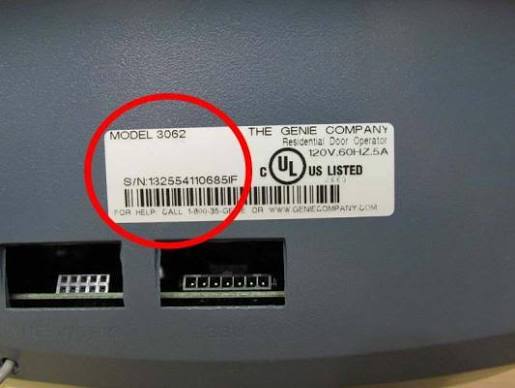
Primary Location: The Motor Unit Label
For the vast majority of Genie openers, the model number is located directly on the motor housing. However, the exact placement depends on the era and type of drive system.
Step-by-Step Inspection Guide
- Ensure Safety First: Before inspecting, ensure the garage door is fully closed and disconnected from power if you plan to touch the unit. Use a sturdy stepladder; never stand on buckets or chairs.
- Locate the Light Lens Cover: Most modern Genie openers (ChainMax, SilentMax, TriloG) hide the label under the plastic light lens cover. Gently squeeze the sides of the lens cover to release the tabs and remove it.
- Check the Rear Panel: On older models (like the Screw Drive series), the label is often on the back panel facing the garage wall. You may need a flashlight and a mirror to read it without removing the unit.
- Inspect the Side Panels: Some belt-drive models place the identification sticker on the left or right side of the chassis, near the rail attachment point.
- Photograph Everything: Do not rely on memory. Take a clear, well-lit photo of the entire label, including the model number, serial number, and date code.
⚠️ Critical Safety Warning: Never attempt to open the motor housing casing to look for internal markings unless you are a certified technician. Internal capacitors can hold lethal electrical charges even when unplugged. Always rely on external manufacturer labels. For general safety standards regarding garage door systems, refer to guidelines established by organizations documented on Wikipedia.
Secondary Locations When the Label Is Missing or Faded
Garage environments are harsh. Heat, humidity, and age can cause adhesive labels to peel or ink to fade. If the primary label is illegible, use these secondary methods.
Check the Remote Control
While remotes do not carry the opener’s model number, they provide a crucial clue. Look at the FCC ID or model number on the back of your original remote. Cross-reference this with Genie’s compatibility charts online. For example, if your remote is a “G3T-R,” your opener is likely compatible with Intellicode 2 technology, narrowing down the manufacturing era significantly.
Review Original Documentation
Search your home files, email archives, or purchase receipts for:
- Installation invoices
- Owner’s manuals
- Warranty registration cards
- Home inspection reports (if you purchased the home recently)
Use the Serial Number Decoder
If the model number is gone but the serial number remains, you can often decode it. Genie serial numbers typically encode the manufacturing date and product line. Contacting Genie customer support with a clear photo of the remaining serial tag can yield an exact model match.
Quick Reference: Common Genie Model Number Formats
Understanding the naming convention helps verify you’ve found the right information. Here is a comparison table of common series:
| Series Name | Typical Model Format | Drive Type | Common Label Location |
|---|---|---|---|
| SilentMax | 7055, 7155 | Belt Drive | Under light lens |
| ChainMax | 1000, 1400 | Chain Drive | Under light lens / Side |
| TriloG | 1500, 1800 | DC Motor Belt | Under light lens |
| Excelerator | ISD, ISL | Direct Screw | Back panel / Side |
| Legacy | 8500, 9500 | Chain/Screw | Back panel |
| Wall Mount | HPC, RJO | Jackshaft | Side of unit / Cover |
Note: Always distinguish between the Model Number (e.g., 7155-TKV) and the Assembly Number. Parts diagrams use assembly numbers, but retailers search by model number. Record both.
What to Do After Finding Your Model Number
Once you have successfully identified your unit, take these immediate actions to future-proof your maintenance:
- Create a Digital Record: Save the photo to a cloud folder labeled “Home Maintenance.” Upload a copy to your phone’s notes app.
- Download the Manual: Visit Genie’s official support site and download the PDF manual for your exact model. Bookmark the parts diagram page.
- Register Your Product: If the unit is new or you never registered it, do so now. This activates warranty coverage and provides recall notifications.
- Label the Unit Yourself: Write the model number on a piece of masking tape and stick it to the outside of the light lens cover or the rail where it’s easily visible next time.
Frequently Asked Questions (FAQ)
Can I use the serial number instead of the model number to order parts?
Generally, no. Retailers and parts distributors index inventory by model number. The serial number is primarily for warranty validation and manufacturing date tracking. However, if your model label is completely destroyed, providing the serial number to Genie’s customer service team can help them identify the correct model for you.
My Genie opener has no visible label anywhere. What should I do?
If all labels are missing, identify the drive type (chain, belt, or screw) and count the number of lights or note the color of the learn button. Take photos of the entire unit, including the rail and trolley mechanism, and contact Genie technical support. They can often identify the model based on visual characteristics and component configurations unique to specific production runs.
Is the model number the same as the FCC ID?
No. The FCC ID identifies the radio frequency transmitter inside the opener and is regulated by federal communications law. Multiple Genie models may share the same FCC ID because they use identical receiver boards. Always prioritize the manufacturer’s model number over the FCC ID for parts compatibility.
Does finding the model number require professional help?
In most cases, no. Locating the model number is a simple visual inspection that any homeowner can perform safely with a ladder and flashlight. Professional assistance is only necessary if the unit is mounted in an inaccessible location, if you suspect electrical issues, or if the unit requires disassembly beyond removing the light lens cover.
How long do Genie garage door opener labels typically last?
Label longevity varies significantly based on garage conditions. In climate-controlled garages, labels can remain legible for 15–20 years. In unconditioned spaces with extreme temperature fluctuations and high humidity, adhesive failure and ink fading can occur within 5–8 years. This is why creating a secondary digital record immediately after installation is strongly recommended.
Can I determine the model number from the remote alone?
Not definitively, but you can narrow it down considerably. Remotes indicate the technology generation (e.g., Intellicode 1 vs. Intellicode 2) and frequency, which corresponds to specific manufacturing eras. This eliminates incompatible models but may still leave several possibilities. Always verify against the motor unit label for certainty.
Conclusion
Knowing how to find model number on Genie garage door opener units transforms a potentially stressful repair situation into a manageable, confident task. By checking under the light lens cover first, utilizing secondary identification methods when needed, and documenting your findings digitally, you protect your investment and ensure every future maintenance interaction is accurate and efficient. Your garage door is one of the largest moving objects in your home—treating its identification with care is a small act that yields significant long-term dividends in safety and savings.
Found this guide helpful? Share it with fellow homeowners on Facebook, Pinterest, or your neighborhood Nextdoor group! Someone in your community is probably staring at their garage ceiling right now wishing they had this exact information. A single share could save them hours of frustration and hundreds of dollars in wrong-part returns. Let’s make garage maintenance less mysterious, one model number at a time! 🔧🏠
Leave a Reply