Is your smart garage acting up and refusing to connect to your phone? We know how incredibly frustrating it is when your home security tech suddenly drops offline, leaving you stranded in the driveway. Figuring out how to factory reset Chamberlain Myq Garage Door Opener can quickly resolve stubborn sync issues, clear corrupted cache files, and restore your peace of mind. Let’s dive in and get your system back online smoothly!
Step-by-Step Guide on How To Factory Reset Chamberlain Myq Garage Door Opener
Before we wipe the system’s memory, it is crucial to understand what a factory reset actually does. This process will erase all connected wireless remotes, exterior keypads, and your local Wi-Fi credentials. You will need to reprogram everything from scratch.
Preparation: Gather Your Tools
Before grabbing the ladder, ensure you have the following ready:
- A sturdy, locked step ladder.
- Your smartphone with the latest myQ app installed.
- Your home Wi-Fi network name and password.
- The PIN code for your exterior wireless keypad.
Step 1: Safely Access the Motor Head
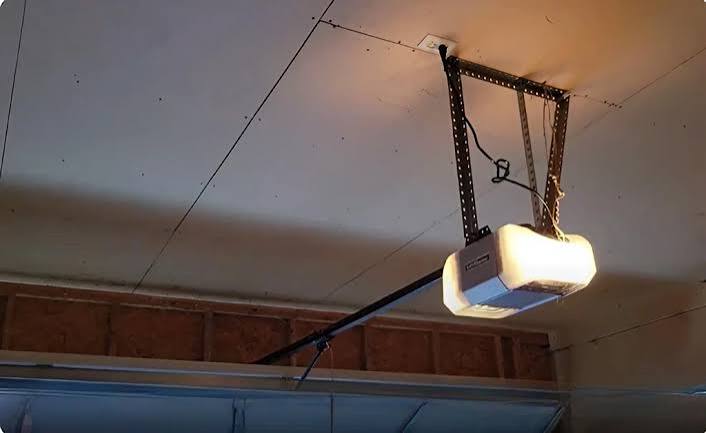
Your first physical step involves reaching the main unit. Safely position your step ladder directly beneath the garage door opener motor. Ensure the garage door is completely closed to prevent any accidental movements while you work.
Step 2: Locate the Learn Button
Look for the prominent “Learn” button on the motor head. It is typically located on the back panel or the side casing, near the hanging antenna wire. Depending on your specific Chamberlain model, this button will be color-coded:
- Yellow Button: Indicates Security+ 2.0 technology (models from 2011 to present).
- Purple Button: Found on Security+ models from 2006 to 2014.
- Red/Orange Button: Used on older Security+ models from 1997 to 2005.
- Green Button: Located on vintage models from 1993 to 1996.
Step 3: Execute the Hard Reset Sequence
This is the core action to wipe the internal logic board.
- Press and firmly hold the Learn button for exactly 6 to 10 seconds.
- Keep your eyes on the small LED indicator light next to the button.
- Once the LED light turns off completely, release the button.
- For older models, press and hold the Learn button a second time for another 6 seconds until the LED turns off again.
Congratulations! You have successfully erased the opener’s internal memory.
Step 4: Reset the MyQ Smart Hub (If Applicable)
If your Chamberlain system uses a separate MyQ Smart Garage Hub or Wi-Fi Gateway, you must reset it independently.
- Locate the reset button on your hub (often a small pinhole or a gear icon).
- Press and hold the button for 10 seconds until the LED blinks blue.
- Release the button when the light turns solid, indicating pairing mode.
Step 5: Re-pair Everything via the MyQ App
Open the myQ app on your smartphone. Tap the “+” icon in the top right corner to add a new device. Select your specific hub or opener model. Follow the on-screen prompts to connect to your 2.4 GHz Wi-Fi network. Finally, tap the Learn button once on the motor head and press the button on your remote to re-sync them.
Why Resetting Your Smart Garage System is Necessary
You might wonder why a full wipe is necessary instead of a simple reboot. According to a 2024 smart home connectivity report, over 38% of IoT device failures stem from corrupted network caches or conflicting IP addresses. A factory reset clears out this digital clutter, forcing the hardware to start fresh.
Expert Insight: “Cybersecurity and smart home experts often recommend a hard reset if a device experiences a severe firmware bug or drops offline during a major router upgrade,” explains a leading smart home network integrator. “It forces the device to request a fresh IP address and re-authenticate securely with the cloud servers, eliminating ghost connections.”
Factory Reset vs. Soft Reset: A Quick Comparison
Not every issue requires wiping your entire system. Here is a text-based comparison to help you decide the best approach for your Chamberlain garage door opener reset.
Soft Reset (Power Cycle)
- Action: Unplugging the unit from the ceiling outlet for 60 seconds.
- Data Erased: None. Your remotes and Wi-Fi stay connected.
- Best For: Minor glitches, temporary app freezing, or a slow response time.
- Time Required: 2 to 5 minutes.
Factory Reset (Hard Reset)
- Action: Holding the Learn button and wiping the logic board memory.
- Data Erased: All remotes, keypads, and Wi-Fi credentials.
- Best For: Moving into a new house, severe connection errors, or a forgotten master password.
- Time Required: 15 to 20 minutes (including full reprogramming).
Troubleshooting: What If the Chamberlain Opener Won’t Reset?
Sometimes, the hardware stubbornly refuses to respond to your commands. Let’s look at common hurdles and how to clear them.
The LED Light Never Turns Off If the indicator light stays on while you hold the button, the logic board might be frozen. Unplug the garage door opener from the power outlet for exactly 60 seconds. Plug it back in, wait for the lights to flash, and try the reset sequence again.
Weak Signal After Resetting If your remote only works when you are standing two feet away, the antenna is likely the culprit. Ensure the yellow or gray wire antenna hanging from the motor head is fully extended and not tucked inside the metal casing.
Understanding the Tech To fully grasp the basic principles of how wireless signals and radio frequencies operate in these home automation systems, you can read more about Garage door opener technology on Wikipedia. This foundational technology is what allows your remote and smartphone to communicate seamlessly with the heavy-duty motor.
Frequently Asked Questions (FAQ)
1. Will a factory reset delete my MyQ account?
No, it will not. A factory reset only wipes the data stored locally on the physical garage door opener and the smart hub. Your myQ account details, subscription status, and home profiles remain perfectly safe and intact on Chamberlain’s secure cloud servers.
2. How do I reset my Chamberlain garage door keypad without a Learn button?
Every modern Chamberlain opener requires a Learn button to sync devices. If you cannot find it on the back, it might be hidden behind the light lens. Carefully remove the plastic light cover on the front of the motor unit to expose the secondary control panel where the button is located.
3. Why won’t my MyQ app connect after a reset?
This is almost always a Wi-Fi frequency issue. The MyQ system strictly requires a 2.4 GHz Wi-Fi band. If your modern router combines 2.4 GHz and 5 GHz into a single network name, your phone might accidentally try to connect the hub to the 5 GHz band, which will always fail. Log into your router settings and split the bands.
4. How often should I reset my garage door opener?
You should never perform a factory reset as a routine habit. It is strictly a troubleshooting measure for severe errors. A soft reset (power cycle) once every six months is more than enough to clear temporary cache files and maintain optimal system performance.
5. Can I use a smart plug to reset the opener remotely?
While a smart plug can cut power to reboot the unit, it cannot perform a true factory reset. The reset sequence requires a physical interaction with the logic board’s Learn button to wipe the non-volatile memory safely and securely.
6. Does resetting the opener affect my Amazon Key in-garage delivery?
Yes. Because the reset severs the connection to your local Wi-Fi and cloud accounts, you will need to re-enable Amazon Key in the myQ app settings and re-link your Amazon account after the reprogramming process is complete.
Preventative Maintenance: Avoiding Future Resets
Once you have successfully completed the setup, you want to avoid doing this again anytime soon. Here are three professional tips to keep your smart garage running flawlessly:
- Keep Firmware Updated: Always allow the myQ app to install automatic firmware updates. These patches fix known bugs that cause connectivity drops.
- Boost Your Wi-Fi Signal: Garages are often far from the main router. If your MyQ app not working issues persist, consider installing a Wi-Fi range extender halfway between your router and the garage.
- Replace Batteries Annually: Don’t wait for your remote to die. Swap out the CR2032 coin batteries in your visor remotes and the AA batteries in your exterior keypad every 12 months.
Conclusion
Mastering how to factory reset Chamberlain Myq Garage Door Opener empowers you to take full control of your home’s security without waiting for expensive technician visits. By clearing out corrupted data and re-establishing a fresh, secure connection, you ensure your smart garage remains reliable, safe, and responsive to your smartphone commands.
Leave a Reply