Introduction
Is your smart garage door acting up? Perhaps it’s refusing to connect to the MyQ app, or you’ve just moved into a new home and want to ensure previous owners can no longer access your property. You are not alone; thousands of homeowners face these connectivity and security hurdles every year. Knowing how to factory reset a Liftmaster garage door opener is the most effective way to wipe the slate clean, remove old remote codes, and restore your system to its original settings. This guide will walk you through the process safely and efficiently, ensuring your garage is secure and fully functional again.
Why You Might Need a Factory Reset
Before we dive into the buttons and LEDs, it is crucial to understand why a reset is necessary. A factory reset does more than just fix glitches; it is a critical security measure.
1. Enhanced Security After Moving
If you have recently purchased a home, the previous owners likely had remotes, keypads, and smartphone access linked to the opener. Even if they handed over their remotes, there is no guarantee they didn’t keep a spare. A factory reset ensures that all previously programmed devices are erased, giving you complete control over who enters your garage.
2. Resolving Connectivity Issues
Smart garage openers rely on complex Wi-Fi and radio frequency signals. Over time, software glitches or signal interference can cause the opener to become unresponsive to the MyQ app or smart home hubs like Alexa and Google Home. A reset clears the internal memory cache, often resolving stubborn connection errors that simple power cycling cannot fix.
3. Preparing for Sale or Transfer
If you are selling your home but keeping the opener for your new place, or if you are gifting the unit to a family member, a factory reset ensures the device is ready for a new user without any of your personal data or paired devices remaining in the system.
Step-by-Step: How To Factory Reset A Liftmaster Garage Door Opener
While models vary slightly, the core process for most modern Liftmaster openers (including those with MyQ technology) follows a similar pattern. Always prioritize safety before beginning.
Safety First
- Clear the Area: Ensure no people, pets, or objects are under the garage door.
- Disconnect Power (Optional but Recommended): For a hard reset, some technicians recommend unplugging the unit for 30 seconds before starting. However, for a standard memory wipe, you can usually proceed with the unit powered on.
Method 1: The “Learn” Button Reset (Most Common)
This method works for the majority of Liftmaster models manufactured after 2011, including the 8500, 8550, and 8750 series.
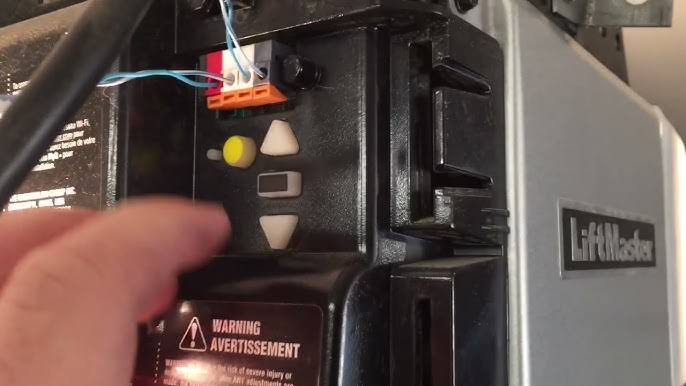
- Locate the Learn Button: Find the motor unit mounted on your garage ceiling. Look for a small button labeled “LEARN.” It is typically located near the hanging antenna wire. The button color may be yellow, purple, orange, or red, depending on the model year.
- Press and Hold: Press and hold the “LEARN” button. Do not release it immediately.
- Watch the LED: Keep holding the button until the indicator LED next to it turns off. This usually takes about 6 to 10 seconds.
- Release the Button: Once the light goes out, release the button.
- Confirmation: Your opener has now been reset. All remote controls, keyless entry pads, and wireless keypads have been erased from the memory.
Note: This action does not reset the Wi-Fi settings on MyQ-enabled models. It only clears the radio frequency (RF) devices. If you need to reset Wi-Fi, see Method 2 below.
Method 2: Resetting Wi-Fi and MyQ Settings
If your goal is to troubleshoot smart features, you must reset the network connection separately.
- Access the Wi-Fi Module: On newer models, the Wi-Fi module is built-in. On older ones, it may be a separate dongle plugged into the logic board.
- Locate the Wi-Fi Button: Look for a button specifically marked with a Wi-Fi symbol or labeled “WIFI.”
- Initiate Reset: Press and hold the Wi-Fi button for approximately 10 seconds.
- Observe the Light: The LED will blink rapidly and then turn solid or go dark, indicating the network settings have been cleared.
- Reconnect: Open the MyQ app on your smartphone and follow the prompts to set up the device as if it were new.
Method 3: Hard Reset via Power Cycle
If the above methods do not resolve a frozen system, perform a hard reset.
- Unplug the garage door opener from the power outlet.
- Wait for 30 full seconds to allow capacitors to discharge.
- Plug the unit back in.
- Wait for the lights to flash and the system to boot up (this may take 1–2 minutes).
- Proceed with Method 1 or 2 to clear memory if needed.
Troubleshooting Common Reset Issues
Even with clear instructions, things can go wrong. Here is a comparison of common problems and their solutions.
| Issue | Possible Cause | Solution |
|---|---|---|
| LED won’t turn off | Button not held long enough | Hold the Learn button for a full 10–15 seconds. |
| Opener unresponsive | Logic board freeze | Perform a Hard Reset (Method 3) first. |
| Wi-Fi won’t reconnect | Router compatibility | Ensure your router is broadcasting on 2.4GHz (MyQ does not support 5GHz). |
| Remote won’t reprogram | Remote battery dead | Replace the battery in the remote before attempting to pair it again. |
For more technical details on radio frequency standards used in garage door openers, you can refer to the general overview on Wikipedia’s page for Garage Door Openers, which provides historical context on how these security protocols have evolved.
Re-Programming Your Devices After Reset
Once you have successfully learned how to factory reset a Liftmaster garage door opener, you must re-pair your devices. Without this step, your garage door will not operate.
Reprogramming Remotes
- Press the “LEARN” button on the motor unit once briefly (do not hold). The LED will glow steadily.
- Within 30 seconds, press and hold the button on your remote control that you wish to use.
- Release the button when the motor unit’s LED blinks or you hear two clicks.
- Test the remote.
Reprogramming Keyless Entry Pads
- Enter your desired PIN on the keypad.
- Press and hold the “ENTER” button.
- While holding “ENTER,” press the “LEARN” button on the motor unit.
- Release both buttons. The LED will blink to confirm.
Expert Tips for Maintaining Your Liftmaster Opener
To avoid needing frequent resets, consider these maintenance tips from industry professionals:
- Update Firmware: Regularly check the MyQ app for firmware updates. These patches often fix bugs that lead to connectivity issues.
- Check Antenna Position: Ensure the hanging antenna on the motor unit is vertical and not tucked behind metal beams, which can block signals.
- Battery Health: Replace remote batteries annually. Weak signals can cause the opener to behave erratically, mimicking a need for a reset.
FAQ Section
1. Does factory resetting my Liftmaster erase the Wi-Fi password?
No, typically pressing the “LEARN” button only erases remote controls and keypads. To erase Wi-Fi settings, you must specifically reset the Wi-Fi module using the dedicated Wi-Fi button or through the MyQ app settings.
2. How long does a factory reset take?
The actual reset process takes less than 15 seconds. However, reprogramming all your remotes, keypads, and reconnecting to Wi-Fi can take 15–30 minutes depending on the number of devices.
3. Will I lose my MyQ account data after a reset?
No. Your MyQ account data (such as usage history and camera footage if applicable) is stored in the cloud, not on the garage door opener itself. You will simply need to log in and re-add the device to your app.
4. Can I factory reset an old Liftmaster model without a Learn button?
Very old models (pre-2011) may use DIP switches instead of a Learn button. For these units, you cannot “factory reset” in the digital sense. You must manually match the DIP switch positions on the remote to the opener. If you have lost the code, you may need to replace the receiver or the entire unit.
5. Is it safe to reset the opener while the door is closed?
Yes, it is actually safer to reset the opener when the door is closed. This prevents accidental activation during the reprogramming phase. Just ensure you test the door’s movement carefully after reprogramming.
6. What if the Learn button is broken?
If the physical button is damaged, you may need to contact Liftmaster support for a replacement logic board. In some cases, a hard power cycle might temporarily restore function, but a hardware repair is usually necessary for a permanent fix.
Conclusion
Learning how to factory reset a Liftmaster garage door opener is a vital skill for any homeowner. It enhances your security, resolves frustrating technical glitches, and prepares your device for new users. By following the steps outlined above—locating the Learn button, holding it until the LED extinguishes, and reprogramming your devices—you can regain full control of your garage system in minutes.
Don’t let a malfunctioning garage door compromise your peace of mind. If this guide helped you solve your problem, please share it with friends or neighbors who might be struggling with their own smart home devices. A secure garage is a happy garage!
Leave a Reply