Introduction
There is nothing quite as frustrating as driving away from home and suddenly wondering, “Did I close the garage?” or arriving late at night wishing you could open the door before pulling into the driveway. If you have been searching for how to connect my garage door opener to my phone, you are taking the first step toward total peace of mind and modern home convenience. This guide will walk you through every method, compatibility check, and safety tip so you can control your garage securely from anywhere.
Can I Connect Any Garage Door Opener to My Phone?
Before purchasing new hardware, it is vital to understand that not all openers are created equal. The answer depends entirely on the age and model of your current system.
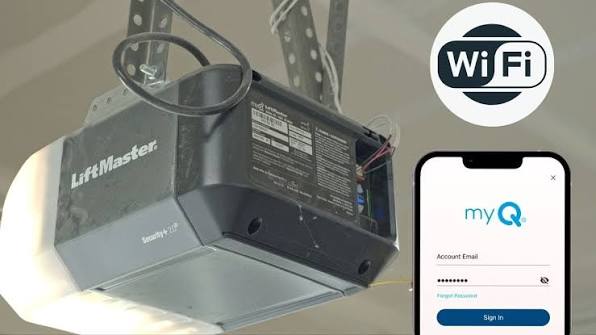
- Smart Openers (Post-2017): Brands like Chamberlain MyQ, LiftMaster, and Genie Aladdin Connect often have built-in Wi-Fi. These connect directly to your router without extra hardware.
- Legacy Openers (Pre-2015): Older units lack internal Wi-Fi but can usually be made smart using an aftermarket hub or smart controller.
- Non-Compatible Units: Some very old chain-drive models or proprietary commercial systems may require a full motor replacement.
According to industry data from the Consumer Technology Association, over 35% of US homeowners now utilize some form of smart entry technology, with garage automation being one of the fastest-growing segments due to its direct impact on home security and insurance premiums.
What Equipment Do I Need to Connect My Garage Door to My Phone?
Gathering the right tools prevents mid-installation frustration. Here is a checklist based on your specific situation:
For Built-In Smart Openers
- Smartphone (iOS 14+ or Android 10+)
- Stable 2.4 GHz Wi-Fi network (most smart garage devices do not support 5 GHz bands)
- Manufacturer’s official app (e.g., myQ, Aladdin Connect)
- Ladder for initial QR code scanning on the motor unit
For Legacy Openers (Add-On Method)
- Smart Garage Hub/Controller (e.g., Meross MSG100, Tailwind iQ3, or brand-specific hub)
- Wired door sensor (usually included in kit)
- Power outlet within 6 feet of ceiling mount location
- Screwdriver and wire strippers (for hardwired installations)
Pro Tip: Always verify your Wi-Fi signal strength at the garage ceiling before mounting any device. Use a free Wi-Fi analyzer app on your phone; you need at least -65 dBm for reliable operation.
Step-by-Step: How To Connect My Garage Door Opener To My Phone
This tutorial covers the universal workflow applicable to most major brands. Always defer to your specific manufacturer’s manual for wiring diagrams.
Step 1: Verify Safety Sensors Are Functional
Never automate a garage door with malfunctioning safety eyes. Test by placing an object in the door’s path while closing; the door must reverse immediately. If it does not, repair the sensors first. This aligns with federal safety standards outlined in the Consumer Product Safety Commission guidelines on Wikipedia.org, which mandate photoelectric reversal systems for all residential openers manufactured after 1993.
Step 2: Download the Correct App and Create Account
Search your app store for the exact brand name. Avoid third-party “universal” apps unless explicitly recommended. Create an account using a strong, unique password and enable two-factor authentication (2FA) immediately—this prevents unauthorized remote access.
Step 3: Put the Opener/Hub Into Pairing Mode
- Built-in Wi-Fi: Press and hold the “Learn” or “Wi-Fi” button on the motor unit until the LED blinks blue (timing varies: Chamberlain = 6 seconds, Genie = 10 seconds).
- Add-on Hub: Plug in the hub and press the pairing button until the indicator flashes. Mount the door sensor on the top panel of the garage door, ensuring alignment with the base unit when closed.
Step 4: Connect to Your 2.4 GHz Network
Open the app and select “Add Device.” When prompted, enter your Wi-Fi credentials. Critical: Ensure your phone is connected to the 2.4 GHz band during setup. Many dual-band routers broadcast both frequencies under one SSID; temporarily disabling 5 GHz in your router settings can prevent connection failures.
Step 5: Test Remote Operation and Set Notifications
Once paired, test open/close commands from at least 1 mile away using cellular data. Configure push notifications for:
- Door opened/closed events
- Door left open > 10 minutes
- Offline/disconnected alerts
Step 6: Integrate With Voice Assistants (Optional)
Link your account to Amazon Alexa, Google Home, or Apple HomeKit via the app’s “Integrations” menu. For security, always set up a voice PIN code to prevent unauthorized verbal commands.
Smart Garage Controller vs. Full Opener Replacement: Which Is Better?
| Feature | Add-On Smart Hub | New Smart Opener |
|---|---|---|
| Cost | $30–$80 | $250–$500+ |
| Installation Time | 15–30 minutes | 2–4 hours |
| Battery Backup | No (unless opener has it) | Often included |
| Noise Level | Unchanged | Ultra-quiet belt drive available |
| Warranty Impact | None | New 5–10 year coverage |
| Best For | Renters, budget-conscious | Homeowners planning long-term |
Expert Insight: Mike Reynolds, certified garage door technician with 18 years of experience, notes: “I recommend add-on hubs for 80% of my clients. Unless your existing opener is noisy, failing, or lacks safety sensors, there’s no ROI in replacing a perfectly functional motor just for smartphone connectivity.”
Common Troubleshooting Issues During Setup
Even professionals encounter hiccups. Here are solutions to the most frequent problems:
- “Device Not Found” Error: Move closer to the opener during setup. Restart your router and ensure Bluetooth is enabled on your phone (many apps use BLE for initial handshake).
- Intermittent Connectivity: Install a Wi-Fi extender or mesh node in the garage. Metal garage doors and concrete walls severely degrade signals.
- App Shows Door as “Open” When Closed: Reposition the door sensor. The magnet gap should be less than ½ inch. Clean sensor contacts with isopropyl alcohol.
- Voice Assistant Won’t Respond: Re-link the skill/integration and verify your voice PIN. Some platforms require re-authentication after firmware updates.
FAQ: Everything About Connecting Your Garage Door to Your Phone
Q1: Is it safe to control my garage door from my phone?
Yes, when configured correctly. Modern apps use bank-level AES-256 encryption and TLS protocols. Always enable 2FA, use strong passwords, and keep your app updated. Never share login credentials, and review connected devices quarterly.
Q2: Will connecting my garage door opener void my warranty?
Using manufacturer-approved hubs or built-in Wi-Fi features will not void your warranty. However, cutting wires or modifying internal circuitry of the motor unit to install third-party devices typically will. Stick to plug-and-play add-on controllers designed for your brand.
Q3: Can multiple family members control the same garage door?
Absolutely. Most apps allow you to invite unlimited users via email. Each person gets their own login with customizable permissions (e.g., teens get open/close access but cannot change settings or add new users). Activity logs show who operated the door and when.
Q4: What happens if my internet goes down?
Your physical remotes and wall buttons will continue working normally. Smartphone control requires an active internet connection. Some premium hubs offer local network control via LAN, but this is rare. Consider a cellular backup hub if you live in an area with frequent outages.
Q5: Do smart garage door openers work with Apple HomeKit?
Many do, but not all. Chamberlain MyQ requires a separate Home Bridge for native HomeKit support, while Genie Aladdin Connect and Tailwind iQ3 offer direct integration. Always check the product packaging or app description for the “Works with Apple HomeKit” badge before purchasing.
Q6: How much does professional installation cost?
DIY setup is free and takes under an hour for most add-on hubs. Professional installation typically ranges from $100–$200 for hub setup, or $300–$600 for full opener replacement including labor and disposal of old unit. Get three quotes and verify the technician is licensed and insured.
Conclusion: Take Control of Your Home’s Most Used Entry Point
Learning how to connect my garage door opener to my phone transforms a mundane daily task into a seamless, secure experience. Whether you opt for a budget-friendly add-on hub or invest in a next-generation smart opener, the benefits—remote monitoring, automated schedules, guest access, and enhanced security—are immediate and lasting. You’ve now got the knowledge to choose the right path and execute it safely.
Found this guide helpful? Share it on Facebook, X (Twitter), or Pinterest to help fellow homeowners gain confidence in smart home upgrades. Tag us with your setup photos—we love seeing real-world installations! Your next stress-free departure starts with a single tap. 🏠📱
Leave a Reply