Introduction
There is nothing quite as frustrating as fumbling for a bulky remote or getting out of your vehicle in the pouring rain just to open your garage. If you have been searching for how to connect my car to my garage door opener, you are not alone; millions of drivers want the seamless convenience of integrated vehicle controls. This comprehensive guide will walk you through the exact steps to sync your car’s built-in system safely and correctly, transforming your daily commute into a smoother, hands-free experience.
Understanding Your Vehicle’s Built-In System
Before diving into buttons and lights, it is crucial to understand what you are actually programming. Most modern vehicles equipped with factory-integrated garage door controls use one of two primary systems: HomeLink or Car2U. Identifying which system your vehicle uses is the first step in answering how to connect my car to my garage door opener successfully.
HomeLink vs. Car2U: What Do I Have?
- HomeLink: The industry standard found in over 95% of vehicles with integrated transmitters. It typically features three buttons located on the rearview mirror, overhead console, or visor. HomeLink supports both older fixed-code openers and newer rolling-code security systems.
- Car2U: Less common but still present in certain makes (often older Chrysler, Dodge, or Jeep models). Car2U buttons usually have distinct indicator lights and require a slightly different synchronization sequence.
Expert Insight: According to automotive electronics specialists, attempting to program a Car2U system using HomeLink instructions is the #1 reason for failed setups. Always verify your system type via your owner’s manual or the manufacturer’s logo near the buttons before proceeding.
For a deeper technical understanding of radio frequency protocols used in these systems, you can refer to the Wikipedia article on Garage Door Openers, which details the evolution from dip switches to rolling code encryption.
Step-by-Step: Programming HomeLink (Rolling Code)
The vast majority of garage door openers manufactured after 1996 utilize rolling code technology for security. This means the access code changes every time the door operates. Here is the precise method for syncing a rolling-code opener with HomeLink.
Phase 1: Clear Previous Codes
If this is a used vehicle or the buttons were previously programmed, you must reset them first.
- Press and hold the two outer HomeLink buttons simultaneously.
- Hold for approximately 10–20 seconds until the indicator light flashes rapidly (usually amber or red).
- Release both buttons. The system is now in “learning mode.”
Phase 2: Program the Vehicle Button
- Sit in the driver’s seat with the ignition in the “ON” or “ACC” position (engine does not need to be running, but electrical power must be active).
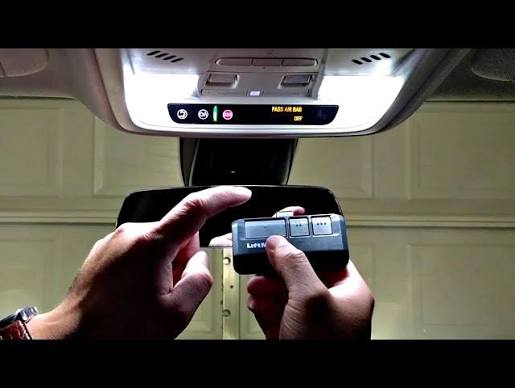
- Hold your original handheld garage remote 1–3 inches away from the HomeLink button you wish to program.
- Simultaneously press and hold both the handheld remote button AND the chosen HomeLink button.
- Watch the HomeLink indicator light. It will flash slowly at first, then rapidly once the signal is captured. This typically takes 5–15 seconds.
- Release both buttons when the rapid flashing begins.
Phase 3: Sync with the Garage Motor Unit
This is the step most people miss when figuring out how to connect my car to my garage door opener.
- Go to your garage door motor unit (mounted on the ceiling).
- Locate the “Learn” or “Smart” button. It is usually colored yellow, purple, orange, or green and located near the antenna wire.
- Press and release the Learn button. You have exactly 30 seconds to complete the next step.
- Return to your vehicle and press the newly programmed HomeLink button firmly for 2 seconds, then release. Repeat this press-hold-release cycle up to 3 times within the 30-second window.
- Test the system. The door should activate from your vehicle.
Troubleshooting: Why Won’t My Car Connect?
Even with perfect technique, issues arise. Below is a comparison table addressing the most common failure points.
| Symptom | Likely Cause | Solution |
|---|---|---|
| Light flashes slowly, never rapidly | Incompatible frequency or dead remote battery | Replace handheld remote battery; verify opener frequency (315MHz vs 390MHz) |
| Rapid flash achieved, but door won’t open | Rolling code sync incomplete | Re-do Phase 3; ensure Learn button was pressed before vehicle button |
| Works intermittently | Signal interference or weak battery | Check vehicle battery health; relocate LED bulbs near opener (LEDs cause RF noise) |
| No lights illuminate at all | Blown fuse or system malfunction | Check vehicle fuse box for “HomeLink” or “Accessory” fuse; consult dealer |
Critical Safety Note
Never attempt to program your vehicle while the garage door is in motion. Always ensure the door path is clear of people, pets, and objects. Modern openers have auto-reverse sensors, but relying on them during programming is unsafe.
Alternative Solutions for Older Vehicles or Openers
Not every scenario fits the standard HomeLink mold. If your vehicle lacks built-in controls or your opener is pre-1996, consider these alternatives:
Universal Visor Clips
For cars without integrated systems, universal clip-on remotes ($15–$30) attach to your sun visor and function identically to factory systems. They support both fixed and rolling codes.
Smart Garage Controllers
Devices like myQ, Tailwind, or Meross bypass traditional RF programming entirely. These connect to your Wi-Fi and allow smartphone control, voice commands via Alexa/Google Home, and even geofencing (auto-open when you arrive). This is often superior to learning how to connect my car to my garage door opener if your hardware is outdated.
Pros and Cons: Built-In vs. Smart Controller
- Built-In (HomeLink):
- ✅ No extra devices needed
- ✅ Works without internet
- ❌ Limited to RF-compatible openers
- ❌ No remote status monitoring
- Smart Controller:
- ✅ Works with virtually any opener
- ✅ Real-time status & alerts
- ❌ Requires Wi-Fi & subscription (some brands)
- ❌ Dependent on internet connectivity
Frequently Asked Questions (FAQ)
1. Can I program my car to my garage door opener without the original remote?
In most cases, no. The vehicle needs to capture the existing signal from a working handheld remote to clone the frequency and code. However, some newer smart openers allow direct-to-vehicle pairing via an app without a physical remote. If you have no remote, you may need to purchase a compatible replacement or install a smart controller.
2. How many garage doors can I program into my car?
Most HomeLink systems offer three programmable buttons, allowing you to store up to three separate garage doors, gates, or lighting systems. Some premium vehicles offer up to five buttons. Each button operates independently.
3. Will connecting my car to my garage door opener drain my car battery?
No. HomeLink and similar systems draw negligible power (typically under 5 milliamps in standby). Even if parked for weeks, the impact on a healthy car battery is virtually zero. Battery drain issues are almost always caused by other parasitic draws, not the garage transmitter.
4. Is it safe to program my car myself, or should I hire a professional?
It is completely safe to DIY. Programming involves only radio signals and button presses—no electrical wiring or mechanical adjustments. Professional help is only necessary if your garage door opener itself requires repair or if you are installing a new motor unit.
5. My HomeLink works sometimes but not others. What’s wrong?
Intermittent operation is usually caused by RF interference. Common culprits include LED light bulbs installed in the garage opener fixture, nearby wireless routers, or a weakening vehicle battery. Try replacing garage LEDs with incandescent bulbs temporarily to test. Also, ensure your handheld remote battery is fresh, as a weak source signal produces unreliable clones.
6. Does programming my car void my garage door opener warranty?
Absolutely not. HomeLink and Car2U are certified, FCC-compliant accessories designed specifically for this purpose. Using them is considered normal operation and has no impact on manufacturer warranties for either your vehicle or your garage door opener.
Conclusion
Mastering how to connect my car to my garage door opener is one of the simplest upgrades you can make to your daily routine. Whether you are syncing a modern HomeLink system, troubleshooting a stubborn connection, or exploring smart alternatives, the key is patience and following the correct sequence for your specific hardware. Remember: identify your system type, clear old codes, capture the signal accurately, and always complete the motor-unit sync step.
Once connected, you will enjoy the convenience of seamless entry, enhanced security through rolling codes, and the satisfaction of solving a common homeowner headache yourself.
Found this guide helpful? Share it with friends, family, or neighbors who are still struggling with their garage door setup! Tag us on social media or leave a comment below with your vehicle make and model—we love helping our community get connected. 🚗🏠
Leave a Reply