Introduction
There is nothing quite as frustrating as pulling into your driveway after a long day, only to realize you cannot get your vehicle’s built-in garage system to sync with your home. If you are currently searching for how to connect Jeep Grand Cherokee to garage door opener, you are not alone; this is one of the most common convenience hurdles for new and used Jeep owners. The good news is that whether you have a 2014 model or the latest 2026 WL platform, the programming process is standardized, safe, and typically takes less than ten minutes to complete. This guide will walk you through every step with empathy and precision, ensuring you never have to fumble for a plastic remote again.
Understanding Your Jeep’s HomeLink System
Before diving into buttons and LEDs, it is vital to understand what technology lives inside your overhead console. The Jeep Grand Cherokee utilizes the HomeLink Wireless Control System, a universal transceiver integrated directly into the vehicle. Unlike older aftermarket solutions, modern HomeLink systems (version 5.0 and newer) support both fixed-code and rolling-code security protocols, making them compatible with over 99% of garage door openers sold in the United States.
According to automotive electronics standards, HomeLink operates on radio frequencies between 288–390 MHz. However, knowing how to connect Jeep Grand Cherokee to garage door opener requires identifying which generation of system your specific trim level possesses.
Fixed-Code vs. Rolling-Code: Why It Matters
| Feature | Fixed-Code Openers | Rolling-Code Openers |
|---|---|---|
| Manufacture Date | Pre-1996 | Post-1996 |
| Security Level | Low (Static Signal) | High (Changing Signal) |
| Programming Steps | 2 Steps | 3 Steps (Includes “Learn” Button) |
| LED Indicator | Rapid Flash then Solid | Slow Flash → Rapid → Solid |
| Common Brands | Genie (Old), Stanley | LiftMaster, Chamberlain, Craftsman |
Note: For a deeper technical understanding of radio frequency security protocols in automotive applications, you can refer to the comprehensive overview on Wikipedia.
Preparation: Safety and Compatibility Checks
Before you begin programming, safety and preparation are paramount. You do not want to accidentally trigger the door while standing underneath it, nor do you want to waste time pressing buttons that are not responding due to a simple oversight.
- Clear the Area: Ensure no people, pets, or objects are in the path of the garage door. The door will cycle multiple times during programming.
- Check Batteries: Replace the batteries in your handheld garage door remote before starting. A weak signal from the original remote is the #1 cause of programming failure.
- Ignition Status: For most Jeep Grand Cherokee models (2011–2026), the ignition must be in the ON/RUN position (engine running or accessory mode active). Some older models require the engine to be fully running to provide adequate voltage to the HomeLink module.
- Locate the “Learn” Button: Find the learn button on your actual garage door motor unit. It is usually located on the back or side panel and may be colored yellow, purple, orange, or red. Have a stepladder ready if needed.
Step-by-Step: How To Connect Jeep Grand Cherokee To Garage Door Opener
This tutorial covers the Rolling-Code method, which applies to nearly all Jeep Grand Cherokees and modern garage openers. If you have an antique pre-1996 opener, skip step 4.
Step 1: Clear Previous Memory (Recommended)
If this is a used vehicle or you have previously attempted programming, clear the memory first to avoid conflicts.
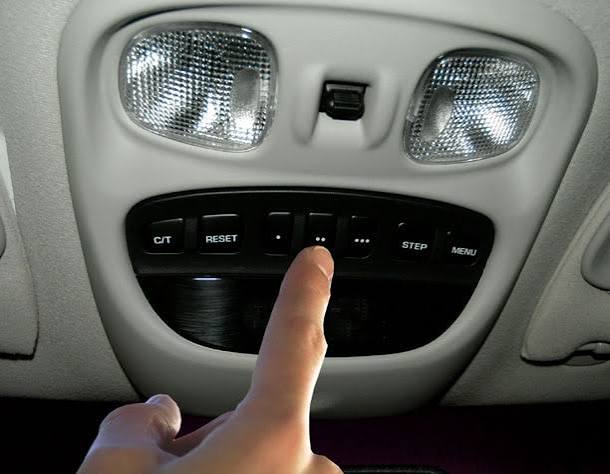
- Press and hold the two outer HomeLink buttons simultaneously for 10–20 seconds.
- Release when the indicator light begins to flash rapidly.
- Do not skip this step unless you are certain the buttons are empty.
Step 2: Train the Vehicle to the Handheld Remote
- Hold your handheld garage remote 1–3 inches away from the HomeLink buttons on your overhead console.
- Simultaneously press and hold the desired HomeLink button AND the button on your handheld remote.
- Watch the HomeLink LED. It will flash slowly at first, then transition to a rapid flash (or solid light, depending on year).
- Release both buttons once the rapid flash occurs. This typically takes 5–15 seconds.
Step 3: Test the Initial Sync
Press the programmed HomeLink button once.
- If the door moves: You have a fixed-code opener. You are done!
- If the LED flashes but the door does not move: Proceed to Step 4 (Rolling-Code Training).
Step 4: Complete Rolling-Code Synchronization
This is the critical step where many users fail. Precision timing matters here.
- Locate the “Learn” or “Smart” button on your garage door motor unit.
- Press and release the Learn button. You now have exactly 30 seconds.
- Return to your Jeep immediately. Firmly press and hold the programmed HomeLink button for 2 seconds, then release.
- Repeat the press-hold-release cycle up to three times within the 30-second window.
- The garage door should activate, confirming successful synchronization.
Step 5: Verify and Label
Test the button three times to ensure consistency. Use the provided label stickers (often found in your owner’s manual kit) to mark the button as “Garage,” “Gate,” or “Lights.”
Troubleshooting Common Programming Failures
Even when following instructions on how to connect Jeep Grand Cherokee to garage door opener, issues arise. Here are data-backed solutions for the top three failures:
- LED Never Flashes Rapidly: This usually indicates the handheld remote battery is dead, or you are holding it too far away. Try fresh batteries and reduce distance to 0.5 inches. Also, verify you are not using a “dip switch” style remote with a newer HomeLink system without an adapter.
- Door Opens Partially Then Reverses: This is rarely a programming issue. It is almost always a safety sensor misalignment. Check the photo-eye sensors near the floor; if they are dirty or knocked out of alignment, the door will reverse as a safety precaution regardless of HomeLink status.
- Works Intermittently: Interference from LED bulbs in the garage opener housing is a documented phenomenon. According to manufacturer service bulletins, certain non-shielded LED bulbs emit RF noise that blocks HomeLink signals. Swap to incandescent bulbs temporarily to test; if functionality returns, purchase “garage door opener compatible” LED bulbs.
FAQ: Connecting Your Jeep Grand Cherokee
1. Can I program my Jeep Grand Cherokee without the original handheld remote?
Generally, no. The HomeLink system learns the unique digital signature from your existing remote. However, if you have a newer HomeLink 5.0 system (2020+ Grand Cherokee), some models support direct cloud-based setup via the Uconnect app without a physical remote, though this depends heavily on your specific garage opener brand integration.
2. How many devices can my Jeep Grand Cherokee store?
Most Jeep Grand Cherokee models feature three programmable HomeLink buttons. Each button can store one device. You can use these for a combination of garage doors, entry gates, smart lighting, or security systems. If you need more capacity, consider upgrading to a HomeLink rearview mirror retrofit kit.
3. Will programming HomeLink erase my garage door opener’s existing remotes?
No. Programming your Jeep simply adds another authorized transmitter to the opener’s memory bank. Your existing wall-mounted keypads and handheld remotes will continue to function normally. However, if you perform a factory reset on the garage motor itself, all remotes including HomeLink will need reprogramming.
4. My Jeep is a 2024–2026 model with the new vertical screen. Is the process different?
The physical button location remains in the overhead console or rearview mirror assembly across all current generations. While the Uconnect interface has changed dramatically, the underlying HomeLink hardware protocol remains consistent. Always consult your specific year’s owner’s manual for button location variations, especially in the Summit Reserve and Laredo X trims where placement differs slightly.
5. What if my garage door opener uses Bluetooth instead of RF?
Newer smart openers (like myQ-enabled models) sometimes prioritize Bluetooth/Wi-Fi. HomeLink is strictly an RF transceiver and cannot natively communicate via Bluetooth. In this case, you may need a HomeLink-to-myQ bridge adapter or rely solely on the smartphone app. Check your opener’s compatibility list on the manufacturer’s website before attempting RF programming.
6. Is there a subscription fee for using HomeLink in my Jeep?
No. HomeLink is a one-time hardware feature included with your vehicle purchase. There are no monthly fees, subscriptions, or activation costs associated with programming or using the system. Be wary of third-party services charging for what is essentially a free DIY procedure outlined in this guide.
Conclusion
Mastering how to connect Jeep Grand Cherokee to garage door opener transforms your daily arrival experience from a chore into seamless automation. By understanding the difference between fixed and rolling codes, preparing your workspace safely, and following the precise 30-second synchronization window, you can achieve reliable performance in under ten minutes. Remember that troubleshooting is part of the process—interference and battery issues are far more common than hardware failure.
Your Jeep was engineered to make life easier, and HomeLink is one of its most underrated convenience features. Now that you have successfully synced your vehicle, enjoy the satisfaction of hands-free entry every single day.
Found this guide helpful? Share it with fellow Jeep owners on Facebook, Reddit’s r/GrandCherokee community, or X (Twitter) so they can stop struggling with their overhead consoles too! Tag us and let us know which model year you successfully programmed—we love hearing your success stories. Safe driving and happy parking!
Leave a Reply