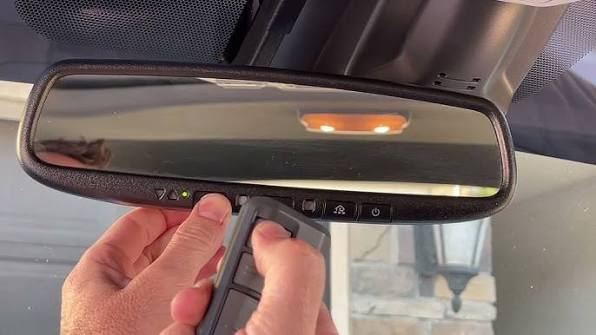
Have you ever pulled into your driveway only to realize you need to dig through your bag or glove compartment to find that bulky garage remote? It is a minor inconvenience, but one that disrupts the smooth flow of your daily routine. If you are looking for a more streamlined solution, learning how to connect Grand Highlander to garage door opener systems can transform your driving experience into one of true convenience and modern efficiency.
The 2024 and 2025 Toyota Grand Highlander comes equipped with the HomeLink® system, a built-in universal transceiver that allows your vehicle to communicate with your garage door, gate, or even home lighting systems. While the technology is designed to be user-friendly, the pairing process can sometimes feel ambiguous without clear instructions. This guide will walk you through every step, ensuring you can open your garage with the simple press of a button on your rearview mirror.
Understanding the HomeLink System in Your Grand Highlander
Before diving into the buttons and codes, it is helpful to understand what you are working with. The HomeLink system in the Grand Highlander is not just a simple radio transmitter; it is a sophisticated learning device capable of mimicking the signal of your existing garage door remote.
Most modern garage door openers use rolling code technology for security. This means the code changes every time you press the button to prevent hackers from intercepting and reusing the signal. Because of this, connecting your vehicle requires a specific “handshake” protocol between the car and the garage motor unit.
According to general standards for universal transceivers, compatibility is high, but not absolute. Most major brands like LiftMaster, Chamberlain, Genie, and Craftsman work seamlessly with Toyota’s HomeLink system. However, older models manufactured before 1993 may require additional hardware or might not be compatible at all. For a deeper technical understanding of radio frequency standards in home automation, you can refer to Wikipedia’s entry on Home Automation.
Key Components You Will Need
- Your Grand Highlander: Ensure the vehicle is parked outside the garage with the engine running or in accessory mode.
- Original Garage Remote: You must have the handheld remote that currently opens your garage.
- A Ladder: You will need physical access to the motor unit hanging from your garage ceiling.
- Patience: The process usually takes 10–20 minutes.
Step-by-Step Guide: How to Program HomeLink in Grand Highlander
Programming your Grand Highlander involves two main phases: clearing any previous settings (if applicable) and then training the vehicle to recognize your garage door signal. Follow these steps precisely to ensure a successful connection.
Phase 1: Clearing Previous Channels (If Necessary)
If your Grand Highlander is new, the HomeLink buttons are likely blank. However, if you bought a certified pre-owned vehicle or previously tried to program a different device, you should clear the memory first.
- Press and hold the two outer HomeLink buttons (usually labeled I and III) simultaneously.
- Keep holding them for about 20 seconds.
- Watch the indicator light above the buttons. It will start flashing slowly and then rapidly.
- Once the light flashes rapidly, release both buttons. The memory is now cleared.
Phase 2: Training the Vehicle to the Remote
This is the core part of learning how to connect Grand Highlander to garage door opener systems. You will teach the car to mimic your handheld remote.
- Position Yourself: Sit in the driver’s seat with your original garage remote handy. Close all doors to minimize interference.
- Select a Button: Choose which HomeLink button you want to use (I, II, or III). Let’s assume you are using Button I.
- Initiate Learning Mode: Press and hold the chosen HomeLink button and the button on your handheld remote simultaneously. Hold them about 1–3 inches apart.
- Wait for the Signal: Keep holding both buttons. The HomeLink indicator light will change from a slow blink to a rapid flash. This indicates that the vehicle has successfully learned the frequency.
- Note: This step can take up to 30 seconds. Do not release the buttons until the rapid flash occurs.
- Test the Basic Function: Press the programmed HomeLink button in your car. Does the garage door move? If yes, skip to Phase 3. If no, proceed to Phase 3 anyway, as rolling code systems often require an extra step.
Phase 3: Syncing with Rolling Code Systems
Most garage doors built after 1996 use rolling codes. Even if the car learned the frequency in Phase 2, the garage motor needs to recognize the car as a trusted device.
- Locate the Learn Button: Use your ladder to access the garage door motor unit on the ceiling. Look for a small button labeled “Learn,” “Smart,” or “Program.” It is often colored yellow, purple, or red.
- Press the Learn Button: Press and release the “Learn” button on the motor unit. You typically have 30 seconds to complete the next step. An LED light on the motor will usually turn on or blink to indicate it is ready.
- Return to the Vehicle: Within those 30 seconds, go back to your Grand Highlander and press the programmed HomeLink button three times in succession.
- Press, release, wait two seconds.
- Press, release, wait two seconds.
- Press, release.
- Confirm Connection: The garage door should activate (open or close). If it does, the synchronization is complete.
| Troubleshooting Scenario | Possible Cause | Solution |
|---|---|---|
| Light flashes rapidly immediately | Memory already cleared | Proceed directly to Phase 2 |
| Door does not move after Phase 2 | Rolling code security | Complete Phase 3 sync process |
| “Learn” button not found | Older motor model | Check manual for dip switches |
| Signal weak inside garage | Metal roof interference | Park closer to the door during setup |
Common Issues and Troubleshooting Tips
Even with careful instruction, things do not always go perfectly the first time. Here are some common hurdles users face when trying to connect Grand Highlander to garage door opener units and how to overcome them.
Interference from LED Bulbs
A surprisingly common issue in modern homes is interference from LED light bulbs in the garage door opener unit. Some LED bulbs emit radio frequency noise that jams the signal between your car and the motor.
- Fix: Try temporarily replacing the LED bulb with an incandescent bulb during programming. If it works, you may need to buy shielded LED bulbs designed for garage openers.
Distance and Angle Matters
During the initial training phase (Phase 2), the distance between your handheld remote and the HomeLink buttons is crucial.
- Fix: If the light does not flash rapidly, try moving the remote closer to the mirror (1 inch away) or further away (3 inches). Also, try angling the remote differently. Some frequencies transmit better from the side of the remote rather than the front.
Battery Strength
Weak batteries in your handheld remote can cause inconsistent signals.
- Fix: Replace the battery in your handheld remote before starting the process to ensure the strongest possible signal transmission.
Multiple Doors
If you have two garage doors, you can program both. Simply repeat the entire process for the second door using a different HomeLink button (e.g., Button II). Ensure you label them mentally so you do not open the wrong door!
Frequently Asked Questions (FAQ)
1. Can I program my Grand Highlander to open gates or lights too?
Yes. The HomeLink system is universal. While this guide focuses on garage doors, the same steps apply to gate operators, entry doors, and even home lighting systems that use radio frequency remotes. Just ensure the device operates on a compatible frequency (usually 315 MHz or 390 MHz).
2. What if my garage door opener does not have a “Learn” button?
Older garage door openers (pre-1996) often use dip switches instead of a learn button. In this case, you must match the dip switch positions inside your handheld remote to the positions on the motor unit. Once matched, the Phase 2 training process should work without needing Phase 3.
3. How many devices can I store in my Grand Highlander’s HomeLink?
The Toyota Grand Highlander HomeLink system typically supports up to three different devices. You can use Button I for the garage, Button II for a gate, and Button III for home lighting.
4. Will resetting my HomeLink delete all my programmed devices?
Yes. If you perform the clearing procedure (holding the two outer buttons), all three channels will be erased. You will need to reprogram any devices you wish to keep using.
5. Is it safe to use HomeLink?
Absolutely. HomeLink uses encrypted rolling codes for modern systems, making it just as secure as your handheld remote. In fact, it is often safer because you do not risk losing a separate remote that could be found by strangers.
Conclusion
Learning how to connect Grand Highlander to garage door opener systems is a small investment of time that yields significant daily convenience. By following the steps outlined above—clearing memory, training the remote, and syncing with the motor unit—you can enjoy the seamless integration of your vehicle with your home.
No more fumbling for remotes in the rain or worrying about losing them. With your Grand Highlander properly programmed, you gain a smoother, more modern driving experience that aligns with the sophisticated design of Toyota’s flagship SUV.
If you found this guide helpful, please share it with fellow Grand Highlander owners on social media. Helping others unlock the full potential of their vehicle’s features creates a smarter, more connected community of drivers. Drive safely and enjoy the ease of hands-free access!
Leave a Reply