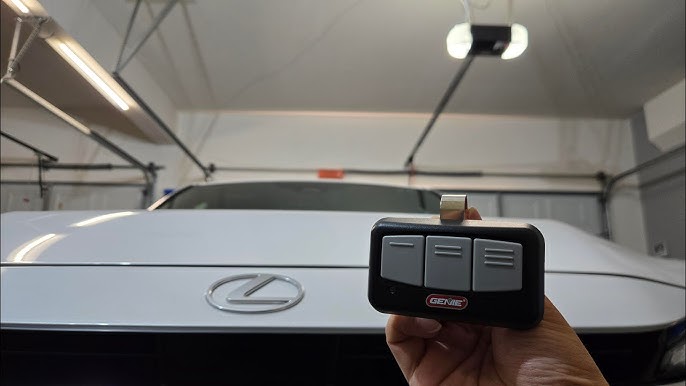
Introduction
There is nothing quite as frustrating as pulling into your driveway in the rain, only to realize you cannot remember where you placed your garage remote. If you are searching for how to connect garage door opener to Lexus RX 350, you are taking the first step toward a seamless, keyless entry experience that adds genuine convenience to your daily routine. This comprehensive guide will walk you through programming your vehicle’s built-in universal transmitter safely and correctly, ensuring you never have to fumble for a plastic clicker again.
Understanding Your Lexus RX 350 HomeLink System
Before diving into the programming sequence, it is vital to understand the technology at play. The Lexus RX 350 is equipped with the HomeLink Universal Transceiver, typically located in the overhead console near the rearview mirror or integrated directly into the mirror assembly itself.
Unlike older radio-frequency remotes, modern HomeLink systems use rolling-code technology for enhanced security. According to Wikipedia, this system was originally developed by Prince Corporation and is now a standard feature in millions of vehicles worldwide, acting as an RF bridge between your car and home automation devices. Understanding this helps explain why the programming process involves both the vehicle buttons and your existing handheld remote; they must perform a secure digital handshake rather than a simple frequency copy.
Compatibility Check: Rolling Code vs. Fixed Code
Most garage door openers manufactured after 1996 utilize rolling codes. However, if your opener is significantly older, the programming steps may vary slightly.
| Feature | Rolling Code (Post-1996) | Fixed Code (Pre-1996) |
|---|---|---|
| Security | High (Code changes every use) | Low (Static code) |
| Programming Steps | Requires “Learn” button on motor unit | Vehicle-only programming usually sufficient |
| Indicator Light | Rapid flash then solid | Solid light immediately |
| Common Brands | Chamberlain, LiftMaster, Genie Intellicode | Older Stanley, Linear models |
Note: If you are unsure of your opener type, check the manufacturer label on the motor unit or consult your opener’s manual.
Step-by-Step: How to Program HomeLink on Lexus RX 350
Follow these precise instructions to ensure a successful sync. Safety First: Always ensure your garage door area is clear of people, pets, and obstacles before beginning. Never program while the vehicle is in motion.
Step 1: Clear Previous Settings (If Applicable)
If your Lexus is pre-owned or the buttons were previously programmed, start fresh to avoid signal conflicts.
- Turn your ignition to the ON position (engine does not need to be running, but accessories must be powered).
- Press and hold the two outer HomeLink buttons simultaneously.
- Hold for approximately 10 seconds until the indicator LED begins to flash rapidly.
- Release both buttons. The system is now reset and ready for new programming.
Step 2: Initial Handshake Training
This step teaches your Lexus the specific frequency of your garage door opener.
- Hold your original handheld garage remote 1–3 inches away from the HomeLink buttons on your overhead console.
- Simultaneously press and hold the desired HomeLink button AND the button on your handheld remote.
- Watch the HomeLink indicator light closely. It will flash slowly at first, then transition to a rapid flash (or solid light for fixed-code systems).
- Once the rapid flashing occurs, release both buttons. This confirms the vehicle has learned the signal.
Step 3: Complete Rolling Code Synchronization
Skip this step ONLY if your indicator light turned solid in Step 2. If it flashed rapidly, proceed below.
- Locate the “Learn” or “Smart” button on your actual garage door opener motor unit (usually hanging from the ceiling). This button is often yellow, purple, orange, or red.
- Press and release the Learn button. You typically have 30 seconds to complete the next action.
- Return to your vehicle and press and hold the programmed HomeLink button for 2 seconds, then release.
- Repeat this press-hold-release cycle up to three times.
- Test the button. The garage door should activate. If it moves partially or the light behaves erratically, repeat Step 3 once more.
Troubleshooting Common Connection Issues
Even with perfect execution, technology can be temperamental. Here are solutions to the most frequent hurdles users face when learning how to connect garage door opener to Lexus RX 350.
The Indicator Light Won’t Flash Rapidly
- Battery Check: Replace the battery in your handheld remote. A weak signal is the #1 cause of programming failure.
- Distance Adjustment: Try holding the remote at different angles and distances (0.5 inches to 4 inches) from the HomeLink module.
- Interference: Turn off nearby LED bulbs or unplug wireless routers temporarily, as some devices emit RF noise that blocks the training signal.
Door Opens Partially Then Reverses
This usually indicates incomplete rolling code synchronization. Return to the motor unit and press the Learn button again, ensuring you complete the three press-hold cycles within the 30-second window. Some newer LiftMaster/Chamberlain units require you to hold the vehicle button until the door fully completes its cycle.
HomeLink Works Intermittently
- Antenna Position: Ensure the garage opener’s antenna wire is hanging vertically and not coiled or touching metal.
- Vehicle Battery: A weak car battery can reduce HomeLink transmission power. Have your battery tested if other electrical issues are present.
- Range Extender: For homes with metal-clad garages or significant distance, consider installing a HomeLink repeater kit.
Advanced Tips for Optimal Performance
To maximize reliability and longevity of your connection, consider these expert recommendations:
- Program All Three Buttons Strategically: Use Button 1 for your primary garage, Button 2 for a secondary door or gate, and Button 3 for community amenities or a future smart device. Label them mentally to avoid accidental presses.
- Update Firmware: Some newer Lexus RX 350 models receive HomeLink firmware updates during dealer service visits. Ask your technician about TSBs (Technical Service Bulletins) related to universal transmitter compatibility if you own a 2020+ model.
- Smart Garage Integration: If your opener supports Wi-Fi (e.g., MyQ, Aladdin Connect), you can often link it to your Lexus via the manufacturer’s app for status notifications, adding a layer of confirmation beyond the physical button press.
- Seasonal Maintenance: Extreme cold can affect battery performance in both remotes and vehicle modules. Test your system seasonally and keep spare batteries in your glovebox.
Frequently Asked Questions (FAQ)
Q1: Can I program my Lexus RX 350 HomeLink without my original garage remote?
Generally, no. The vehicle needs to learn the specific encrypted signal from your existing remote. However, if your opener has a “Learn” button and supports direct vehicle pairing (some newer Genie and Chamberlain models do), you may bypass the handheld remote. Consult your opener’s manual for “direct vehicle programming” instructions.
Q2: Why does my HomeLink work for my neighbor’s door but not mine?
This indicates successful programming but incorrect signal matching. Your vehicle likely picked up a stronger nearby signal during training. Clear all HomeLink memory (Step 1 above) and reprogram, ensuring your handheld remote is held extremely close (touching the console) and that no other remotes are within 20 feet during training.
Q3: Is HomeLink compatible with all garage door opener brands?
HomeLink is compatible with over 95% of garage door openers sold in North America, including Chamberlain, LiftMaster, Craftsman, Genie, Overhead Door, and Wayne Dalton. For European or Asian-market openers, compatibility varies. Check the official HomeLink compatibility database online using your opener’s model number.
Q4: Do I need to reprogram HomeLink after changing my car battery?
No. HomeLink memory is stored in non-volatile memory and survives battery disconnection. However, if you replace the garage door opener’s logic board or change its security settings, reprogramming will be necessary.
Q5: Can I use HomeLink to control smart home devices beyond garage doors?
Yes! Modern HomeLink systems can control gates, lighting systems, security cameras, and even smart locks that support RF or Z-Wave/Zigbee bridges. The programming process mirrors garage door setup, though device-specific instructions apply.
Q6: My Lexus RX 350 has buttons in the mirror instead of the ceiling. Does the process differ?
The programming logic is identical regardless of button location. Mirror-integrated HomeLink modules function exactly like overhead console versions. The only difference is physical positioning—ensure your handheld remote is aimed directly at the mirror housing during Step 2.
Conclusion
Mastering how to connect garage door opener to Lexus RX 350 transforms a minor daily annoyance into effortless automation. By following the clearing, training, and synchronization steps outlined above, you’ve unlocked a level of convenience that aligns perfectly with the premium ownership experience your Lexus deserves. Remember, patience during the rolling-code handshake is key—most failures stem from rushing Step 3 rather than technical incompatibility.
Now that your garage opens with a single touch from your driver’s seat, share this guide with fellow Lexus owners who are still juggling remotes! Post your success story or troubleshooting tips on social media using #LexusHomeLink and help others enjoy the same seamless entry. Safe driving and smooth openings ahead!
Leave a Reply