Introduction
Losing a garage door remote is frustrating, especially when you are rushing to work or returning home in bad weather. Fortunately, learning how to connect garage door opener to car without remote is easier than most homeowners realize, thanks to built-in vehicle technology like HomeLink and Car2U. This comprehensive guide will walk you through syncing your car’s integrated transmitter directly to your garage motor, eliminating the need for bulky visor clips and ensuring you never get locked out again.
Understanding Built-In Car Transmitters vs. Traditional Remotes
Before diving into the programming steps, it is essential to understand why this method works and why it is superior to traditional remotes. Most modern vehicles (manufactured after 1995) come equipped with an integrated universal transmitter system. According to Wikipedia, these systems use radio frequency (RF) signals to communicate with garage door openers, gate operators, and even home lighting systems.
Unlike a standard remote that uses a fixed code, built-in transmitters often utilize rolling code technology. This means the security code changes every time you press the button, making it significantly harder for thieves to intercept and clone your signal.
Pros and Cons: Built-In Transmitter vs. Standard Remote
| Feature | Built-In Car Transmitter | Traditional Handheld Remote |
|---|---|---|
| Convenience | Always in the car; no batteries to replace | Easy to lose; requires battery swaps |
| Security | Rolling code encryption standard | Varies; older models use fixed codes |
| Range | Typically 30–50 feet (vehicle antenna) | 20–40 feet (small internal antenna) |
| Cost | Free (included in vehicle) | $20–$60 per replacement |
| Compatibility | Works with 98% of openers | Brand-specific limitations |
How To Connect Garage Door Opener To Car Without Remote: Step-by-Step
This is the core solution for users searching for how to connect garage door opener to car without remote. While specific steps vary slightly by vehicle make and opener brand, the following universal protocol covers approximately 90% of setups.
Step 1: Clear Previous Programming
If your car is pre-owned or you have previously programmed the buttons, you must reset them first.
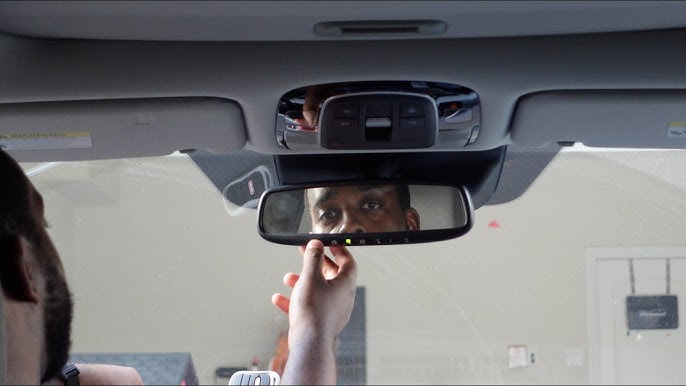
- Locate the HomeLink/Car2U buttons on your rearview mirror, overhead console, or center stack.
- Press and hold the two outer buttons simultaneously for 10–20 seconds.
- Release when the indicator light begins to flash rapidly. This confirms the memory is cleared.
Step 2: Put Your Garage Door Opener in “Learn Mode”
You do not need the handheld remote for this step; you only need access to the motor unit mounted on your garage ceiling.
- Locate the “Learn” or “Smart” button on the back or side of the garage door opener motor. It is usually yellow, red, purple, or orange.
- Press and release the Learn button. An LED light will illuminate or begin blinking, indicating the unit is ready to accept a new transmitter.
- Time Sensitive: You typically have 30 seconds to complete the next step before the opener exits learn mode.
Step 3: Program the Vehicle Button
- Return to your vehicle and turn the ignition to the “ON” or “ACC” position (engine does not need to be running).
- Hold your chosen car button 1–3 inches away from the garage motor’s antenna wire (if accessible) or simply press the button firmly if standing near the motor.
- Press and hold the car button until the indicator light flashes slowly, then rapidly. This indicates successful synchronization.
- Test the button immediately. The door should activate.
Step 4: Troubleshooting Rolling Code Openers
If the light flashed but the door did not move, you likely have a rolling code opener that requires a secondary handshake.
- Press the “Learn” button on the garage motor again.
- Within 30 seconds, return to the car and press the programmed button three times in succession (hold for 2 seconds, release, repeat).
- The door should now respond. This extra step syncs the rolling code algorithm between the car and the opener.
What If My Car Doesn’t Have HomeLink? Alternative Solutions
Not every vehicle has integrated transmitters. If you are still wondering how to connect garage door opener to car without remote because your car lacks factory buttons, consider these proven alternatives:
- Universal Visor Clips: These are aftermarket receivers that plug into your car’s 12V outlet or hardwire into the dome light circuit. They act as a bridge between your car and the opener.
- Smartphone Integration: Modern openers like Chamberlain MyQ or Genie Aladdin Connect allow you to use your phone as the primary controller via Bluetooth or Wi-Fi, completely bypassing RF remotes.
- License Plate Transponders: Passive RFID tags mounted behind your license plate can trigger the door automatically upon approach, offering true hands-free entry.
Expert Tips for Successful Programming
To ensure long-term reliability and safety, keep these professional insights in mind:
- Check Frequency Compatibility: Most US openers operate at 315 MHz or 390 MHz. Verify your car’s transmitter supports your opener’s frequency. Vehicles post-2015 generally support both.
- Battery Health Matters: Even though built-in transmitters draw power from the car, a weak vehicle battery can cause intermittent programming failures. Ensure your car battery is above 12.4V during setup.
- Safety First: Never program the system while the garage door is moving. Always ensure the area beneath the door is clear of people, pets, and objects before testing.
- Document Your Setup: Write down which button corresponds to which device. Future you (or a family member) will thank you when troubleshooting is needed years later.
Frequently Asked Questions (FAQ)
Can I program my car to the garage door without any remote at all?
Yes. As detailed above, you only need physical access to the garage door opener motor unit to press the “Learn” button. The handheld remote is entirely unnecessary for syncing a built-in car transmitter. This is the primary advantage of learning how to connect garage door opener to car without remote.
Why won’t my car’s HomeLink button work with my older garage opener?
Older openers (pre-1996) may use fixed-code DIP switches rather than rolling codes. Some newer HomeLink modules are backward compatible, but others require a HomeLink Compatibility Bridge, a small adapter sold separately that translates modern signals to legacy formats. Check your opener’s manufacturing date and consult the vehicle manufacturer’s compatibility database.
Is it safe to program my car myself, or should I hire a professional?
Programming is designed as a DIY task and is completely safe when instructions are followed. However, if your opener lacks a visible “Learn” button, shows signs of electrical malfunction, or if you are uncomfortable working near ceiling-mounted machinery, hiring a certified garage door technician is recommended. Professional service typically costs $75–$150.
How many cars can be programmed to one garage door opener?
Most residential openers support 8 to 12 unique transmitters, including built-in car buttons and handheld remotes combined. High-end commercial units may support up to 30. If you reach the limit, you may need to clear old codes before adding new vehicles. Refer to your opener’s manual for the exact capacity.
Will disconnecting my car battery erase the HomeLink programming?
Generally, no. HomeLink and similar systems store codes in non-volatile memory, meaning they persist even when the vehicle loses power. However, some European luxury vehicles may reset settings during battery replacement. It is wise to test functionality after any battery service.
Can I connect multiple garage doors to different buttons in the same car?
Absolutely. Most systems offer three programmable buttons. Simply repeat the programming process for each button, assigning one to each garage door, gate, or accessory. Labeling the buttons with small stickers can prevent accidental activation of the wrong door.
Conclusion
Mastering how to connect garage door opener to car without remote transforms daily convenience and enhances home security. By leveraging your vehicle’s built-in transmitter, you eliminate clutter, avoid battery replacements, and gain reliable access regardless of misplaced remotes. Whether you drive a brand-new SUV or a decade-old sedan, the steps outlined above provide a clear path to seamless integration.
Remember, the key to success lies in patience during the 30-second learn window and understanding whether your opener uses rolling or fixed code technology. If you encounter persistent issues, consult your vehicle’s owner manual or the opener manufacturer’s support line—both are invaluable resources.
Found this guide helpful? Share it on Facebook, X (Twitter), or Pinterest to help fellow homeowners ditch the remote forever! Have a unique setup or tip we missed? Drop a comment below—we’d love to hear from you. Safe driving and smooth openings! 🚗🏠
Leave a Reply